







Question: I don't know how to do this please help. (1.1) Calculate the number of (1.2) Calculate the Room Total for (1.3) Calculate the Add-On Total
I don't know how to do this please help.
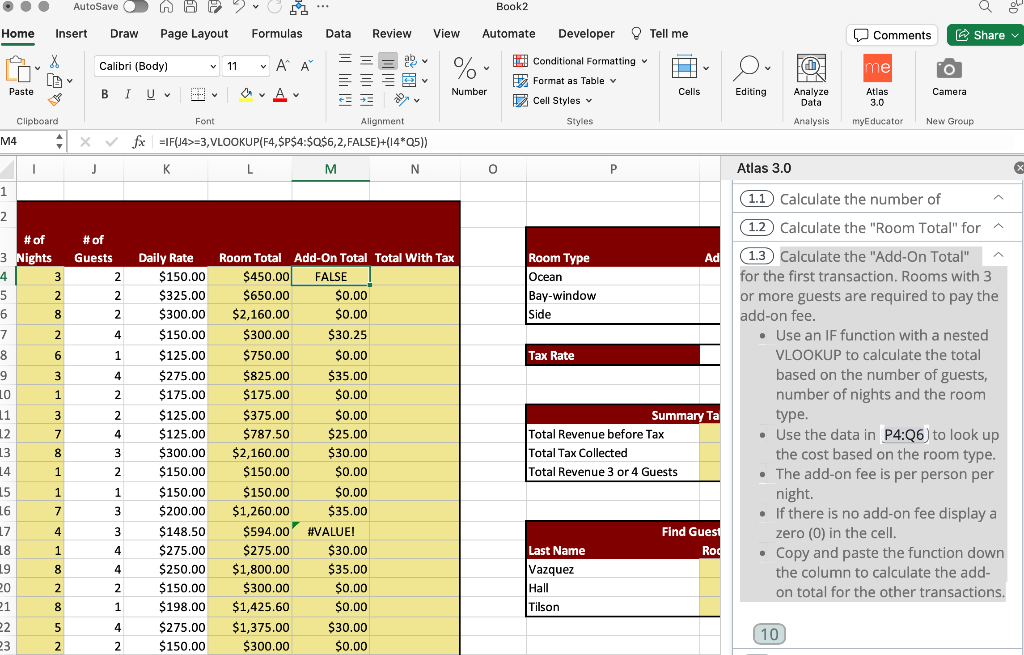
(1.1) Calculate the number of (1.2) Calculate the "Room Total" for (1.3) Calculate the "Add-On Total" for the first transaction. Rooms with 3 or more guests are required to pay the add-on fee. - Use an IF function with a nested VLOOKUP to calculate the total based on the number of guests, number of nights and the room type. - Use the data in P4:Q6) to look up the cost based on the room type. - The add-on fee is per person per night. - If there is no add-on fee display a zero (0) in the cell. - Copy and paste the function down the column to calculate the addon total for the other transactions. 10 (1.1) Calculate the number of (1.2) Calculate the "Room Total" for (1.3) Calculate the "Add-On Total" for the first transaction. Rooms with 3 or more guests are required to pay the add-on fee. - Use an IF function with a nested VLOOKUP to calculate the total based on the number of guests, number of nights and the room type. - Use the data in P4:Q6) to look up the cost based on the room type. - The add-on fee is per person per night. - If there is no add-on fee display a zero (0) in the cell. - Copy and paste the function down the column to calculate the addon total for the other transactions. 10
Step by Step Solution
There are 3 Steps involved in it

Get step-by-step solutions from verified subject matter experts
 Study Help