







Question: i dont need help with the methods or aynything, i really just cant figure out how to loop it to get this exact output i
i dont need help with the methods or aynything, i really just cant figure out how to loop it to get this exact output
i would usually use a do while loop but doing that i have to keep asking if the user wants to run it again.
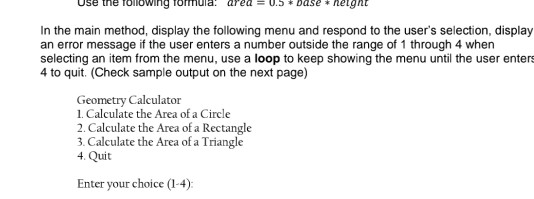
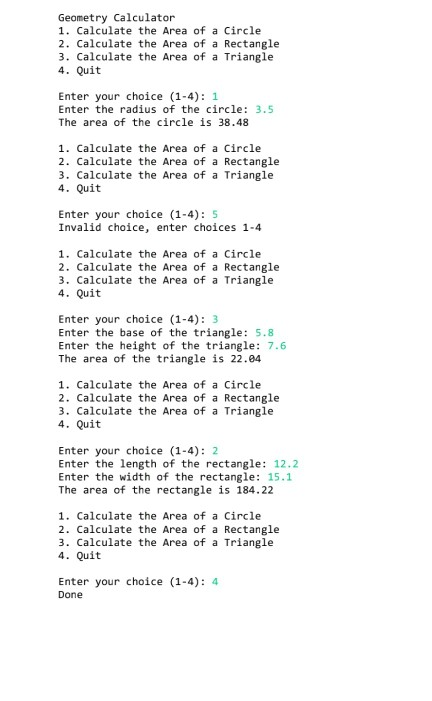
Use the following formula! Area = .5 * Dase * helght In the main method, display the following menu and respond to the user's selection, display an error message if the user enters a number outside the range of 1 through 4 when selecting an item from the menu, use a loop to keep showing the menu until the user enters 4 to quit (Check sample output on the next page) Geometry Calculator 1. Calculate the Area of a Circle 2. Calculate the Area of a Rectangle 3. Calculate the Area of a Triangle 4. Quit Enter your choice (1-4) Geometry Calculator 1. Calculate the Area of a Circle 2. Calculate the Area of a Rectangle 3. Calculate the Area of a Triangle 4. Quit Enter your choice (1-4): 1 Enter the radius of the circle: 3.5 The area of the circle is 38.48 1. Calculate the Area of a Circle 2. Calculate the Area of a Rectangle 3. Calculate the Area of a Triangle 4. Quit Enter your choice (1-4): 5 Invalid choice, enter choices 1-4 1. Calculate the Area of a Circle 2. Calculate the area of a Rectangle 3. Calculate the Area of a Triangle 4. Quit Enter your choice (1-4): 3 Enter the base of the triangle: 5.8 Enter the height of the triangle: 7.6 The area of the triangle is 22.04 1. Calculate the Area of a Circle 2. Calculate the Area of a Rectangle 3. Calculate the Area of a Triangle 4. Quit Enter your choice (1-4): 2 Enter the length of the rectangle: 12.2 Enter the width of the rectangle: 15.1 The area of the rectangle is 184.22 1. Calculate the Area of a Circle 2. Calculate the Area of a Rectangle 3. Calculate the Area of a Triangle 4. Quit Enter your choice (1-4): 4 Done
Step by Step Solution
There are 3 Steps involved in it

Get step-by-step solutions from verified subject matter experts
 Study Help