





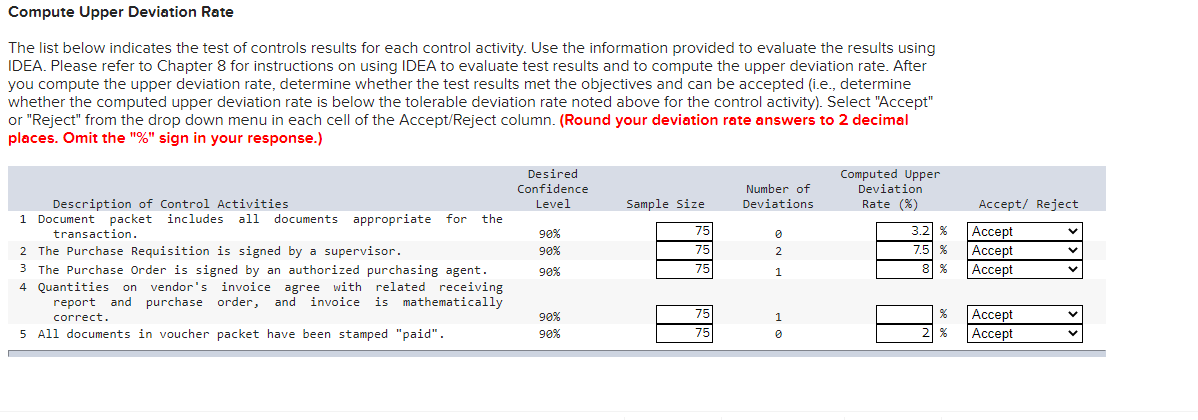
Question: I don't understand what I am doing incorrectly under the Computed Upper Deviation Rate (%) column ?? Compute Upper Deviation Rate The list below indicates

I don't understand what I am doing incorrectly under the Computed Upper Deviation

Rate (%) column??
I don't understand what I am doing incorrectly
Compute Upper Deviation Rate The list below indicates the test of controls results for each control acivity. Use the information provided to evaluate the results using IDEA. Please refer to Chapter 8 for instructions on using IDEA to evaluate test results and to compute the upper deviation rate. After you compute the upper deviation rate, determine whether the test results met the objectives and can be accepted [i_e_, determine whether the computed upper deviation rate is below the tolerable deviation rate noted above for the control activity], Select "Accept" or "Reject" from the drop down menu in each cell of the AccepthejeC' column. (Round your deviation rote answers to 2 decimal places. Omit the "9%" sign in your response.) Desired Computed Upper Confidence Number of Deviation Description of Control Activities Level Sample Size Deviations Rate (X) Accept! Reject 1 Document packet includes all documents appropriate for the transaction. 90% 75 0 3-2 % Accept V 2 The Purchase Requisition is signed by a supervisor. 90% 75 2 7.5 % Accept V 3 The Purchase Order is signed by an authorized purchasing agent. 99% F5 1 8 % Accept V 4 Quantities on vendor's invoice agree with related receiving report and purchase order, and invoice is mathematically correct . 90% 7'5 1 % Accept V 5 All documents in voucher packet have been stamped "paid". 90% 75 6 2 % Accept V

Step by Step Solution

There are 3 Steps involved in it

1 Expert Approved Answer
Step: 1 Unlock blur-text-image

Question Has Been Solved by an Expert!

Get step-by-step solutions from verified subject matter experts

Step: 2 Unlock
Step: 3 Unlock

Students Have Also Explored These Related Accounting Questions!