







Question: I get an error message through my code and i can't figure out what should i change ?? This is my code : # SuperMarket.py
I get an error message through my code and i can't figure out what should i change ??
This is my code :
# SuperMarket.py - This program creates a report that lists weekly hours worked # by employees of a supermarket. The report lists total hours for # each day of one week. # Input: Interactive # Output: Report. days = ['Sunday', 'Monday', 'Tuesday', 'Wednesday', 'Thursday', 'Friday', 'Saturday']
def dayChange(dayofweek): for i, day in enumerate(days): if dayofWeek == day: return days[i-1] # Declare variables. HEAD1 = "WEEKLY HOURS WORKED" DAY_FOOTER = "Day Total " SENTINEL = "done" # Named constant for sentinel value hoursWorked = 0 # Current record hours hoursTotal = 0 # Hours total for a day prevDay = "" # Previous day of week notDone = True # loop control count = 0
dayTotals = [0,0,0,0,0,0,0]
# Print two blank lines. print(" ") # Print heading. print("\t" + HEAD1) # Print two blank lines. print(" ")
# Read first record dayOfWeek = input("Enter day of week or done to quit: ") if dayOfWeek == SENTINEL: notDone = False else: hoursWorked = input("Enter hours worked: ") prevDay = dayChange
while notDone == True: for i , day in enumerate (days): if day == dayOfWeek: dayTotals[i] =dayTotals[i] + str(hoursWorked) hoursTotal=dayTotals[i] print("\t" + DAY_FOOTER + str(hoursTotal)+" "+"\tTIMED OUT:"+str(prevDay)) dayOfWeek = raw_input("Enter day of week or done to quit: ") if dayOfWeek == SENTINEL: notDone = False else: hoursWorked = input("Enter hours worked: ") prevDay = dayChange(dayOfWeek) for i, hours in enumerate(dayTotals): if hours!=0: print("Day Total "+str(hours)) else: count=count+1 if(count>0): print("Day Total 0") main()
Please provide your answer with a Pyton screen since i am using a similar software so i can see clearly where my mistake was
Thank you,
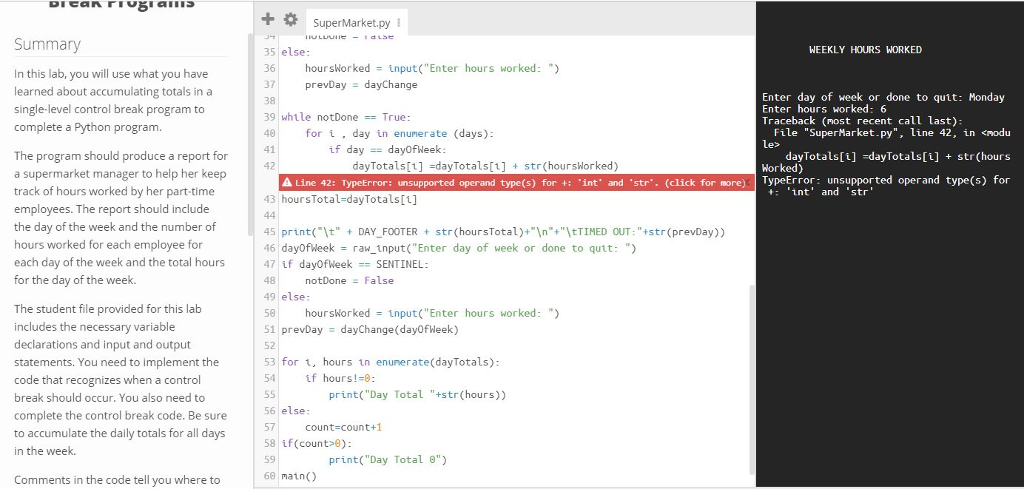
+SuperMarketpy Summary WEEKLY HOURS WORKED In this lab, you will use what you have learned about accumulating totals in a single-level control break program to complete a Python program. 35 else 36 hoursWorked input("Enter hours worked: ) 37 prevDay dayChange 38 39 whtle notDoneTrue: 40 41 42 Enter day of week or done to quit: Monday Enter hours worked: 6 Traceback (most recent call last) line File le> "SuperMarket .??", for iday in enumerate (days) 42, in
Step by Step Solution
There are 3 Steps involved in it

Get step-by-step solutions from verified subject matter experts
 Study Help