







Question: I got help to write this program. However, when i turned it in, my professor said it was not what he wanted. #include using namespace
I got help to write this program. However, when i turned it in, my professor said it was not what he wanted.
#include
using namespace std;
void displayMenu();
void calcSum(int, int);
void calcDiff(int, int);
void calcProduct(int, int);
void calcQuotient(int, int);
int main()
{
int choice, num1, num2;
while (true) {
displayMenu();
cout
cin >> choice;
cout
cin >> num1 >> num2;
switch (choice) {
case 1:
calcSum(num1, num2);
break;
case 2:
calcDiff(num1, num2);
break;
case 3:
calcProduct(num1, num2);
break;
case 4:
calcQuotient(num1, num2);
break;
case 5:
return 0;
default:
cout
}
}
}
void displayMenu()
{
cout
cout
cout
cout
cout
cout
}
void calcSum(int a, int b)
{
cout
}
void calcDiff(int a, int b)
{
cout
}
void calcProduct(int a, int b)
{
cout
}
void calcQuotient(int a, int b)
{
if (b == 0) {
cout
return;
}
cout
}
The output was:
He said to look back at the Evaluation Sheet:
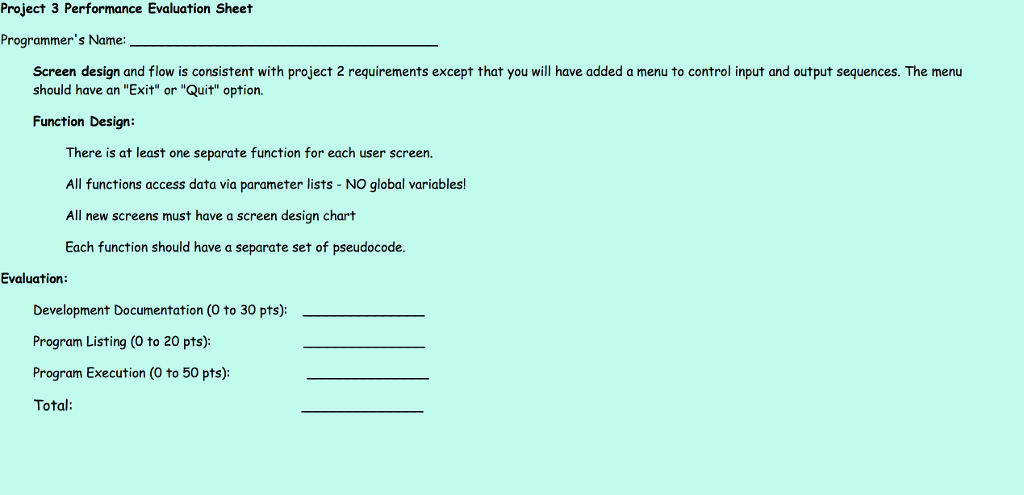
What am I missing and how do I do it?
Project 3 Performance Evaluation Sheet Programmer's Name: Screen design and flow is consistent with project 2 requirements except that you will have added a menu to control input and output sequences. The menu should have an "Exit" or "Quit" option. Function Design: There is at least one separate function for each user screen. All functions access data via parameter lists - NO global variables! All new screens must have a screen design chart Each function should have a separate set of pseudocode. Evaluation Development Documentation (O to 30 pts): Program Listing (O to 20 pts): Program Execution (O to 50 pts); Total
Step by Step Solution
There are 3 Steps involved in it

Get step-by-step solutions from verified subject matter experts
 Study Help