







Question: I have a homework about Object Oriented Programming. (Java Language). So they gave us a code which contains a bouncing ball in a JPanel. It
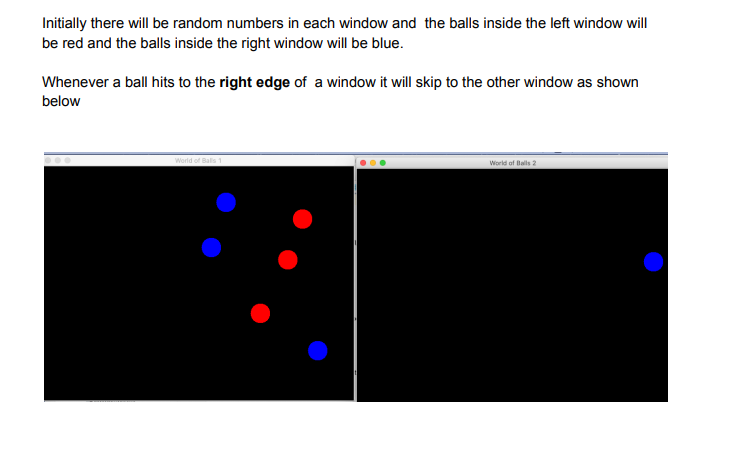
I have a homework about Object Oriented Programming. (Java Language). So they gave us a code which contains a bouncing ball in a JPanel. It wants us to make one more panel and when the ball of the first panel hits its right edge, move it to the other panel. And the balls which are in the left panel must be red, and right panel must be right. How can i do it ? (I already created a second panel)
//Ball.java
package tr.edu.sehir.oop; import java.awt.*; import java.util.Formatter; /** * The bouncing ball. * * @author Hock-Chuan Chua * @version v0.4 (31 October 2010) */ public class Ball { float x, y; // Ball's center x and y (package access) float speedX, speedY; // Ball's speed per step in x and y (package access) float radius; // Ball's radius (package access) private Color color; // Ball's color private static final Color DEFAULT_COLOR = Color.BLUE; /** * Constructor: For user friendliness, user specifies velocity in speed and * moveAngle in usual Cartesian coordinates. Need to convert to speedX and * speedY in Java graphics coordinates for ease of operation. */ public Ball(float x, float y, float radius, float speed, float angleInDegree, Color color) { this.x = x; this.y = y; // Convert (speed, angle) to (x, y), with y-axis inverted this.speedX = (float)(speed * Math.cos(Math.toRadians(angleInDegree))); this.speedY = (float)(-speed * (float)Math.sin(Math.toRadians(angleInDegree))); this.radius = radius; this.color = color; } /** Constructor with the default color */ public Ball(float x, float y, float radius, float speed, float angleInDegree) { this(x, y, radius, speed, angleInDegree, DEFAULT_COLOR); } /** * Make one move, check for collision and react accordingly if collision occurs. * * @param box: the container (obstacle) for this ball. */ public void moveOneStepWithCollisionDetection(ContainerBox box) { // Get the ball's bounds, offset by the radius of the ball float ballMinX = box.minX + radius; float ballMinY = box.minY + radius; float ballMaxX = box.maxX - radius; float ballMaxY = box.maxY - radius; // Calculate the ball's new position x += speedX; y += speedY; // Check if the ball moves over the bounds. If so, adjust the position and speed. if (x ballMaxX) { speedX = -speedX; x = ballMaxX; } // May cross both x and y bounds if (y ballMaxY) { speedY = -speedY; y = ballMaxY; } } /** Draw itself using the given graphics context. */ public void draw(Graphics g) { g.setColor(color); g.fillOval((int)(x - radius), (int)(y - radius), (int)(2 * radius), (int)(2 * radius)); } /** Return the magnitude of speed. */ public float getSpeed() { return (float)Math.sqrt(speedX * speedX + speedY * speedY); } /** Return the direction of movement in degrees (counter-clockwise). */ public float getMoveAngle() { return (float)Math.toDegrees(Math.atan2(-speedY, speedX)); } /** Return mass */ public float getMass() { return radius * radius * radius / 1000f; // Normalize by a factor } /** Return the kinetic energy (0.5mv^2) */ public float getKineticEnergy() { return 0.5f * getMass() * (speedX * speedX + speedY * speedY); } /** Describe itself. */ public String toString() { sb.delete(0, sb.length()); formatter.format("@(%3.0f,%3.0f) r=%3.0f V=(%2.0f,%2.0f) " + "S=%4.1f \u0398=%4.0f KE=%3.0f", x, y, radius, speedX, speedY, getSpeed(), getMoveAngle(), getKineticEnergy()); // \u0398 is theta return sb.toString(); } // Re-use to build the formatted string for toString() private StringBuilder sb = new StringBuilder(); private Formatter formatter = new Formatter(sb); } //BallWorld.java
package tr.edu.sehir.oop; import java.awt.*; import java.awt.event.*; import java.util.Random; import javax.swing.*; /** * The control logic and main display panel for game. * * @author Hock-Chuan Chua * @version October 2010 * modified by e gul */ public class BallWorld extends JPanel { private static final int UPDATE_RATE = 30; // Frames per second (fps) private Ball ball; // A single bouncing Ball's instance private ContainerBox box; // The container rectangular box private DrawCanvas canvas; // Custom canvas for drawing the box/ball private int canvasWidth; private int canvasHeight; /** * Constructor to create the UI components and init the game objects. * Set the drawing canvas to fill the screen (given its width and height). * * @param width : screen width * @param height : screen height */ public BallWorld(int width, int height) { canvasWidth = width; canvasHeight = height; // Init the ball at a random location (inside the box) and moveAngle Random rand = new Random(); int radius = 20; int x = rand.nextInt(canvasWidth - radius * 2 - 20) + radius + 10; int y = rand.nextInt(canvasHeight - radius * 2 - 20) + radius + 10; int speed = 5; int angleInDegree = rand.nextInt(360); ball = new Ball(x, y, radius, speed, angleInDegree, Color.BLUE); // // Init the Container Box to fill the screen box = new ContainerBox(0, 0, canvasWidth, canvasHeight, Color.BLACK, Color.WHITE); // Init the custom drawing panel for drawing the game canvas = new DrawCanvas(); this.setLayout(new BorderLayout()); this.add(canvas, BorderLayout.CENTER); // Handling window resize. this.addComponentListener(new ComponentAdapter() { @Override public void componentResized(ComponentEvent e) { Component c = (Component)e.getSource(); Dimension dim = c.getSize(); canvasWidth = dim.width; canvasHeight = dim.height; // Adjust the bounds of the container to fill the window box.set(0, 0, canvasWidth, canvasHeight); } }); // Start the ball bouncing gameStart(); } /* public void gameStart(){ gameThread gmthr = new gameThread(this,UPDATE_RATE); gmthr.start(); } */ // Start the ball bouncing. public void gameStart() { // Run the game logic in its own thread. Thread gameThread = new Thread() { public void run() { while (true) { // Execute one time-step for the game gameUpdate(); // Refresh the display repaint(); // Delay and give other thread a chance try { Thread.sleep(1000 / UPDATE_RATE); } catch (InterruptedException ex) {} } } }; gameThread.start(); // Invoke GaemThread.run() } /** * One game time-step. * Update the game objects, with proper collision detection and response. */ public void gameUpdate() { ball.moveOneStepWithCollisionDetection(box); } /** The custom drawing panel for the bouncing ball (inner class). */ class DrawCanvas extends JPanel { /** Custom drawing codes */ @Override public void paintComponent(Graphics g) { super.paintComponent(g); // Paint background // Draw the box and the ball box.draw(g); ball.draw(g); } /** Called back to get the preferred size of the component. */ @Override public Dimension getPreferredSize() { return (new Dimension(canvasWidth, canvasHeight)); } } } //ContainerBox.java
package tr.edu.sehir.oop; import java.awt.Color; import java.awt.Graphics; /** * A rectangular container box, containing the bouncing ball. * * @author Hock-Chuan Chua * @version 31 October 2010 */ public class ContainerBox { int minX, maxX, minY, maxY; // Box's bounds (package access) private Color colorFilled; // Box's filled color (background) private Color colorBorder; // Box's border color private static final Color DEFAULT_COLOR_FILLED = Color.BLACK; private static final Color DEFAULT_COLOR_BORDER = Color.YELLOW; /** Constructors */ public ContainerBox(int x, int y, int width, int height, Color colorFilled, Color colorBorder) { minX = x; minY = y; maxX = x + width - 1; maxY = y + height - 1; this.colorFilled = colorFilled; this.colorBorder = colorBorder; } /** Constructor with the default color */ public ContainerBox(int x, int y, int width, int height) { this(x, y, width, height, DEFAULT_COLOR_FILLED, DEFAULT_COLOR_BORDER); } /** Set or reset the boundaries of the box. */ public void set(int x, int y, int width, int height) { minX = x; minY = y; maxX = x + width - 1; maxY = y + height - 1; } /** Draw itself using the given graphic context. */ public void draw(Graphics g) { g.setColor(colorFilled); g.fillRect(minX, minY, maxX - minX - 1, maxY - minY - 1); g.setColor(colorBorder); g.drawRect(minX, minY, maxX - minX - 1, maxY - minY - 1); } }//gameThread.java
package tr.edu.sehir.oop; /** * @author Hock-Chuan Chua * @version 31 October 2010 *game thread is declared as a separate class not inner class * modified by e gul */ public class gameThread extends Thread { BallWorld bw; int updaterate; public gameThread(BallWorld bw , int updaterate) { // constructor this.bw = bw; this.updaterate =updaterate; } public void run() { while (true) { // Execute one time-step for the game bw.gameUpdate(); // Refresh the display bw.repaint(); // Delay and give other thread a chance try { Thread.sleep(1000 / updaterate); } catch (InterruptedException ex) { } } } } //Main.java
package tr.edu.sehir.oop; import javax.swing.JFrame; /** * Main Program for running the bouncing ball as a standalone application. * * @author Hock-Chuan Chua * @version October 2010 * modified by e gul */ public class Main { public static void main(String[] args) { // Run UI in the Event Dispatcher Thread (EDT), instead of Main thread //javax.swing.SwingUtilities.invokeLater(new Runnable() { // public void run() { JFrame frame = new JFrame("World 1"); frame.setDefaultCloseOperation(JFrame.EXIT_ON_CLOSE); frame.setContentPane(new BallWorld(640, 480)); // BallWorld is a JPanel frame.pack(); // Preferred size of BallWorld frame.setVisible(true); // Show it frame.setLocation(100,150); JFrame frame2 = new JFrame("World 2"); frame2.setDefaultCloseOperation(JFrame.EXIT_ON_CLOSE); frame2.setContentPane(new BallWorld(640, 480)); // BallWorld is a JPanel frame2.pack(); // Preferred size of BallWorld frame2.setVisible(true); // Show it frame2.setLocation(740,150); //} //}); } }Initially there will be random numbers in each window and the balls inside the left window will be red and the balls inside the right window will be blue. Whenever a ball hits to the right edge of a window it will skip to the other window as shown below World of Balls World of Balls 2
Step by Step Solution
There are 3 Steps involved in it

Get step-by-step solutions from verified subject matter experts
 Study Help