



Question: I have a JavaFX program that is a modern art generator. It takes a shape selection from a combobox, object count from a textfield, and
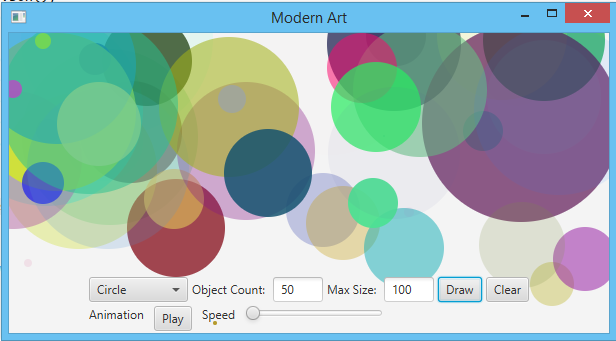
I have a JavaFX program that is a "modern art generator." It takes a shape selection from a combobox, object count from a textfield, and max size from a text field, and outputs the selected shape, n number of times, of various size and color. I also have "draw" and "clear" buttons - doing what you expect they would do - and a play/pause button for a Timeline animation with accompanying Slider in order to control the speed of the animation.
When you press draw, it implements a method that displays all of the selected shapes at one time on the screen. However, when you press the "Play/Pause" button, I would like if the shapes were added one-by-one onto the screen instead of all at once. What is a way that I can achieve this? I will post a copy of all of my code below for reference. I apologize for how sloppy it is, I'm still trying to learn!
package sample; import javafx.animation.*; import javafx.application.Application; import javafx.geometry.Insets; import javafx.geometry.Pos; import javafx.scene.Scene; import javafx.scene.control.*; import javafx.scene.layout.BorderPane; import javafx.scene.layout.HBox; import javafx.scene.layout.Pane; import javafx.scene.layout.VBox; import javafx.scene.paint.Color; import javafx.scene.paint.Paint; import javafx.scene.shape.Circle; import javafx.scene.shape.Rectangle; import javafx.stage.Stage; import javafx.util.Duration; import java.util.Random; public class Main extends Application { Pane artworkPane = new Pane(); ComboBox comboBox = new ComboBox(); int object = 50; int size = 100; @Override public void start(Stage primaryStage) { drawCircle(); BorderPane borderPane = new BorderPane(); HBox drawingBarPane = new HBox(); HBox animationPane = new HBox(); VBox controlBarPane = new VBox(); Scene scene = new Scene(borderPane, 600, 300); Label countLabel = new Label("Object Count: "); Label sizeLabel = new Label("Max Size: "); TextField objectCount = new TextField(object+""); TextField maxSize = new TextField(size+""); objectCount.setPrefWidth(50); maxSize.setPrefWidth(50); Button draw = new Button("Draw"); Button clear = new Button("Clear"); Label animationLabel = new Label("Animation"); Button animationButton = new Button("Play"); Label sliderSpeed = new Label("Speed"); Slider slider = new Slider(); slider.setShowTickLabels(false); slider.setShowTickMarks(false); slider.setMin(10); slider.setMax(100); Timeline timeline = new Timeline( new KeyFrame(Duration.seconds(slider.getValue()), e -> {if(comboBox.getValue() == "Circle") drawCircle(); else drawRectangle();})); timeline.setCycleCount(Timeline.INDEFINITE); timeline.rateProperty().bind(slider.valueProperty()); drawingBarPane.setSpacing(4); drawingBarPane.setPadding(new Insets(2, 2, 2, 2)); drawingBarPane.getChildren().addAll(comboBox, countLabel, objectCount, sizeLabel, maxSize, draw, clear); drawingBarPane.setAlignment(Pos.CENTER); animationPane.setSpacing(10); animationPane.setPadding(new Insets(2, 2, 2, 80)); animationPane.getChildren().addAll(animationLabel, animationButton, sliderSpeed, slider); controlBarPane.getChildren().addAll(drawingBarPane, animationPane); animationButton.setOnAction(e -> { if (animationButton.getText().equals("Play")) { animationButton.setText("Pause"); timeline.play(); artworkPane.getChildren().clear(); } else { animationButton.setText("Play"); timeline.stop(); } }); comboBox.getItems().add("Circle"); comboBox.getItems().add("Rectangle"); comboBox.setValue("Circle"); borderPane.setBottom(controlBarPane); borderPane.setCenter(artworkPane); primaryStage.setTitle("Modern Art"); primaryStage.setScene(scene); primaryStage.show(); controlBarPane.toFront(); draw.setOnAction(e -> { artworkPane.getChildren().clear(); size = Integer.parseInt(maxSize.getText()); object = Integer.parseInt(objectCount.getText()); draw(); }); objectCount.setOnAction(e -> { artworkPane.getChildren().clear(); object = Integer.parseInt(objectCount.getText()); draw(); }); maxSize.setOnAction(e -> { artworkPane.getChildren().clear(); size = Integer.parseInt(maxSize.getText()); draw(); }); comboBox.setOnAction(e -> { artworkPane.getChildren().clear(); draw(); }); clear.setOnAction(e -> { artworkPane.getChildren().clear(); }); } public void drawCircle() { int centerX, centerY, radius; Random random = new Random(); for (int i=0; i
1 Modern Art Circle 50 Max Size: 100 Draw Clear Object Count: Play Speed Animation 1 Modern Art Circle 50 Max Size: 100 Draw Clear Object Count: Play Speed Animation Step by Step Solution
There are 3 Steps involved in it

Get step-by-step solutions from verified subject matter experts