







Question: I have a problem with my python code can you fix it, please!! Here is the picture shown where is the problem: and here is
I have a problem with my python code can you fix it, please!!
Here is the picture shown where is the problem:
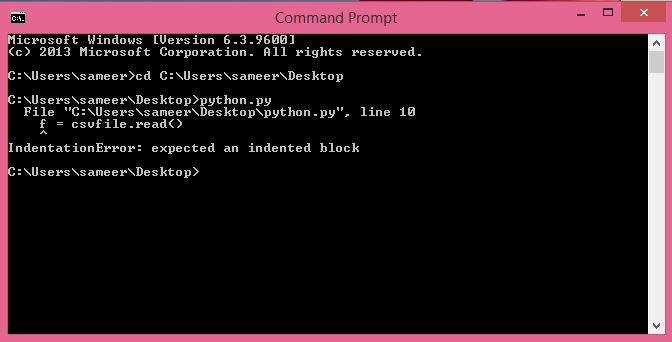
and here is the code:
from io import StringIO import pandas as pd import csv from simplecrypt import encrypt, decrypt from getpass import getpass
def EncryptCsv(a): with open(a,"r") as csvfile: #pass do something with file abc.csv f = csvfile.read() ciphertext = encrypt('USERPASSWORD',f.encode('utf8')) e = open('abc.enc','wb') # abc.enc doesn't need to exist, python will create it e.write(ciphertext) e.close filename2 = "abc.enc" def DecryptCsv(a): with open(a,"rb") as encryptedfile encryptedfile.read() print('Please enter the password and press the enter key Decryption may take some time')
# Decrypts the data, requires a user-input password CSVplaintext = decrypt(getpass("password: "), f).decode('utf8') print('Data have been Decrypted')
#create a temp csv-like file to pass to pandas.read_csv() DATA=StringIO(CSVplaintext)
# Makes a panda dataframe with the data df = pd.read_csv(DATA) df.to_csv('test_decrypted.csv', encoding='utf-8', index=False) #Driver code for Encryption filename1 = "abc.csv" EncryptCsv(filename1)
#Driver code for Decryption filename2 = "abc.enc" #the encrypted file that needs to be changed into a csv file #Output after decrypting abc.enc would give the decrypted csv - test_decrypted.csv DecryptCsv(filename2)
Command Prompt icrosoft Windows [Uersion 6.3.96001 (c> 2013 Microsoft Corporation. All rights reserved CNUsers sameercd CUsers sameerDesktop Users sameer\Desktop>python py File "CUsers sameer Desktop python.py". line 10 - csufile.read IndentationErro: expected an indented block Users sameer\Desktop>
Step by Step Solution
There are 3 Steps involved in it

Get step-by-step solutions from verified subject matter experts
 Study Help