







Question: I have a problem with this question: This is in python. I can get the list to print out the correct output however it is
I have a problem with this question:
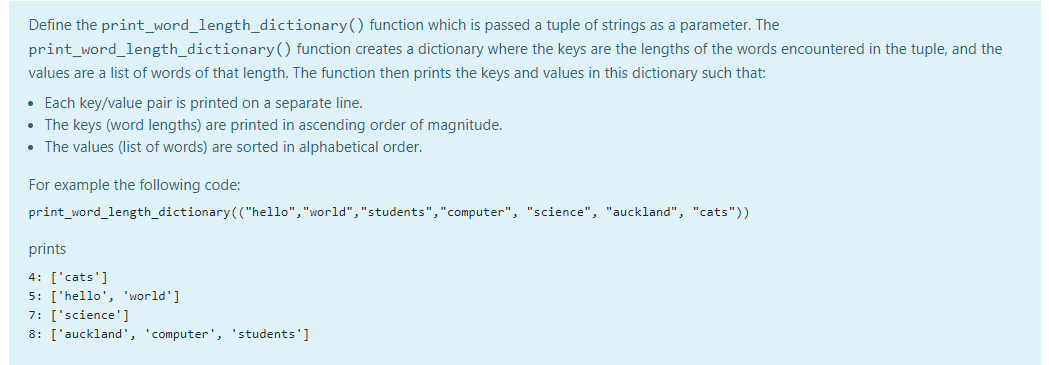
This is in python. I can get the list to print out the correct output however it is overwriting the values when the length of the word is the same.
Here is my code and example output. What am I doing wrong?
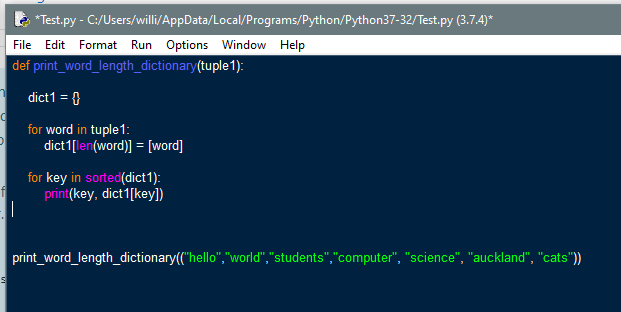
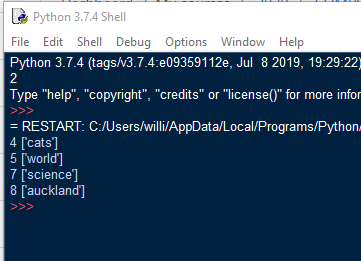
Define the print_word_length_dictionary() function which is passed a tuple of strings as a parameter. The print_word_length_dictionary() function creates a dictionary where the keys are the lengths of the words encountered in the tuple, and the values are a list of words of that length. The function then prints the keys and values in this dictionary such that: Each key/value pair is printed on a separate line. The keys (word lengths) are printed in ascending order of magnitude. The values (list of words) are sorted in alphabetical order. For example the following code: print_word_length_dictionary(("hello", "world", "students","computer", "science", "auckland", "cats")) prints 4: ['cats'] 5: ['hello', 'world'] 7: ['science'] 8: ['auckland', 'computer', 'students'] Le *Test.py - C:/Users/willi/AppData/Local/Programs/Python/Python37-32/Test.py (3.7.4)* File Edit Format Run Options Window Help def print_word_length_dictionary(tuple1): dict1 = 1 for word in tuple 1: dict1[len(word)] = [word] for key in sorted(dict 1): print(key, dict1[key]) print_word_length_dictionary(("hello","world", "students","computer", "science", "auckland", "cats")) t Python 3.7.4 Shell File Edit Shell Debug Options Window Help Python 3.7.4 (tags/v3.7.4:e09359112e, Jul 8 2019, 19:29:22 Type "help", "copyright", "credits" or "license()" for more infor >>> = RESTART: C:/Users/willi/AppData/local/Programs/Python 4 [cats'] 5 ['world'] 7 ['science] 8 ['auckland']
Step by Step Solution
There are 3 Steps involved in it

Get step-by-step solutions from verified subject matter experts
 Study Help