







Question: I have a program that is almost finished, but just need a few things adjusted (See ScreenShot). I need the best mpg, highest mileage, fleet
I have a program that is almost finished, but just need a few things adjusted (See ScreenShot). I need the best mpg, highest mileage, fleet avg mpg to be displayed and Car lot by MPG to be sorted from highest to lowest MPG.
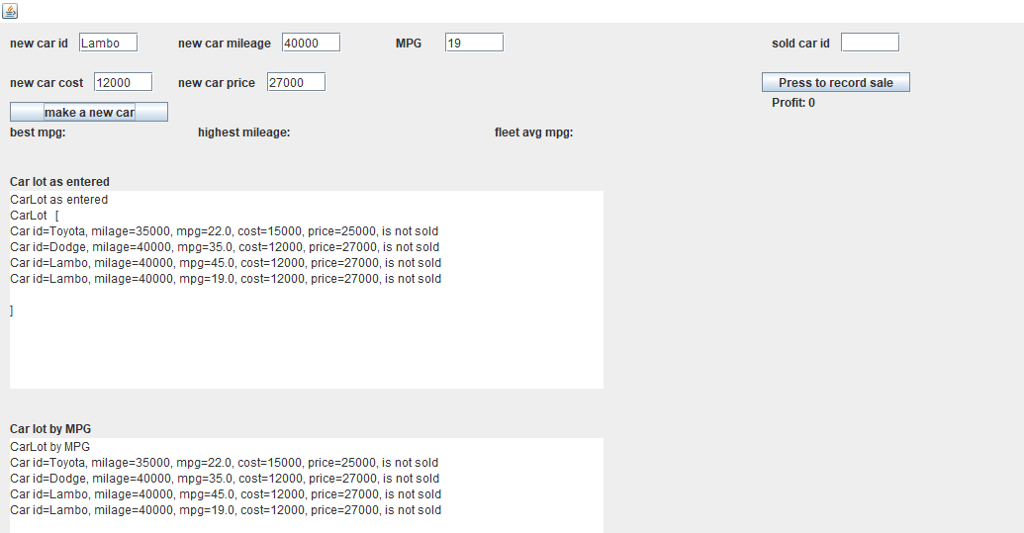
This is the code done already: (WidgetViewer.java is just a class that must be in the same package to use the GUI.)
CarLotGUI.java
import javax.swing.JLabel; import javax.swing.JTextArea; import javax.swing.JTextField;
import java.awt.event.MouseAdapter; import java.awt.event.MouseEvent; import java.util.ArrayList; import java.util.Collections; import java.util.List; import java.util.Scanner;
import javax.swing.JButton;
public class CarLotGUI {
public static void main(String[] args) { WidgetViewer wv = new WidgetViewer();
JLabel idmain = new JLabel("new car id"); JLabel mileage = new JLabel("new car mileage"); JLabel mpgmain = new JLabel("MPG"); JLabel cost = new JLabel("new car cost"); JLabel price = new JLabel("new car price"); JLabel soldID = new JLabel("sold car id"); JLabel bestMPG = new JLabel("best mpg: "); JLabel higest = new JLabel("highest mileage: "); JLabel fleet = new JLabel("fleet avg mpg: "); JLabel profit = new JLabel("profit: "); JLabel lotmain = new JLabel("Car lot as entered"); JLabel mpgLot = new JLabel("Car lot by MPG");
JButton newcar = new JButton("make a new car"); JButton sale = new JButton("Press to record sale");
JTextArea asEnteredArea = new JTextArea(); JTextArea byMPGArea = new JTextArea();
JTextField soldCarField = new JTextField(); JTextField carIdField = new JTextField(); JTextField carMileageField = new JTextField(); JTextField mpgField = new JTextField(); JTextField carCostField = new JTextField(); JTextField priceField = new JTextField();
wv.add(soldCarField, 850, 10, 60, 20); wv.add(carIdField, 80, 10, 60, 20); wv.add(carMileageField, 285, 10, 60, 20); wv.add(mpgField, 450, 10, 60, 20); wv.add(carCostField, 95, 50, 60, 20); wv.add(priceField, 270, 50, 60, 20);
wv.add(idmain, 10, 10, 200, 20); wv.add(mileage, 180, 10, 200, 20); wv.add(mpgmain, 400, 10, 200, 20); wv.add(cost, 10, 50, 200, 20); wv.add(price, 180, 50, 200, 20); wv.add(soldID, 780, 10, 200, 20); wv.add(bestMPG, 10, 100, 200, 20); wv.add(higest, 200, 100, 200, 20); wv.add(fleet, 500, 100, 200, 20); wv.add(profit, 780, 70, 150, 20); wv.add(lotmain, 10, 150, 150, 20); wv.add(asEnteredArea, 10, 170, 600, 200); wv.add(mpgLot, 10, 400, 150, 20); wv.add(byMPGArea, 10, 420, 600, 200);
wv.add(newcar, 10, 80, 160, 20); wv.add(sale, 770, 50, 150, 20);
ArrayList
newcar.addMouseListener(new MouseAdapter() { public void mouseClicked(MouseEvent event) { Car newcar = new Car(carIdField.getText(), Integer.parseInt(carMileageField.getText()), Double.parseDouble(mpgField.getText()), Integer.parseInt(carCostField.getText()), Integer.parseInt(priceField.getText())); carList.add(newcar); displayText(carList, asEnteredArea, byMPGArea, profit); profit.setText("Profit: 0"); } });
sale.addMouseListener(new MouseAdapter() { public void mouseClicked(MouseEvent event) { String carId = soldCarField.getText(); for (int x = 0; x
} static void displayText(ArrayList WidgetViewer.java import java.awt.event.ActionListener; import java.util.concurrent.locks.Condition; import java.util.concurrent.locks.Lock; import java.util.concurrent.locks.ReentrantLock; import javax.swing.AbstractButton; import javax.swing.JComponent; import javax.swing.JFrame; import javax.swing.JPanel; import javax.swing.JTextField; import javax.swing.JButton; /** * A really simple class to display Swing widgets in absolute Layout GUI. * * * @author parks */ public class WidgetViewer { /** * This is the width of the JFrame if no value is specified on the constructor */ public static final int DEFAULT_X_SIZE = 600; /** * This is the height of the JFrame if no value is specified on the constructor */ public static final int DEFAULT_Y_SIZE = 400; private JFrame jframe; private JPanel anchor; private boolean userClicked = false; private Lock lock; private Condition waitingForUser; private JComponent userInputComponent = null; private ActionListener eventHandler; /** * Default constructor will display an empty JFrame that has a Absolute layout * JPanel as its content pane and initialize the frame to a default size. */ public WidgetViewer() { this(DEFAULT_X_SIZE, DEFAULT_Y_SIZE); } /** * Constructor will display an empty JFrame that has a Flow layout JPanel as its * content pane and initialize the frame to a given size. */ public WidgetViewer(int pixelSizeInX, int pixelSizeInY) { lock = new ReentrantLock(); waitingForUser = lock.newCondition(); // lambda expression requires Java 8 eventHandler = e -> { if (e.getSource() != userInputComponent) { return; } lock.lock(); userClicked = true; waitingForUser.signalAll(); lock.unlock(); JComponent jbx = (JComponent) e.getSource(); anchor.remove(jbx); }; jframe = new JFrame(); anchor = new JPanel(); anchor.setLayout(null); jframe.setContentPane(anchor); jframe.setSize(pixelSizeInX, pixelSizeInY); jframe.setDefaultCloseOperation(JFrame.EXIT_ON_CLOSE); jframe.setVisible(true); } /** * Add a Swing widget to the GUI. * GUI coordinates start at the top left corner of the frame, and * are measured in pixels. * *
* * @param jcomp * Swing widget (subclasses of JComponent--like JLabel and * JTextField) to be added to the JFrame * * @param x the x value of this widget's top left corner * @param y the y value of this widget's top left corner * @param w the width, in pixels, of this widget * @param h the height, in pixels, of this widget */ public void add(JComponent jcomp, int x, int y, int w, int h) { jcomp.setBounds(x, y, w, h); anchor.add(jcomp); jframe.setContentPane(anchor); }
/** * Add an Abstract Button (like a JButton) to the JFrame. Create an action * listener to wait (suspend the caller) until it is clicked. * * @param absButton * Button (like a JButton) to add to the JFrame */ public void addAndWait(AbstractButton absButton) { userInputComponent = absButton; absButton.addActionListener(eventHandler);
addWait(absButton, absButton.getText().length() + 2); }
/** * Convenience method to create a JButton with the given text and use it * in an addAndWait. * * @param prompt Text for the JButton to display */ public void addButtonAndWait(String prompt) { JButton jb = new JButton(prompt); addAndWait(jb); }
/** * Add a JTextField to the JFrame, and wait for the user to put the cursor in * the field and click Enter. The caller is suspended until enter is clicked. * * @param jTextField * Field to add to the JFrame */ public void addAndWait(JTextField jTextField) { userInputComponent = jTextField; jTextField.addActionListener(eventHandler);
addWait(jTextField, jTextField.getText().length() + 2); }
@SuppressWarnings("unused") private void addWait(JComponent jcomp) { addWait(jcomp, 5); }
private void addWait(JComponent jcomp, int charWidth) { int guessAtWidth = Math.min(charWidth * 10, jframe.getWidth()); add(jcomp, 0, 10, guessAtWidth, 20); lock.lock(); try { while (!userClicked) { waitingForUser.await(); } // we need this to make the just clicked widget disappear in some circumstances jframe.setContentPane(anchor); } catch (InterruptedException e1) { System.err.println("WidgetViewer reports that something really bad just happened"); e1.printStackTrace(); System.exit(0); } userClicked = false; waitingForUser.signalAll(); lock.unlock(); } }
Car.java
public class Car { private int cost; private String identifier; private boolean isSold = false; private int milage; private double mpg; private int price; public Car() { identifier = ""; milage = 0; mpg = 0; cost = 0; price = 0; }
public Car(String identifier) { this.identifier = identifier; milage = 0; mpg = 0; cost = 0; price = 0; }
public Car(String identifier, int milage, double mpg, int cost, int price) { this.identifier = identifier; this.milage = milage; this.mpg = mpg; this.cost = cost; this.price = price; }
public void addMiles(int miles) { milage += miles; }
public int compareId(Car o) { return identifier.compareTo(o.identifier); }
public int compareMPG(Car otherCar) { double myMPG = getMPG(); double otherMPG = otherCar.getMPG(); if (myMPG == otherMPG) return 0; if (myMPG - otherMPG > 0) return 1; return -1; }
public int comparePrice(Car o) { return price - o.price; }
public int getCost() { return cost; }
public String getIdentifier() { return identifier; } public int getMilage() { return milage; }
public double getMPG() { return mpg; } public int getPrice() { return price; } public int getProfit() { if (isSold) return price - cost; return 0; }
public boolean isSold() { return isSold; }
public void setCost(int cost) { this.cost = cost; }
public void setIdentifier(String identifier) { this.identifier = identifier; }
public void setMiles(int milage) { this.milage = milage; }
public void setMPG(double mpg) { this.mpg = mpg; }
public void setPrice(int price) { this.price = price; }
public void setSold(boolean isSold) { this.isSold = isSold; }
@Override public String toString() { String soldProfit = "is sold, profit=" + getProfit(); if (!isSold()) soldProfit = "is not sold"; return "Car id=" + identifier + ", milage=" + milage + ", mpg=" + mpg + ", cost=" + cost + ", price=" + price + ", " + soldProfit + " "; }
}
new car id Lambo new car mileage 40000 MPG19 sold car id new car cost 12000new car price 27000 Press to record sale Profit: 0 make a new car best mpg: highest mileage: fleet avg mpg Car lot as entered CarLot as entered CarLot Car id-Toyota, milage-35000, mpg-22.0, cost-15000, price 25000, is not sold Car id Dodge, milage-40000, mpg-35.0, cost-12000, price 27000, is not sold Car id-Lambo, milage-40000, mpg-45.0, cost 12000, price-27000, is not sold Car id-Lambo, milage-40000, mpg-19.0, cost 12000, price-27000, is not sold Car lot by MPG CarLot by MPG Car id-Toyota, milage 35000, mpg-22.0, cost-15000, price-25000, is not sold Car id-Dodge, milage 40000, mpg-35.0, cost-12000, price-27000, is not sold Car id-Lambo, milage 40000, mpg-45.0, cost-12000, price 27000, is not sold Car id Lambo, milage-40000, mpg-19.0, cost-12000, price-27000, is not sold
Step by Step Solution
There are 3 Steps involved in it

Get step-by-step solutions from verified subject matter experts
 Study Help