







Question: I have Assignment working on Microsoft Word. I need help also explain to figure out with 3,4,5 please. Assessment 1 Format a Document on Website
I have Assignment working on Microsoft Word. I need help also explain to figure out with 3,4,5 please. 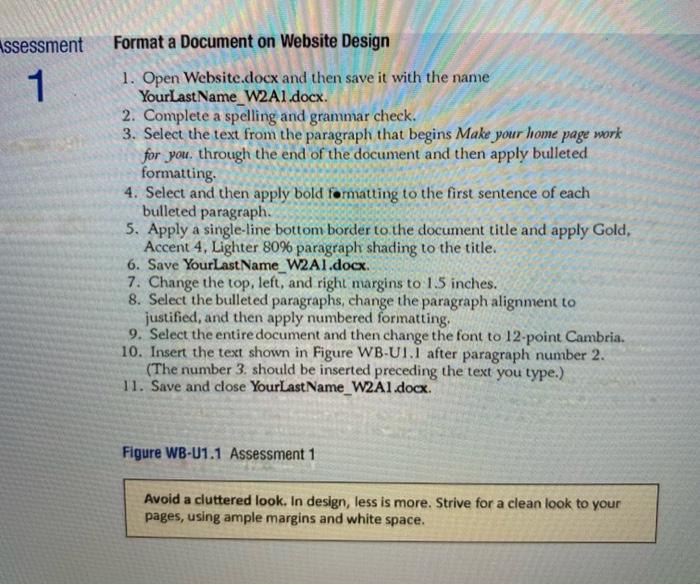
Assessment 1 Format a Document on Website Design 1. Open Website.docx and then save it with the name YourLastName_W2A1.docx. 2. Complete a spelling and grammar check. 3. Select the text from the paragraph that begins Make your home page work for you, through the end of the document and then apply bulleted formatting 4. Select and then apply bold formatting to the first sentence of each bulleted paragraph. 5. Apply a single-line bottom border to the document title and apply Gold, Accent 4, Lighter 80% paragraph shading to the title. 6. Save Your LastName_W2A1.docx 7. Change the top, left, and right margins to 1.5 inches. 8. Select the bulleted paragraphs, change the paragraph alignment to justified, and then apply numbered formatting 9. Select the entire document and then change the font to 12-point Cambria. 10. Insert the text shown in Figure WB-U1.I after paragraph number 2. (The number 3. should be inserted preceding the text you type.) 11. Save and close Your LastName_W2A1.docx Figure WB-U1.1 Assessment 1 Avoid a cluttered look. In design, less is more. Strive for a clean look to your pages, using ample margins and white space
Step by Step Solution
There are 3 Steps involved in it
1 Expert Approved Answer
Step: 1 Unlock

Question Has Been Solved by an Expert!
Get step-by-step solutions from verified subject matter experts
Step: 2 Unlock
Step: 3 Unlock
 Study Help