





Question: I have attached the work for the worksheet E20-7 (L01,2,3) EXCEL (Basic Pension Worksheet) The following defined pension data of Rydell Corp. apply to the

I have attached the work for the worksheet
I have attached the work for the worksheet E20-7I have attached the work for the worksheet E20-7
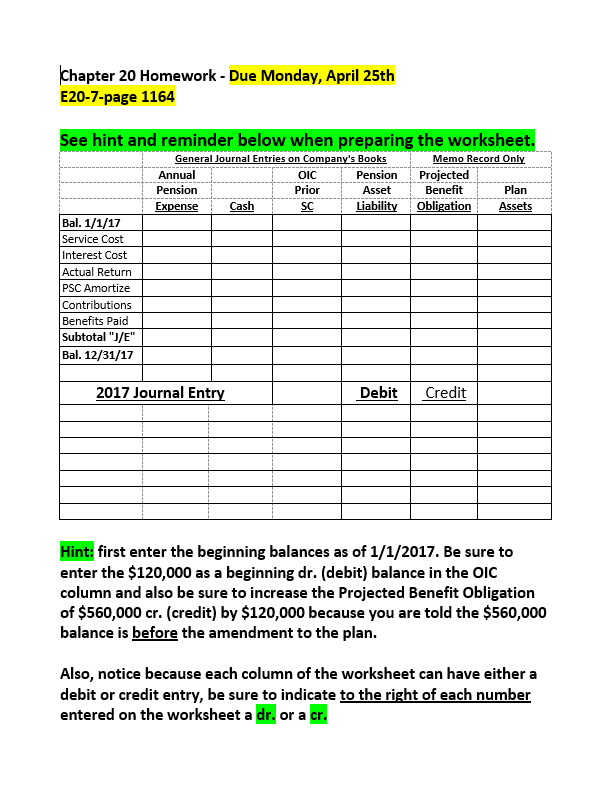
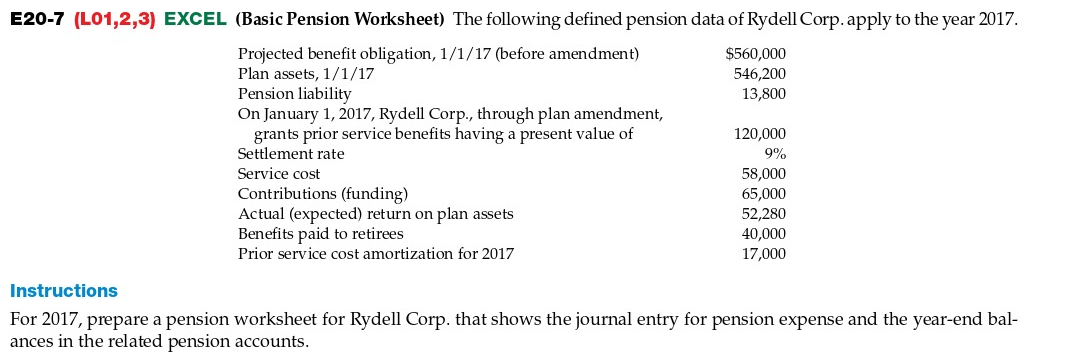
E20-7 (L01,2,3) EXCEL (Basic Pension Worksheet) The following defined pension data of Rydell Corp. apply to the year 2017. Projected benefit obligation, 1/1/17 (before amendment) $560,000 Plan assets, 1/1/17 546,200 Pension liability 13,800 On January 1, 2017, Rydell Corp., through plan amendment, grants prior service benefits having a present value of 120,000 Settlement rate 9% Service cost 58,000 Contributions (funding) 65,000 Actual (expected) return on plan assets 52,280 Benefits paid to retirees 40,000 Prior service cost amortization for 2017 17,000 Instructions For 2017, prepare a pension worksheet for Rydell Corp. that shows the journal entry for pension expense and the year-end bal- ances in the related pension accounts.Chapter 20 Homework - Due Monday, April 25th E20-7-page 1164 See hint and reminder below when preparing the worksheet. General Journal Entries on Company's Books Memo Record Only Annual DIC Pension Projected Pension Prior Asset Benefit Plan Expense Cash SC Liability Obligation Assets Bal. 1/1/17 Service Cost Interest Cost Actual Return PSC Amortize Contributions Benefits Paid Subtotal "J/E" Bal. 12/31/17 2017 Journal Entry Debit Credit Hint: first enter the beginning balances as of 1/1/2017. Be sure to enter the $120,000 as a beginning dr. (debit) balance in the OIC column and also be sure to increase the Projected Benefit Obligation of $560,000 cr. (credit) by $120,000 because you are told the $560,000 balance is before the amendment to the plan. Also, notice because each column of the worksheet can have either a debit or credit entry, be sure to indicate to the right of each number entered on the worksheet a dr. or a cr

Step by Step Solution

There are 3 Steps involved in it

1 Expert Approved Answer
Step: 1 Unlock blur-text-image

Question Has Been Solved by an Expert!

Get step-by-step solutions from verified subject matter experts

Step: 2 Unlock
Step: 3 Unlock

Students Have Also Explored These Related Accounting Questions!