







Question: I have currently a functional Java progam with a gui. Its a simple table of contacts with 3 buttons: add, remove, and edit. Right now
I have currently a functional Java progam with a gui. Its a simple table of contacts with 3 buttons: add, remove, and edit. Right now the buttons are in the program but they do not work yet. I need the buttons to actually be able to add, remove, or edit things on the table. Thanks so much.
Here is the working code so far:
//PersonTableModel.java import java.util.List; import javax.swing.table.AbstractTableModel; public class PersonTableModel extends AbstractTableModel { private static final int COLUMN_FIRSTNAME = 0; private static final int COLUMN_MIDDLENAME = 1; private static final int COLUMN_LASTNAME = 2; private static final int COLUMN_JOB = 3; private String[] columnNames = {"First Name", "Middle Name", "Last Name", "JOB" }; private List
public PersonTableModel(List
@Override public int getRowCount() { return listPersons.size(); }
@Override public Object getValueAt(int rowIndex, int columnIndex) { Person person = listPersons.get(rowIndex); Object returnValue = null; switch(columnIndex){ case COLUMN_FIRSTNAME: returnValue = person.getFirstName(); break; case COLUMN_MIDDLENAME: returnValue = person.getMiddleName(); break; case COLUMN_LASTNAME: returnValue = person.getLastName(); break; case COLUMN_JOB: returnValue = person.getJob(); break; default: throw new IllegalArgumentException("Invalid column index"); } return returnValue; } @Override public String getColumnName(int columnIndex) { return columnNames[columnIndex]; } }
------------------------------------------------------------------------------------------------------------------------------------
//Person.java public class Person { public String getFirstName() { return firstName; } public void setFirstName(String firstName) { this.firstName = firstName; } public String getMiddleName() { return middleName; } public void setMiddleName(String middleName) { this.middleName = middleName; } public String getLastName() { return lastName; } public void setLastName(String lastName) { this.lastName = lastName; } public String getJob() { return job; } public void setJob(String job) { this.job = job; } private String firstName; private String middleName; private String lastName; private String job;
public Person(String firstName, String middleName, String lastName, String job){ this.firstName = firstName; this.middleName = middleName; this.lastName = lastName; this.job = job; } }
-----------------------------------------------------------------------------------------------------------------------------
//TableGUI.java import java.awt.BorderLayout; import java.awt.FlowLayout; import java.awt.event.ActionEvent; import java.awt.event.ActionListener; import java.util.List; import javax.swing.JButton; import javax.swing.JFrame; import javax.swing.JPanel; import javax.swing.JTable; public class TableGUI extends JFrame { //Create PersonTableModel variable PersonTableModel prm; //Create JTable variable JTable table; //Create two panel variables JPanel tablePanel; JPanel buttonPanel; //Declare three button variables JButton addButton; JButton editButton; JButton exitButton; public TableGUI(List
--------------------------------------------------------------------------------------------------------------------------------------------
/**The driver program that displays jTable with * three buttons to add, edit and exit . The buttons * are not implemented. * */ //PersonDriver.java import java.util.ArrayList; import java.util.List; import javax.swing.JFrame; public class PersonDriver extends JFrame { public static void main(String[] args) { //Create a ArrayList object List
------------------------------------------------------------------------------------------------------------------------------------------------
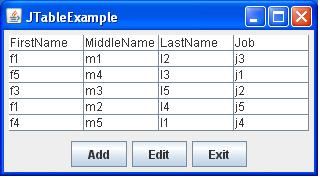
JTableExample FirstName MiddleName LastName Johb m1 m4 m3 m2 m5 j3 j5 Add Edit Exit
Step by Step Solution
There are 3 Steps involved in it

Get step-by-step solutions from verified subject matter experts
 Study Help