







Question: I have seen that the app keeps dropping wrong answers from previous questions because of the similar preamble but please read the scenario and help
 I have seen that the app keeps dropping wrong answers from previous questions because of the similar preamble but please read the scenario and help me please. Would appreciate it a lot and would rate almost instantly as soon as I see it and answers the question well. thank you!
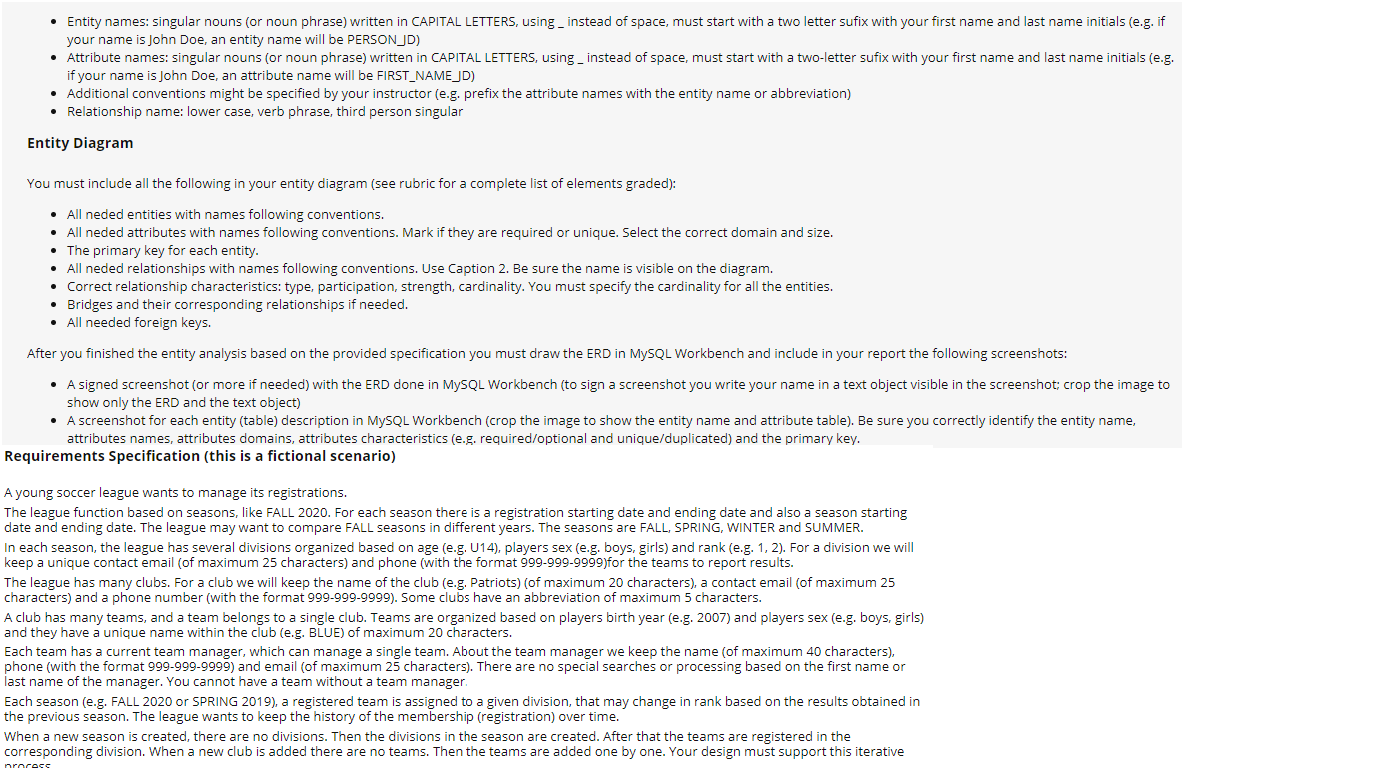
Entity names: singular nouns (or noun phrase) written in CAPITAL LETTERS, using _ instead of space, must start with a two letter sufix with your first name and last name initials (e.g. if your name is John Doe, an entity name will be PERSON_JD) Attribute names: singular nouns (or noun phrase) written in CAPITAL LETTERS, using _ instead of space, must start with a two-letter sufix with your first name and last name initials (e.g. if your name is John Doe, an attribute name will be FIRST_NAME_JD) Additional conventions might be specified by your instructor (e.g. prefix the attribute names with the entity name or abbreviation) Relationship name: lower case, verb phrase, third person singular Entity Diagram You must include all the following in your entity diagram (see rubric for a complete list of elements graded): All neded entities with names following conventions. All neded attributes with names following conventions. Mark if they are required or unique. Select the correct domain and size. The primary key for each entity. All neded relationships with names following conventions. Use Caption 2. Be sure the name is visible on the diagram. Correct relationship characteristics: type, participation, strength, cardinality. You must specify the cardinality for all the entities. Bridges and their corresponding relationships if needed. All needed foreign keys. After you finished the entity analysis based on the provided specification you must draw the ERD in MySQL Workbench and include in your report the following screenshots: A signed screenshot (or more if needed) with the ERD done in MySQL Workbench (to sign a screenshot you write your name in a text object visible in the screenshot: crop the image to show only the ERD and the text object) A screenshot for each entity (table) description in MySQL Workbench (crop the image to show the entity name and attribute table). Be sure you correctly identify the entity name, attributes names, attributes domains, attributes characteristics (e.g. required/optional and unique/duplicated) and the primary key. Requirements Specification (this is a fictional scenario) A young soccer league wants to manage its registrations. The league function based on seasons, like FALL 2020. For each season there is a registration starting date and ending date and also a season starting date and ending date. The league may want to compare FALL seasons in different years. The seasons are FALL, SPRING, WINTER and SUMMER. In each season, the league has several divisions organized based on age (e.g. U14), players sex (e.g. boys, girls) and rank (e.g. 1, 2). For a division we will keep a unique contact email (of maximum 25 characters) and phone with t format 999.999-9999)for the teams to report results. The league has many clubs. For a club we will keep the name of the club (e.g. Patriots) (of maximum 20 characters), a contact email (of maximum 25 characters) and a phone number (with the format 999-999-9999). Some clubs have an abbreviation of maximum 5 characters. A club has many teams, and a team belongs to a single club. Teams are organized based on players birth year (e.g. 2007) and players sex (e.g. boys, girls) and they have a unique name within the club (e.g. BLUE) of maximum 20 characters. Each team has a current team manager, which can manage a single team. About the team manager we keep the name of maximum 40 characters), phone (with the format 999-999-9999) and email (of maximum 25 characters). There are no special searches or processing based on the first name or last name of the manager. You cannot have a team without a team manager Each season (e.g. FALL 2020 or SPRING 2019), a registered team is assigned to a given division, that may change in rank based on the results obtained in the previous season. The league wants to keep the history of the membership (registration) over time. When a new season is created, there are no divisions. Then the divisions in the season are created. After that the teams are registered in the corresponding division. When a new club is added there are no teams. Then the teams are added one by one. Your design must support this iterative proces Entity names: singular nouns (or noun phrase) written in CAPITAL LETTERS, using _ instead of space, must start with a two letter sufix with your first name and last name initials (e.g. if your name is John Doe, an entity name will be PERSON_JD) Attribute names: singular nouns (or noun phrase) written in CAPITAL LETTERS, using _ instead of space, must start with a two-letter sufix with your first name and last name initials (e.g. if your name is John Doe, an attribute name will be FIRST_NAME_JD) Additional conventions might be specified by your instructor (e.g. prefix the attribute names with the entity name or abbreviation) Relationship name: lower case, verb phrase, third person singular Entity Diagram You must include all the following in your entity diagram (see rubric for a complete list of elements graded): All neded entities with names following conventions. All neded attributes with names following conventions. Mark if they are required or unique. Select the correct domain and size. The primary key for each entity. All neded relationships with names following conventions. Use Caption 2. Be sure the name is visible on the diagram. Correct relationship characteristics: type, participation, strength, cardinality. You must specify the cardinality for all the entities. Bridges and their corresponding relationships if needed. All needed foreign keys. After you finished the entity analysis based on the provided specification you must draw the ERD in MySQL Workbench and include in your report the following screenshots: A signed screenshot (or more if needed) with the ERD done in MySQL Workbench (to sign a screenshot you write your name in a text object visible in the screenshot: crop the image to show only the ERD and the text object) A screenshot for each entity (table) description in MySQL Workbench (crop the image to show the entity name and attribute table). Be sure you correctly identify the entity name, attributes names, attributes domains, attributes characteristics (e.g. required/optional and unique/duplicated) and the primary key. Requirements Specification (this is a fictional scenario) A young soccer league wants to manage its registrations. The league function based on seasons, like FALL 2020. For each season there is a registration starting date and ending date and also a season starting date and ending date. The league may want to compare FALL seasons in different years. The seasons are FALL, SPRING, WINTER and SUMMER. In each season, the league has several divisions organized based on age (e.g. U14), players sex (e.g. boys, girls) and rank (e.g. 1, 2). For a division we will keep a unique contact email (of maximum 25 characters) and phone with t format 999.999-9999)for the teams to report results. The league has many clubs. For a club we will keep the name of the club (e.g. Patriots) (of maximum 20 characters), a contact email (of maximum 25 characters) and a phone number (with the format 999-999-9999). Some clubs have an abbreviation of maximum 5 characters. A club has many teams, and a team belongs to a single club. Teams are organized based on players birth year (e.g. 2007) and players sex (e.g. boys, girls) and they have a unique name within the club (e.g. BLUE) of maximum 20 characters. Each team has a current team manager, which can manage a single team. About the team manager we keep the name of maximum 40 characters), phone (with the format 999-999-9999) and email (of maximum 25 characters). There are no special searches or processing based on the first name or last name of the manager. You cannot have a team without a team manager Each season (e.g. FALL 2020 or SPRING 2019), a registered team is assigned to a given division, that may change in rank based on the results obtained in the previous season. The league wants to keep the history of the membership (registration) over time. When a new season is created, there are no divisions. Then the divisions in the season are created. After that the teams are registered in the corresponding division. When a new club is added there are no teams. Then the teams are added one by one. Your design must support this iterative proces
Step by Step Solution
There are 3 Steps involved in it

Get step-by-step solutions from verified subject matter experts
 Study Help