







Question: I have set up the SMTP server at /etc/postfix/, how can I send the email using the mail server via netcat in linux? http://www.microhowto.info/howto/send_an_email_using_netcat.html USERNAME
I have set up the SMTP server at /etc/postfix/, how can I send the email using the mail server via netcat in linux?
http://www.microhowto.info/howto/send_an_email_using_netcat.html
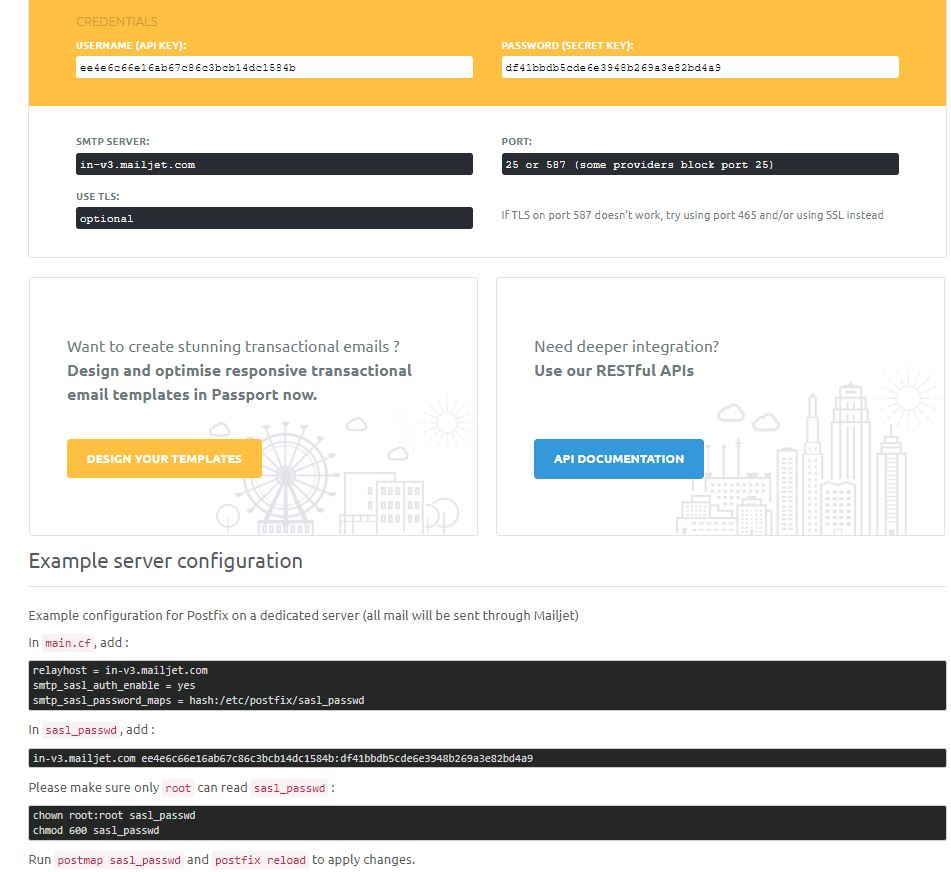
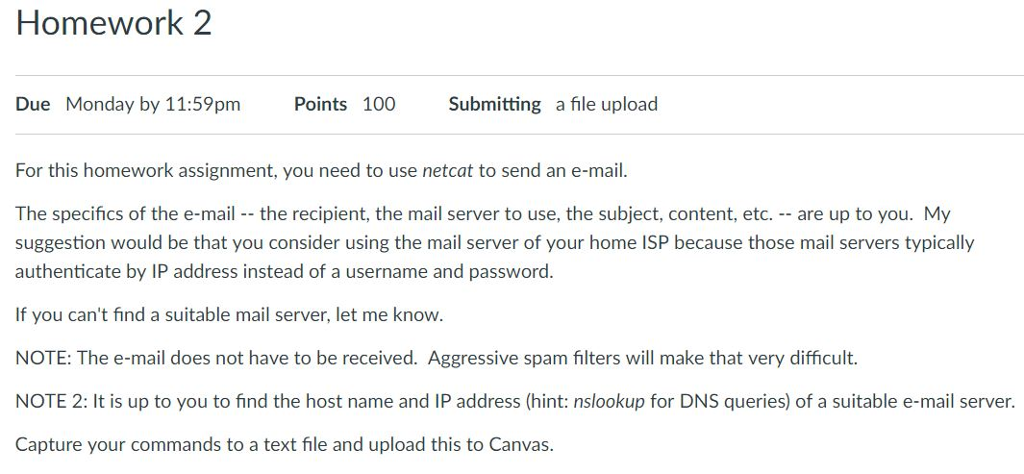
USERNAME (API KEY PASSWORD (SECRET KEY) ee4e6cE6e1ab 7c8c3bcb14dc1584b df41bbdb5cde Ee3948b29a3e82bd4as SMTP SERVER: PORT: in-v3.mailjet.com 25 or 587 (some providers block port 25) USE TLS: optional IF TLS on port 587 doesn't work, try using port 465 and/or using SSL instead Want to create stunning transactional emails? Design and optimise responsive transactional email templates in Passport now Need deeper integration? Use our RESTful APls DESIGN YOUR TEMPLATES API DOCUMENTATION Example server configuration Example configuration for Postfix on a dedicated server (all mail will be sent through Mailjet) In main.cf,add relayhost in-v3.mailjet.com stp_sasl auth_enable yes smtp sasl password maps hash:fetc/postfix/sasl passwd In sas1 passwd, add in-v3.mailjet.com ee4e6C66e16ab67c86c3bcb14dc1584b:df41bbdbScde6e3948b269a3e82bd4a9 Please make sure only root can read sasl_passwd chown root:root sasl passwd chmod 60e sasl passwd Run postmap sasl_passwd and postfix reload to apply changes. USERNAME (API KEY PASSWORD (SECRET KEY) ee4e6cE6e1ab 7c8c3bcb14dc1584b df41bbdb5cde Ee3948b29a3e82bd4as SMTP SERVER: PORT: in-v3.mailjet.com 25 or 587 (some providers block port 25) USE TLS: optional IF TLS on port 587 doesn't work, try using port 465 and/or using SSL instead Want to create stunning transactional emails? Design and optimise responsive transactional email templates in Passport now Need deeper integration? Use our RESTful APls DESIGN YOUR TEMPLATES API DOCUMENTATION Example server configuration Example configuration for Postfix on a dedicated server (all mail will be sent through Mailjet) In main.cf,add relayhost in-v3.mailjet.com stp_sasl auth_enable yes smtp sasl password maps hash:fetc/postfix/sasl passwd In sas1 passwd, add in-v3.mailjet.com ee4e6C66e16ab67c86c3bcb14dc1584b:df41bbdbScde6e3948b269a3e82bd4a9 Please make sure only root can read sasl_passwd chown root:root sasl passwd chmod 60e sasl passwd Run postmap sasl_passwd and postfix reload to apply changes
Step by Step Solution
There are 3 Steps involved in it

Get step-by-step solutions from verified subject matter experts
 Study Help