







Question: I have the Code so far that displays the 1's in all the right odd# positions but dont know how to delete the other even
I have the Code so far that displays the 1's in all the right odd# positions but dont know how to delete the other even #'s and re-size for any input given to the function. This question was answered before but was incorrect. NO LOOPS ALOWED. THIS IS MATLAB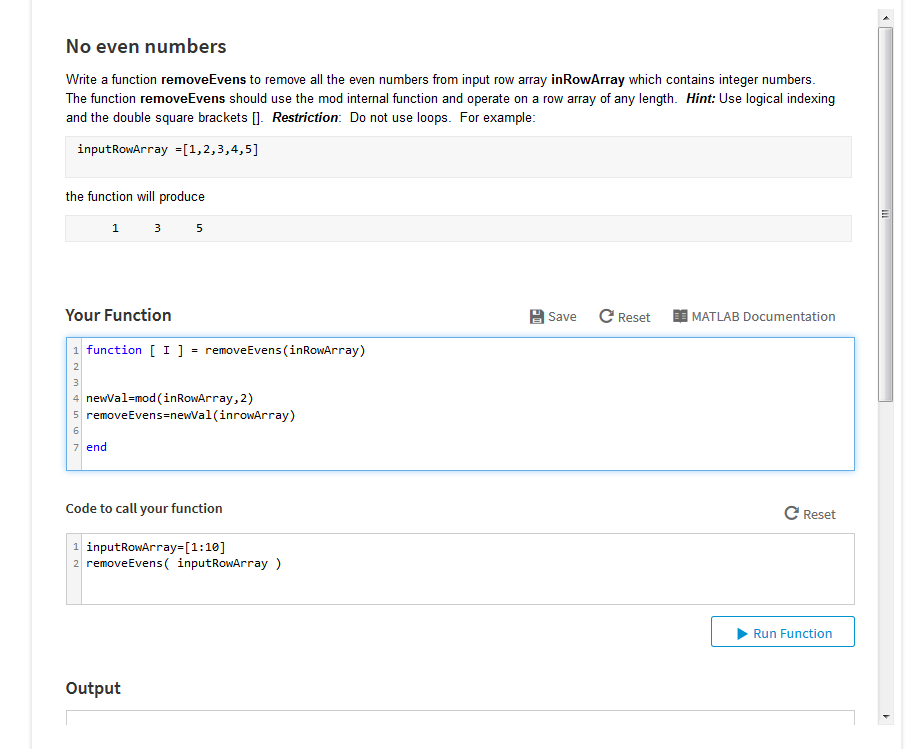
No even numbers Write a function removeEvens to remove all the even numbers from input row array inRowArray which contains integer numbers The function removeEvens should use the mod internal function and operate on a row array of any length. Hint: Use logical indexing and the double square brackets[. Restriction: Do not use loops. For example inputRow Array =[1,2,3,4,5] the function will produce 1 Your Function Save C Reset MATLAB Documentation 1 function [ 1 ] = removeEvens(inROWAr ray) 4 newVal-mod(inRowArray,2) 5 removeEvens=newval (inroWArray) 6 7 end Code to call your function C Reset 1 inputRowArray [1:10] 2 removeEvens( inputRowArray) Run Function Output
Step by Step Solution
There are 3 Steps involved in it

Get step-by-step solutions from verified subject matter experts
 Study Help