







Question: I have the following code however if you run it you can see the output is not correct. additionally my instructor has left some feedback
I have the following code however if you run it you can see the output is not correct. additionally my instructor has left some feedback which i will paste in here along with the desired output. this is in ARMv assembly.
INSTRUCTOR FEEDBACK:
This not from this class:
PUSH POP
MOVEQ r #
MOVNE r #
cb Ed
POP rr pcwe use BX LR for a return.
Do not waste a protected register to carry an index..R is a much better choice.
LDR rfloatinput
LDR rr
You used protected registers in other cases unnecessarily.
Only read the value from memory once into a protected register you did R Then MOV or VMOV it from R when you need it When it is sitting in R it already is a floating point number. You don't need to run it through VFP registers unless you need to VPF math!
The function call
BL decodefloat
should have parameters. It is held in R Or if you want to also print the string, that address could be held in R And skip the multiple format support. Just alwaysdo single.
S is not a protected registers:
VMOV r s
CMP r #
BUT you have the value in Rso use it from there. just
CMP R #
decodefloat is about displaying the bits. Do the math in main and pass the value into this function to be displayed.
Save protected registers. Then save the inout parameter R in a protected registers.
Then check the sign bit and print or
Then extract the bits for the fraction. Shift and print each bit.
Then extract he exponent, sub tract the offset. The print with a d format string Ed
DESIRED OUTPUT: This program will input and decode an IEEE Floating Point Numbers.
It will square the number and decode it Next, if possible, it will take
the square root of the number and decode it This will repeat until the
user enters Zero.
Enter the single precision floating point value to exit:
The initial value is: E
The value squared is: E
The root of the value is: E
Enter the single precision floating point value to exit:
The initial value is: E
The value squared is: E
The root of the value is: E
Enter the single precision floating point value to exit:
The initial value is: E
The value squared is: E
Enter the single precision floating point value to exit:
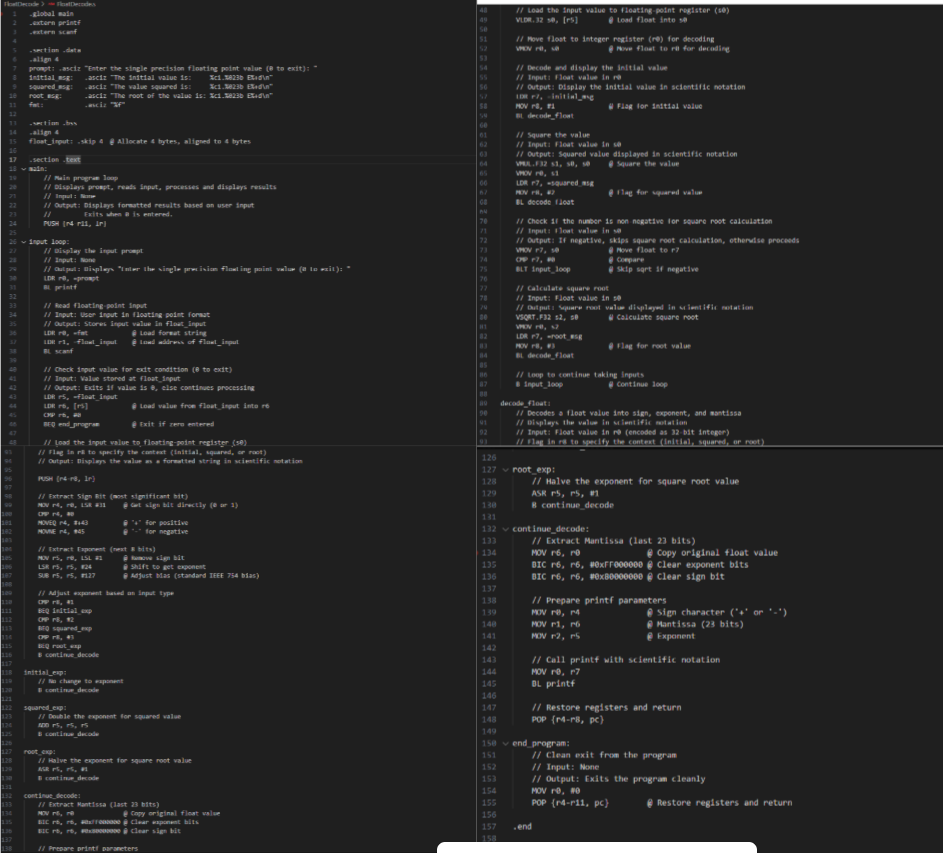
FloatDecode Asm FloatDecode.s
global main
extern printf
extern scanf
section data
align
prompt: asciz "Enter the single precision floating point value to exit:
initialmsg: asciz "The initial value is: cb Ed
squaredmsg: asciz "The value squared is: cb Ed
rootmsg: asciz "The root of the value is: cb Ed
fmt: asciz f
section bss
align
floatinput: skip @ Allocate bytes, aligned to bytes
section text
main:
Main program loop
Displays prompt, reads input, processes and displays results
Input: None
Output: Displays formatted results based on user input
Exits when is entered.
PUSH rr lr
vee inputloop:
Display the input prompt
Input: None
Output: Displays "Enter the single precision floating point value to exit:
LDR rprompt
BL printf
Read floatingpoint input
Input: User input in floatingpoint format
Output: Stores input value in floatinput
LDR rthetafmt @@ Load format string
LDR rfloatinput @ Load address of floatinput
BL scanf
Check input value for exit condition to exit
Input: Value stored at floatinput
Output: Exits if value is else continues processing
LDR rfloatinput
LDR rr @@ Load value from floatinput into r
CMP r #
BEQ endprogram @ Exit if zero entered
Load the input value to floatingpoint register s
Step by Step Solution
There are 3 Steps involved in it
1 Expert Approved Answer
Step: 1 Unlock

Question Has Been Solved by an Expert!
Get step-by-step solutions from verified subject matter experts
Step: 2 Unlock
Step: 3 Unlock
 Study Help