







Question: I have this code, from this question, but it doesn't work package edu.wit.cs.comp1000; import java.io.File; import java.io.FileNotFoundException; import java.util.Scanner; public class PA8b { public static
I have this code, from this question, but it doesn't work
package edu.wit.cs.comp1000;
import java.io.File;
import java.io.FileNotFoundException;
import java.util.Scanner;
public class PA8b {
public static void main(String[] args) {
Scanner in =new Scanner(System.in);
String filename;
int large=0,small=999,no;
System.out.println("Enter the filename: ");
filename=in.nextLine();
Scanner scan=new Scanner(new File(filename));
try {
if(!scan.hasNext());
catch (FileNotFoundException e) {
System.out.println("File is invalid ");
return;
}
try {
while(scan.hasNext())
no=scan.nextInt();
if(no>large)
large=no;
if(no
small=no; }
catch (FileNotFoundException e) {
System.out.println("File is invalid ");
return;
}
System.out.println("Largest Integer: "+large);
System.out.println("Smallest Integer: "+small);
}
}
}
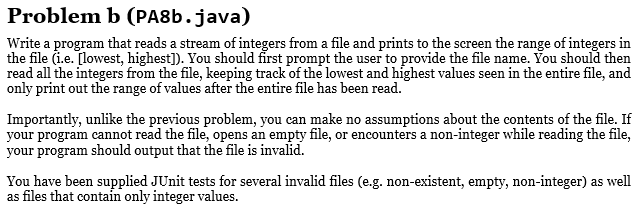
Problem b (PA8b.java) Write a program that reads a stream of integers from a file and prints to the screen the range of integers in the file (i.e. [lowest, highest]). You should first prompt the user to provide the file name. You should then read all the integers from the file, keeping track of the lowest and highest values seen in the entire file, and only print out the range of values after the entire file has been read. Importantly, unlike the previous problem, you can make no assumptions about the contents of the file. If your program cannot read the file, opens an empty file, or encounters a non-integer while reading the file, your program should output that the file is invalid. You have been supplied JUnit tests for several invalid files (e.g. non-existent, empty, non-integer) as well as files that contain only integer values
Step by Step Solution
There are 3 Steps involved in it

Get step-by-step solutions from verified subject matter experts
 Study Help