







Question: I have this problem when creating a domain on the window server 2016, how to fix it? (VMware) Server1-VMware Workstation File Edit View VM Tabs
I have this problem when creating a domain on the window server 2016, how to fix it? (VMware)
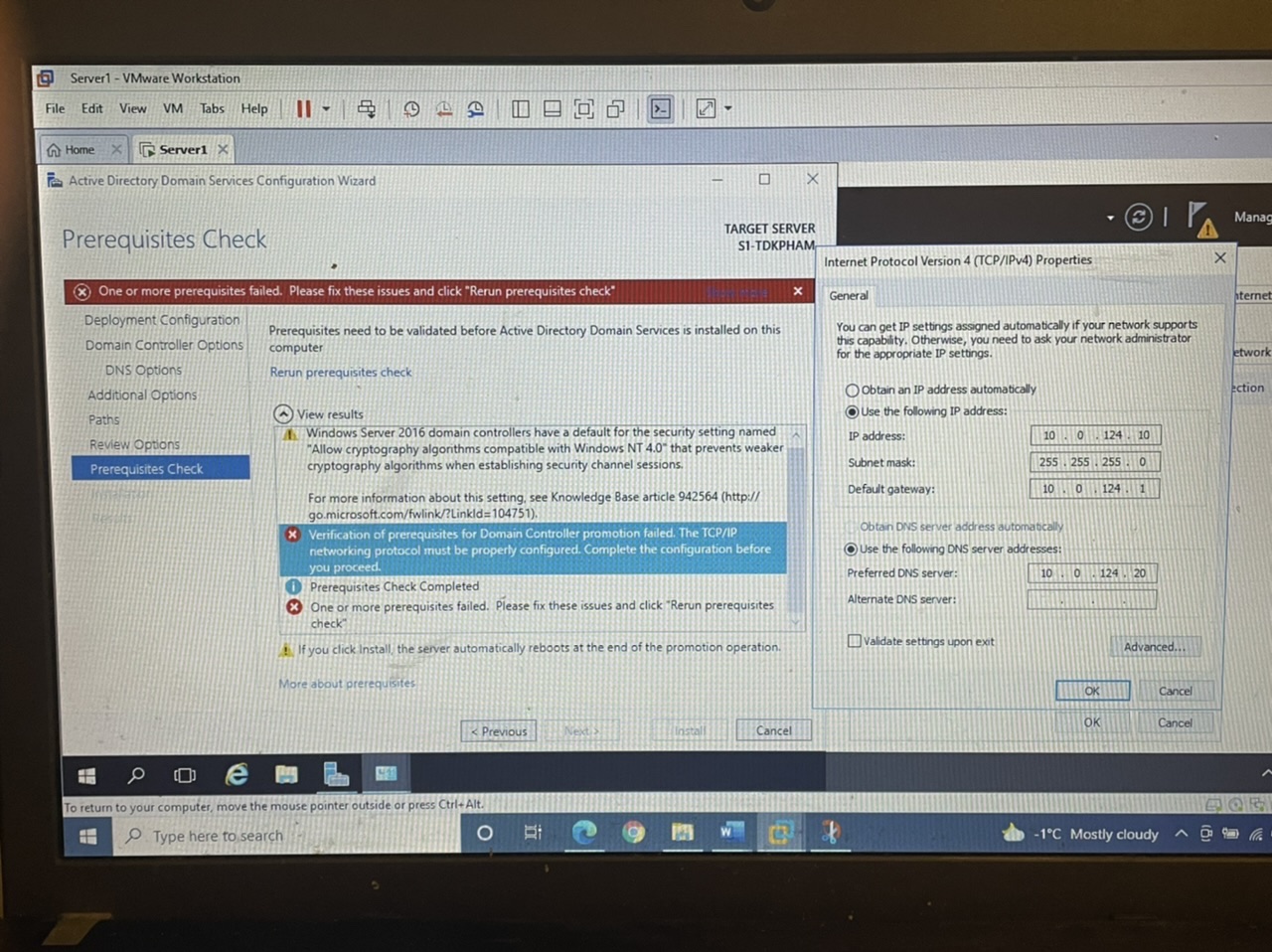
Server1-VMware Workstation File Edit View VM Tabs Help II - Home X Server1 Xx Active Directory Domain Services Configuration Wizard Prerequisites Check One or more prerequisites failed. Please fix these issues and click "Rerun prerequisites check Deployment Configuration Domain Controller Options DNS Options Additional Options Paths Review Options Prerequisites Check H Q 412 BODO e To return to your computer, move the mouse pointer outside or press Ctrl+Al H Type here to search O Prerequisites need to be validated before Active Directory Domain Services is installed on this computer Rerun prerequisites check 411 View results Windows Server 2016 domain controllers have a default for the security setting named "Allow cryptography algorithms compatible with Windows NT 4.0" that prevents weaker cryptography algorithms when establishing security channel sessions. < Previous For more information about this setting, see Knowledge Base article 942564 (http:// go.microsoft.com/fwlink/?LinkId=104751). * Verification of prerequisites for Domain Controller promotion failed. The TCP/IP networking protocol must be properly configured. Complete the configuration before you proceed. - Prerequisites Check Completed One or more prerequisites failed. Please fix these issues and click "Rerun prerequisites check" If you click Install, the server automatically reboots at the end of the promotion operation. More about prerequisites X Bi TARGET SERVER S1-TDKPHAM Next S Install X Cancel CO Internet Protocol Version 4 (TCP/IPv4) Properties General You can get IP settings assigned automatically if your network supports this capability. Otherwise, you need to ask your network administrator for the appropriate IP settings. Obtain an IP address automatically Use the following IP address: IP address: Subnet mask: Default gateway: Obtain DNS server address automatically Use the following DNS server addresses: Preferred DNS server: 10 Alternate DNS server: Validate settings upon exit 10 0 124 10 255 255 255 0 10 I 0 124 1 0124 20 OK OK Advanced... Cancel Cancel -1C Mostly cloudy X T Manag hternet etwork ection FOR
Step by Step Solution
There are 3 Steps involved in it

Get step-by-step solutions from verified subject matter experts
 Study Help