







Question: I have this program it is working fin but I still need the signature part. I want to be able to use the mouse to
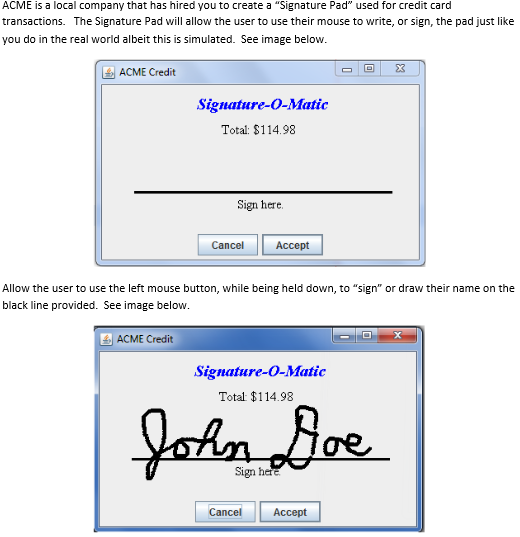
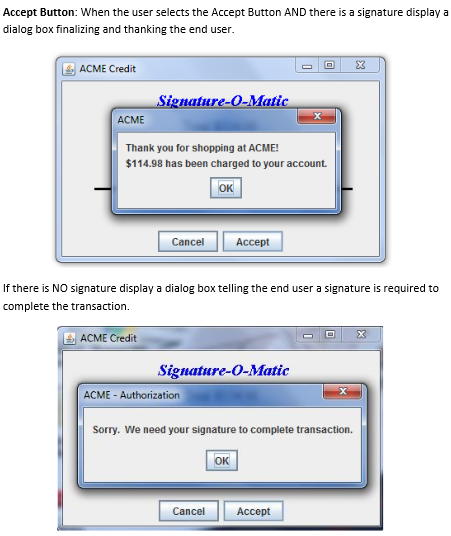
I have this program it is working fin but I still need the signature part. I want to be able to use the mouse to sign. it is explaind in the picture above. please help
package Signature;
import javax.swing.*; import java.awt.*; import java.awt.event.*;
public class ACMECredit {
private static JFrame f; private static JDialog cd; private static JDialog ad;
ACMECredit() { f = new JFrame("Button Example");
JLabel l1 = new JLabel("Signature-O-Matic"); l1.setBounds(120, 50, 200, 30); l1.setFont(new Font("Serif", Font.PLAIN, 25)); l1.setForeground(Color.BLUE);
JLabel l2 = new JLabel("Total $114.98"); l2.setBounds(140, 90, 200, 30); l2.setFont(new Font("Arial", Font.PLAIN, 20));
JLabel l3 = new JLabel("___________________________"); l3.setBounds(50, 250, 300, 30); l3.setFont(new Font("Dialog", Font.BOLD, 20));
JLabel l4 = new JLabel("Sing Here"); l4.setBounds(180, 270, 300, 30); l4.setFont(new Font("Arial", Font.PLAIN, 13));
JButton b = new JButton("Cancle"); b.setBounds(100, 320, 95, 30); b.addActionListener(new ActionListener() { public void actionPerformed(ActionEvent e) { cd = new JDialog(f, "Select Any Option", true); cd.setLayout(new FlowLayout()); JLabel bl1 = new JLabel("Are you sure you want to cancle?"); bl1.setBounds(120, 50, 200, 30); JButton bb1 = new JButton("Yes"); bb1.addActionListener(new ActionListener() { public void actionPerformed(ActionEvent e) { System.exit(0); } }); JButton bb2 = new JButton("No"); bb2.addActionListener(new ActionListener() { public void actionPerformed(ActionEvent e) { cd.setVisible(false); } }); JButton bb3 = new JButton("Cancle"); bb3.addActionListener(new ActionListener() { public void actionPerformed(ActionEvent e) { cd.setVisible(false); } }); cd.add(bl1); cd.add(bb1); cd.add(bb2); cd.add(bb3); cd.setSize(250, 100); cd.setVisible(true); } });
JButton b1 = new JButton("Accept"); b1.addActionListener(new ActionListener() { public void actionPerformed(ActionEvent e) { ad = new JDialog(f, "Select Any Option", true); ad.setLayout(new FlowLayout()); JLabel bl1 = new JLabel("Thank You for shopping at ACME"); JLabel bl2 = new JLabel("$114.98 has been charged to your account"); JButton bb1 = new JButton("OK"); bb1.addActionListener(new ActionListener() { public void actionPerformed(ActionEvent e) { System.exit(0); } }); ad.add(bl1); ad.add(bl2); ad.add(bb1); ad.setSize(280, 120); ad.setVisible(true); } });
b1.setBounds(200, 320, 95, 30); f.add(l1); f.add(l2); f.add(l3); f.add(l4); f.add(b); f.add(b1); f.setSize(400, 400); f.setLayout(null); f.setVisible(true); }
public static void main(String args[]) { new ACMECredit(); } }
ACME is a local company that has hired you to create a "Signature Pad" used for credit card transactions. The Signature Pad will allow the user to use their mouse to write, or sign, the pad just like you do in the real world albeit this is simulated. See image below. ACME Credit Signature-O-Matic Total: $114.98 Sign here. CancelAccept Allow the user to use the left mouse button, while being held down, to "sign" or draw their name on the black line provided. See image below. ACME Credit Signature-o-Matitc Total: $114.98 ce. Cancel Accept
Step by Step Solution
There are 3 Steps involved in it

Get step-by-step solutions from verified subject matter experts
 Study Help