







Question: I have to create a C++ program that stores given items in a shopping cart (both name & price). You are also given a budget
I have to create a C++ program that stores given items in a shopping cart (both name & price). You are also given a budget and the goal is to create a linked list of items in order of cost so that if the total cost of your shopping cart exceeds your budget, you can successively delete the most expensive item until you are under budget. Then you output what items you kept (in alphabetical order), total # of items, and total cost.
Example input (from a .txt file):
-------------------------------------
15.00
Apples, 1.50
Broccoli, 2.00
Yogurt, 4.00
Chocolate, 3.80
Paper towels, 2.20
Milk, 1.70
Ice cream, 4.50
-------------------------------------
Example output (to a new .txt file):
-------------------------------------
Apples, 1.50
Broccoli, 2.00
Chocolate, 3.80
Milk, 1.70
Paper towels, 2.20
Number of items: 5
Cost: 11.20
-------------------------------------
My first intuition is to have an array contained in each node. So the first node would contain Apple[1.5], second would be Broccoli[2], etc. Additionally, as seen in the included screenshot, we will not know the names of the input/output files.
My questions are:
1. How do you sort a linked list of nodes containing arrays?
2. How do you read from/write to a file provided by the command line?
Any guidance/suggested resources are greatly appreciated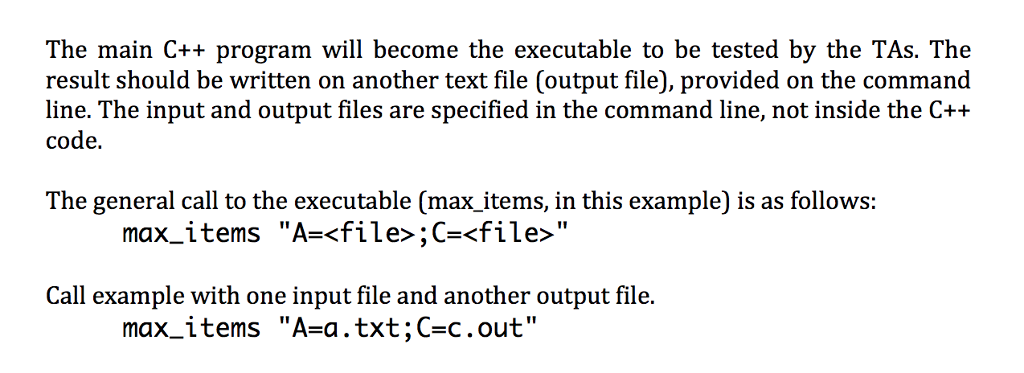
The main C++ program will become the executable to be tested by the TAs. The result should be written on another text file (output file), provided on the command line. The input and output files are specified in the command line, not inside the C++ code. The general call to the executable (max items, in this example) is as follows: max-items "A=
Step by Step Solution
There are 3 Steps involved in it

Get step-by-step solutions from verified subject matter experts
 Study Help