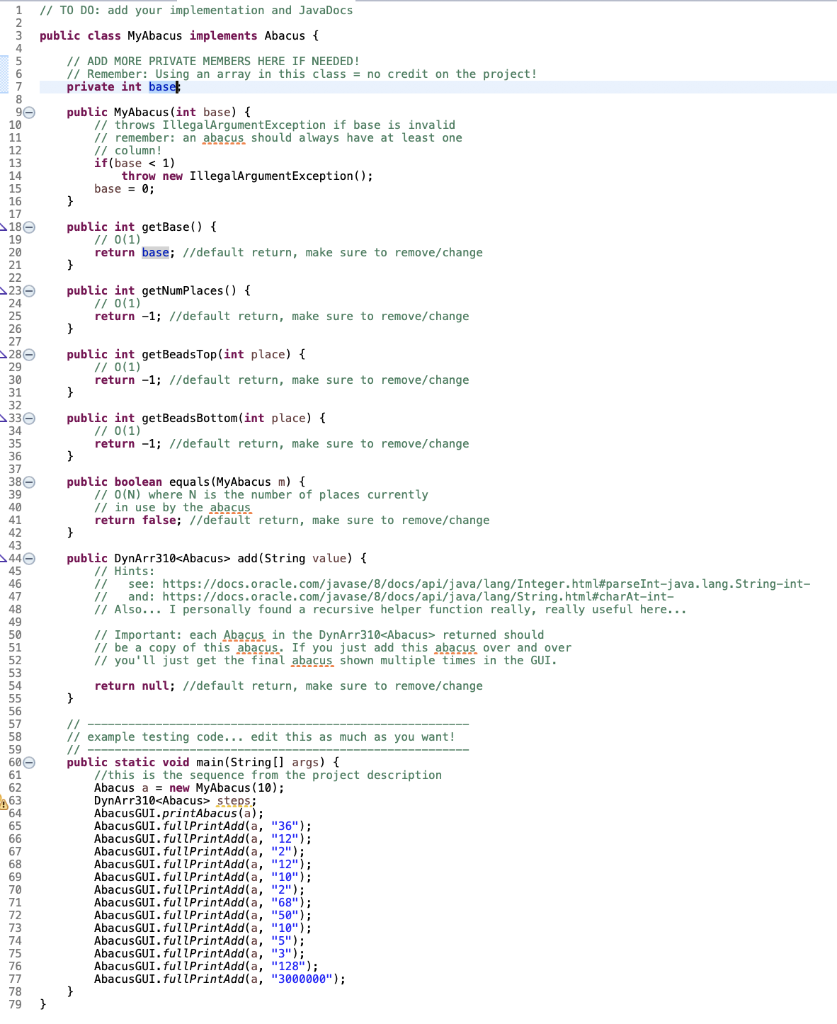
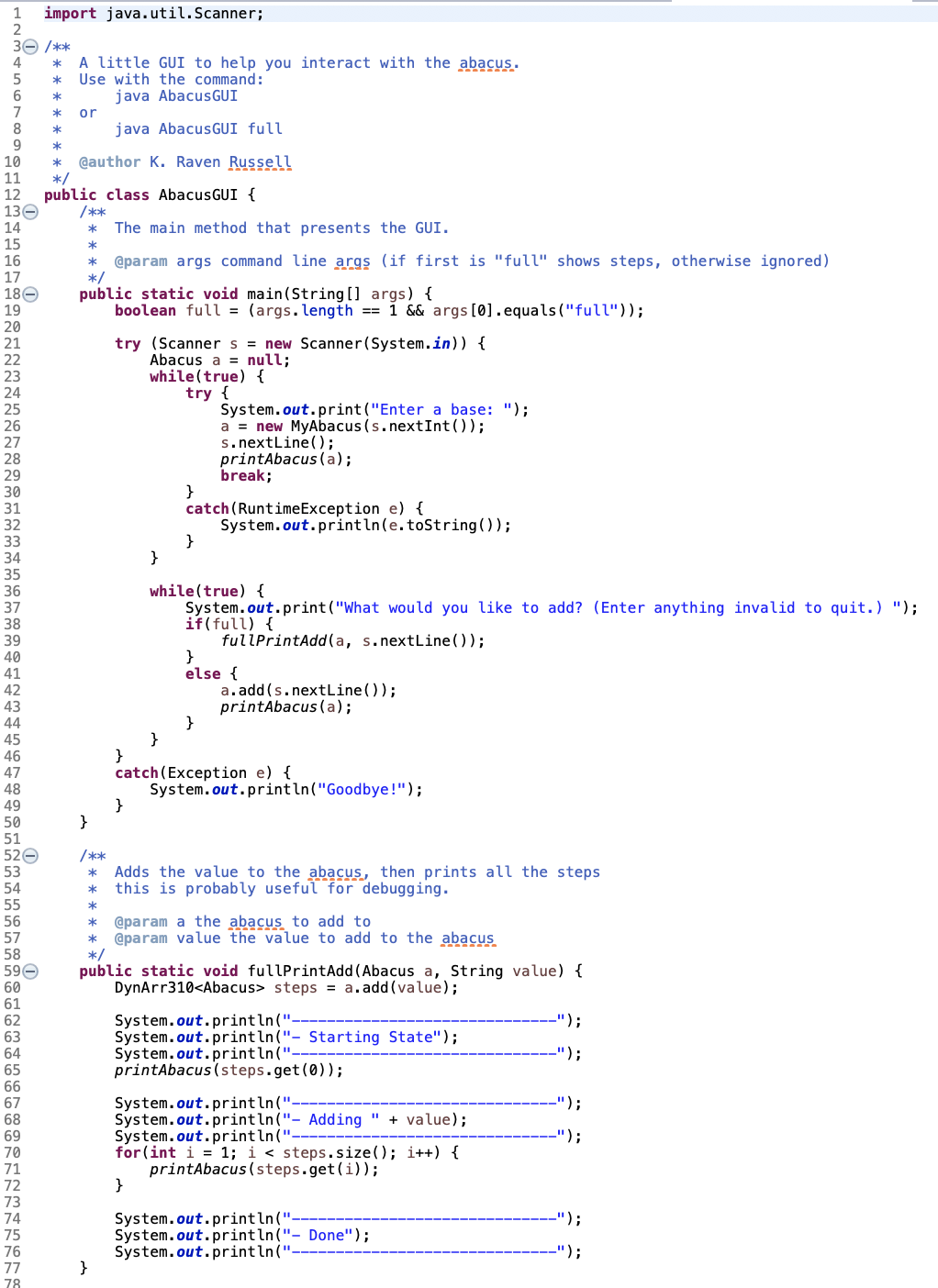
Question: I have to create an abacus for java programming. I have already completed the DynArr310 part. Still need help with MyAbacus class and AbacusGUI class
I have to create an abacus for java programming. I have already completed the DynArr310 part. Still need help with MyAbacus class and AbacusGUI class
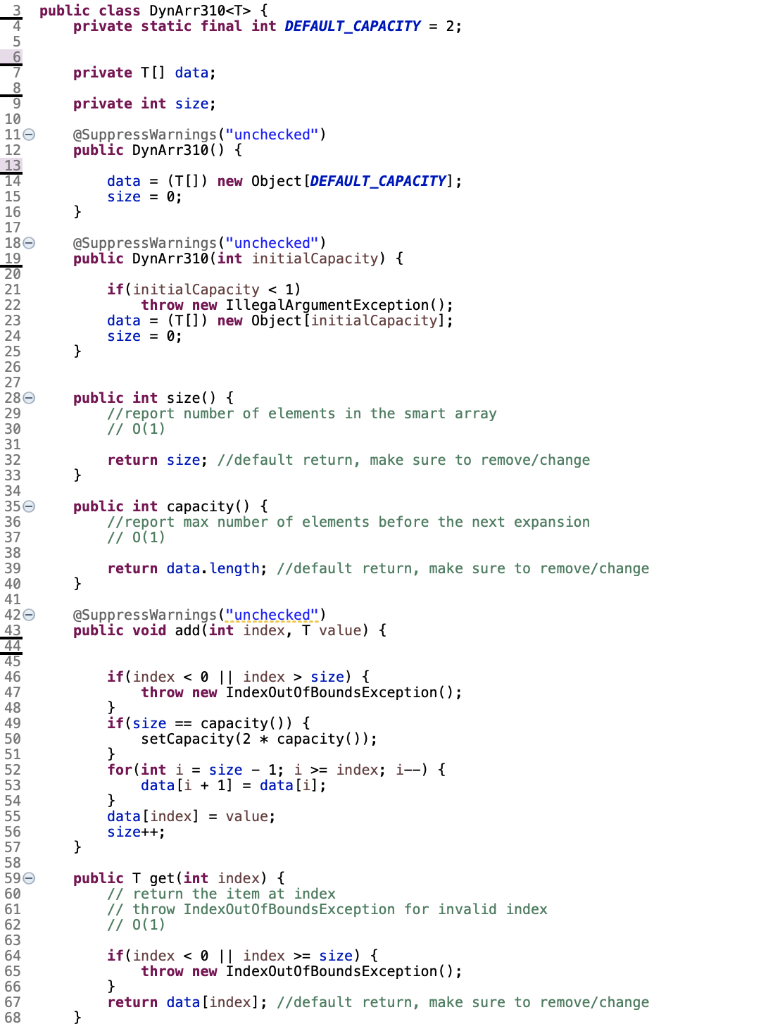
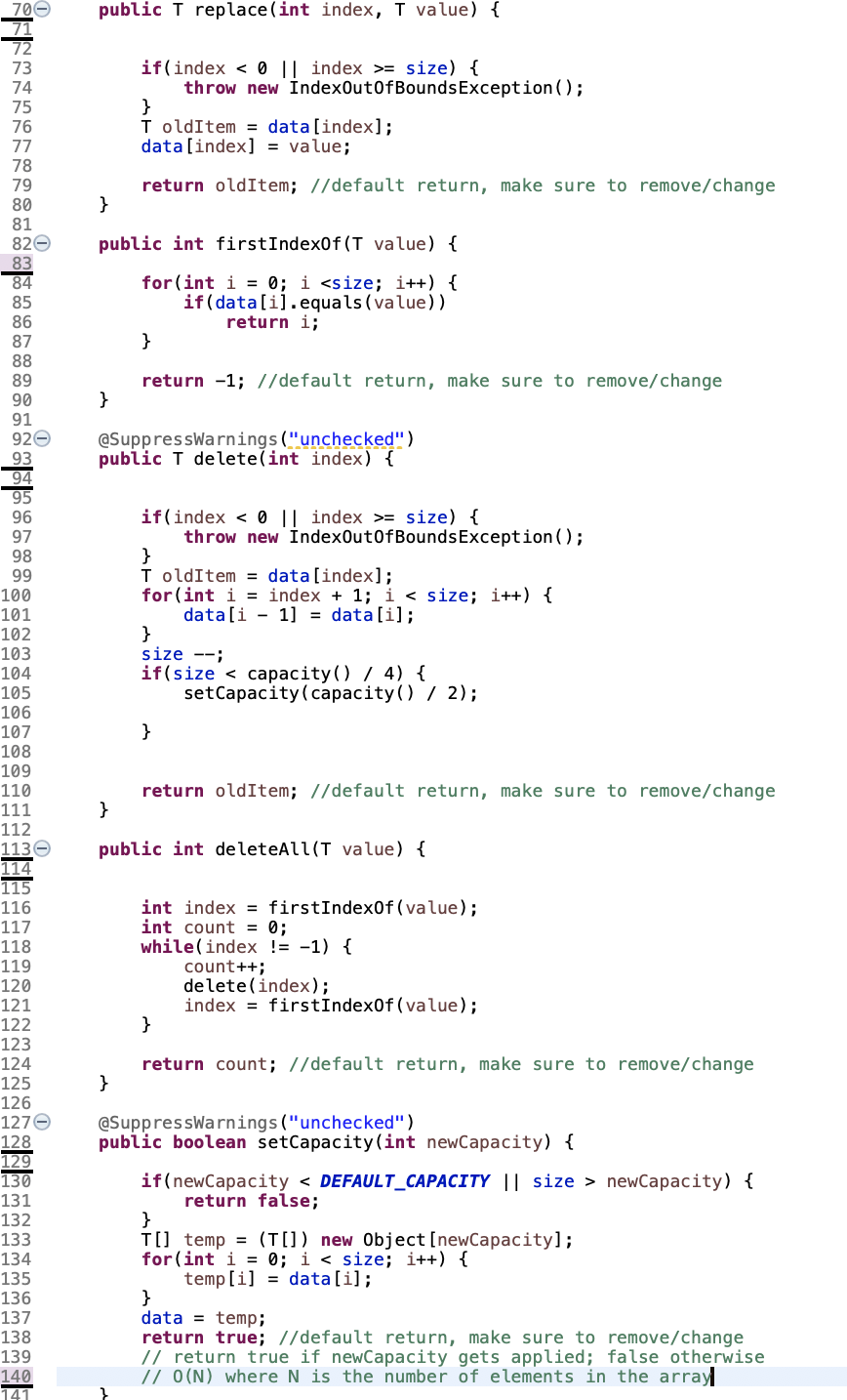
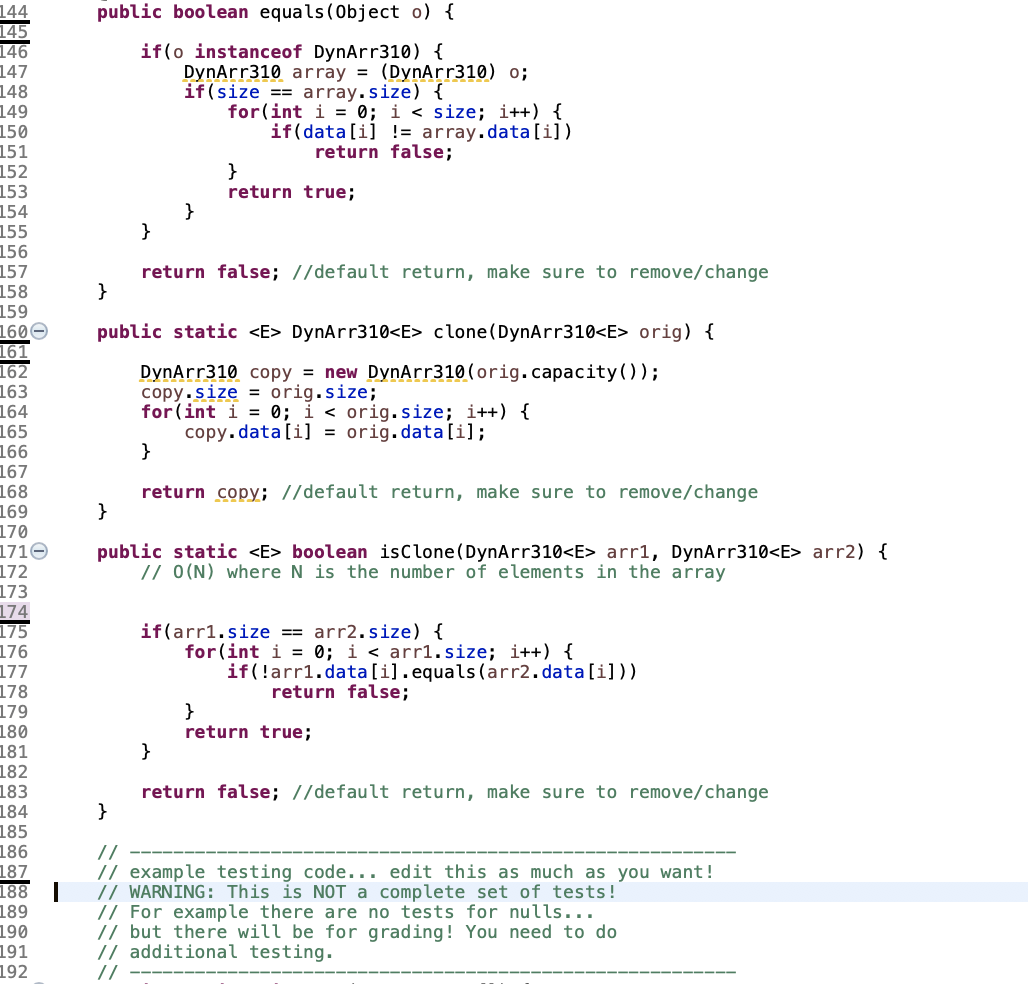
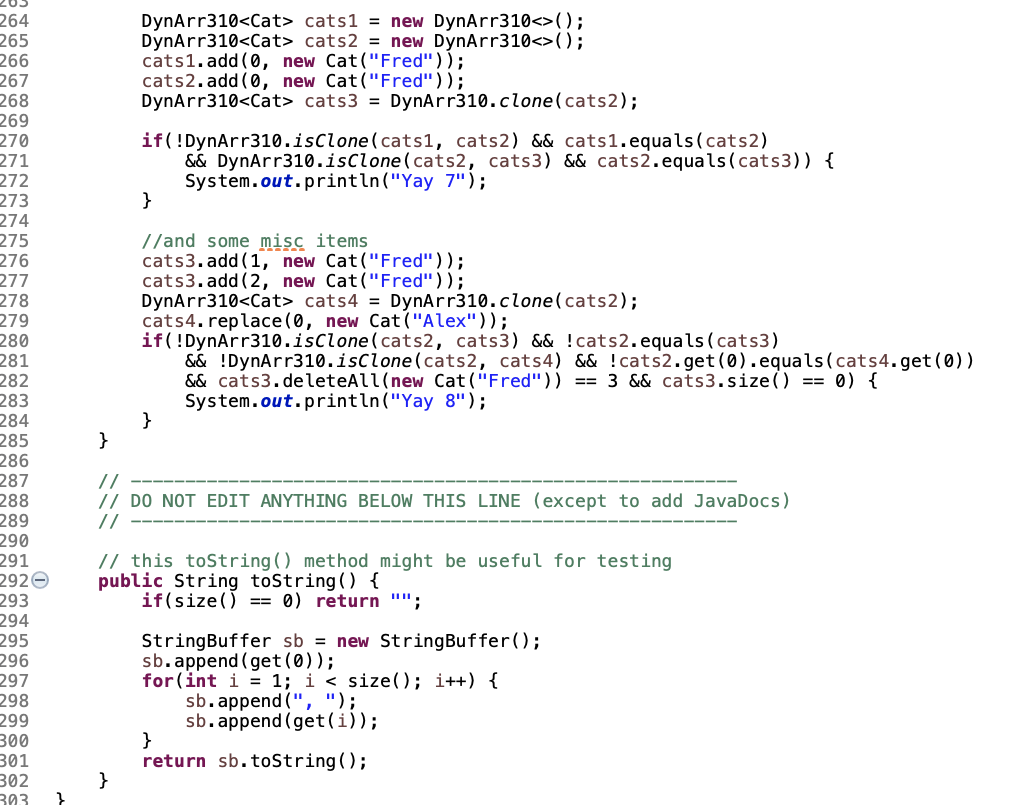
![{ data = (T[]) new Object (DEFAULT_CAPACITY]; size = 0; 180 @SuppressWarnings](https://s3.amazonaws.com/si.experts.images/answers/2024/07/66a715f740744_16666a715f6b0b84.jpg)
![size - 1; i >= index; i--) { data[i + 1] =](https://s3.amazonaws.com/si.experts.images/answers/2024/07/66a715fa160bb_16966a715f97d0ff.jpg)
![data[i]; data[index] = value; size++; 58 59 60 61 public I get(int](https://s3.amazonaws.com/si.experts.images/answers/2024/07/66a715fad4107_17066a715fa5a9b9.jpg)
public class DynArr310 { private static final int DEFAULT_CAPACITY = 2; private Til data; 11 12 private int size; @SuppressWarnings ("unchecked") public DynArr310() { data = (T[]) new Object (DEFAULT_CAPACITY]; size = 0; 180 @SuppressWarnings ("unchecked") public DynArr310(int initialCapacity) { if(initial Capacity size) { throw new IndexOutOfBoundsException(); 48 if(size == capacity () { setCapacity(2 * capacity()); for(int i = size - 1; i >= index; i--) { data[i + 1] = data[i]; data[index] = value; size++; 58 59 60 61 public I get(int index) { // return the item at index // throw IndexOutOfBoundsException for invalid index // 0(1) 62 63 if(index = size) { throw new IndexOutOfBoundsException(); return data[index]; //default return, make sure to remove/change public T replace(int index, T value) { 73 74 if(index = size) { throw new IndexOutOfBounds Exception(); 75 76 77 ToldItem = data[index]; data[index] = value; 79 return oldItem; //default return, make sure to remove/change 80 81 public int firstIndexOf(T value) { 83 84 85 for(int i = 0; i = size) { throw new IndexOutOfBounds Exception(); 98 99 100 ToldItem = data[index]; for(int i = index + 1; i newCapacity) { return false; 130 131 132 133 134 135 136 T[] temp = (T[]) new Object[newCapacity]; for(int i = 0; i DynArr310 clone (DynArr310 orig) { DynArr310 copy = new DynArr310(orig.capacity()); copy.size = orig.size; for(int i = 0; i boolean isclone (DynArr310 arri, DynArr310 arr2) { // O(N) where N is the number of elements in the array 172 173 174 175 if(arri.size == arr2.size) { for(int i = 0; i cats1 = new DynArr310(); DynArr310 cats2 = new DynArr310(); cats1.add(0, new Cat("Fred")); cats2.add(0, new Cat ("Fred")); DynArr310 cats3 = DynArr310.clone(cats2); 264 265 266 267 268 269 270 271 272 273 274 if(!DynArr310.isClone (cats1, cats2) && cats1.equals(cats2) && DynArr310.isClone( cats2, cats3) && cats2.equals(cats3)) { System.out.println("Yay 7"); 275 276 277 278 279 //and some misc items cats3.add(1, new Cat("Fred")); cats3.add(2, new Cat("Fred")); DynArr310 cats4 = DynArr310.clone(cats2); cats4.replace(0, new Cat ("Alex")); if (!DynArr310.isClone (cats2, cats3) && !cats2.equals(cats3) && !DynArr310.isClone (cats2, cats) && !cats.get(0).equals(cats.get(0)) && cats3.deleteAll(new Cat ("Fred")) == 3 && cats3.size() == 0) { System.out.println("Yay 8"); 280 281 282 283 284 285 286 287 288 289 290 291 2920 293 294 295 296 // -- // DO NOT EDIT ANYTHING BELOW THIS LINE (except to add JavaDocs) // - // this toString() method might be useful for testing public String toString() { if(size() == 0) return ""; 297 StringBuffer sb = new StringBuffer(); sb.append(get(0); for(int i = 1; i A snapshot is required for each of the following steps: - - the initial state
- - the final state *
- - expansions (beads should not be moved, the abacus just * becomes bigger/smaller)
- - exchanges (beads are exchanged in one step)
- - movement of x beads up OR down (not both at the same time) in ONE place on the bottom OR top of the abacus (not both at the same time) *
* * * * * 70 72 * * * @param value the string representation of the value to add (e.g. "100" in base 10, or "1f" in base 16) @return the different positions the abacus was in (including the start and finish states) @throws Number FormatException if string is not correct for the base 73 public DynArr310 add(String value); 76 } WN // TO DO: add your implementation and JavaDocs public class MyAbacus implements Abacus { // ADD MORE PRIVATE MEMBERS HERE IF NEEDED! // Remember: Using an array in this class = no credit on the project! private int basel 90 public MyAbacus(int base) { // throws IllegalArgumentException if base is invalid // remember: an abacus should always have at least one // column! if(base add (String value) { // Hints: // see: https://docs.oracle.com/javase/8/docs/api/java/lang/Integer.html#parseInt-java.lang.String-int- https://docs.oracle.com/javase/8/docs/api/java/lang/String.html#charAt-int- // Also... I personally found a recursive helper function really, really useful here... // Important: each Abacus in the DynArr310 returned should // be a copy of this abacus. If you just add this abacus over and over // you'll just get the final abacus shown multiple times in the GUI. return null; //default return, make sure to remove/change - // - // example testing code... edit this as much as you want! // public static void main(String[] args) { //this is the sequence from the project description Abacus a = new MyAbacus(10); DynArr310 steps; AbacusGUI.printAbacus(a); AbacusGUI. fullPrintAdd(a, "36"); AbacusGUI. fullPrintAdd(a, "12"); AbacusGUI. fullPrintAdd(a, "2"); AbacusGUI. fullPrintAdd(a, "12"); AbacusGUI. fullPrintAdd(a, "10"); AbacusGUI. fullPrintAdd(a, "2"); AbacusGUI. fullPrintAdd(a, "68"); AbacusGUI. fullPrintAdd(a, "50"); AbacusGUI. fullPrintAdd(a, "10"); AbacusGUI. fullPrintAdd(a, "5"); AbacusGUI. fullPrintAdd(a, "3"); AbacusGUI. fullPrintAdd(a, "128"); AbacusGUI. fullPrintAdd(a, "3000000"); import java.util.Scanner; 30 /** * * B00OU AWNP A little GUI to help you interact with the abacus. Use with the command: java AbacusGUI or java AbacusGUI full * * * * * 11 * 12 130 14 Cauthor K. Raven Russell */ public class AbacusGUI { /** * The main method that presents the GUI. * @param args command line args (if first is "full" shows steps, otherwise ignored) 15 16 */ 17 180 19 public static void main(String[] args) { boolean full = (args. length == 1 && args[0].equals("full")); try (Scanner s = new Scanner(System.in)) { Abacus a = null; while(true) { try { System.out.print("Enter a base: "); a = new MyAbacus(s.nextInt()); s.nextLine(); printAbacus(a); break; catch (RuntimeException e) { System.out.println(e.toString()); SW while(true) { System.out.print("What would you like to add? (Enter anything invalid to quit.) "); if(full) { fullPrintAdd(a, s.nextLine()); 39 41 else { a.add(s.nextLine()); printAbacus(a); 43 45 46 47 48 catch(Exception e) { System.out.println("Goodbye!"); 49 51 52 /** 53 54 * Adds the value to the abacus, then prints all the steps this is probably useful for debugging. 55 56 57 58 59 60 @param a the abacus to add to * @param value the value to add to the abacus */ public static void fullPrintAdd(Abacus a, String value) { DynArr310 steps = a.add(value); 61 62 ---------"); 63 64 System.out.println("---- System.out.println("- Starting State"); System.out.println("---- printAbacus (steps.get(0)); ---------"); 65 67 ---------"); System.out.println("-- System.out.println("- Adding " + value); System.out.println("---- for(int i = 1; i { private static final int DEFAULT_CAPACITY = 2; private Til data; 11 12 private int size; @SuppressWarnings ("unchecked") public DynArr310() { data = (T[]) new Object (DEFAULT_CAPACITY]; size = 0; 180 @SuppressWarnings ("unchecked") public DynArr310(int initialCapacity) { if(initial Capacity size) { throw new IndexOutOfBoundsException(); 48 if(size == capacity () { setCapacity(2 * capacity()); for(int i = size - 1; i >= index; i--) { data[i + 1] = data[i]; data[index] = value; size++; 58 59 60 61 public I get(int index) { // return the item at index // throw IndexOutOfBoundsException for invalid index // 0(1) 62 63 if(index = size) { throw new IndexOutOfBoundsException(); return data[index]; //default return, make sure to remove/change public T replace(int index, T value) { 73 74 if(index = size) { throw new IndexOutOfBounds Exception(); 75 76 77 ToldItem = data[index]; data[index] = value; 79 return oldItem; //default return, make sure to remove/change 80 81 public int firstIndexOf(T value) { 83 84 85 for(int i = 0; i = size) { throw new IndexOutOfBounds Exception(); 98 99 100 ToldItem = data[index]; for(int i = index + 1; i newCapacity) { return false; 130 131 132 133 134 135 136 T[] temp = (T[]) new Object[newCapacity]; for(int i = 0; i DynArr310 clone (DynArr310 orig) { DynArr310 copy = new DynArr310(orig.capacity()); copy.size = orig.size; for(int i = 0; i boolean isclone (DynArr310 arri, DynArr310 arr2) { // O(N) where N is the number of elements in the array 172 173 174 175 if(arri.size == arr2.size) { for(int i = 0; i cats1 = new DynArr310(); DynArr310 cats2 = new DynArr310(); cats1.add(0, new Cat("Fred")); cats2.add(0, new Cat ("Fred")); DynArr310 cats3 = DynArr310.clone(cats2); 264 265 266 267 268 269 270 271 272 273 274 if(!DynArr310.isClone (cats1, cats2) && cats1.equals(cats2) && DynArr310.isClone( cats2, cats3) && cats2.equals(cats3)) { System.out.println("Yay 7"); 275 276 277 278 279 //and some misc items cats3.add(1, new Cat("Fred")); cats3.add(2, new Cat("Fred")); DynArr310 cats4 = DynArr310.clone(cats2); cats4.replace(0, new Cat ("Alex")); if (!DynArr310.isClone (cats2, cats3) && !cats2.equals(cats3) && !DynArr310.isClone (cats2, cats) && !cats.get(0).equals(cats.get(0)) && cats3.deleteAll(new Cat ("Fred")) == 3 && cats3.size() == 0) { System.out.println("Yay 8"); 280 281 282 283 284 285 286 287 288 289 290 291 2920 293 294 295 296 // -- // DO NOT EDIT ANYTHING BELOW THIS LINE (except to add JavaDocs) // - // this toString() method might be useful for testing public String toString() { if(size() == 0) return ""; 297 StringBuffer sb = new StringBuffer(); sb.append(get(0); for(int i = 1; i A snapshot is required for each of the following steps: - - the initial state
- - the final state *
- - expansions (beads should not be moved, the abacus just * becomes bigger/smaller)
- - exchanges (beads are exchanged in one step)
- - movement of x beads up OR down (not both at the same time) in ONE place on the bottom OR top of the abacus (not both at the same time) *
* * * * * 70 72 * * * @param value the string representation of the value to add (e.g. "100" in base 10, or "1f" in base 16) @return the different positions the abacus was in (including the start and finish states) @throws Number FormatException if string is not correct for the base 73 public DynArr310 add(String value); 76 } WN // TO DO: add your implementation and JavaDocs public class MyAbacus implements Abacus { // ADD MORE PRIVATE MEMBERS HERE IF NEEDED! // Remember: Using an array in this class = no credit on the project! private int basel 90 public MyAbacus(int base) { // throws IllegalArgumentException if base is invalid // remember: an abacus should always have at least one // column! if(base add (String value) { // Hints: // see: https://docs.oracle.com/javase/8/docs/api/java/lang/Integer.html#parseInt-java.lang.String-int- https://docs.oracle.com/javase/8/docs/api/java/lang/String.html#charAt-int- // Also... I personally found a recursive helper function really, really useful here... // Important: each Abacus in the DynArr310 returned should // be a copy of this abacus. If you just add this abacus over and over // you'll just get the final abacus shown multiple times in the GUI. return null; //default return, make sure to remove/change - // - // example testing code... edit this as much as you want! // public static void main(String[] args) { //this is the sequence from the project description Abacus a = new MyAbacus(10); DynArr310 steps; AbacusGUI.printAbacus(a); AbacusGUI. fullPrintAdd(a, "36"); AbacusGUI. fullPrintAdd(a, "12"); AbacusGUI. fullPrintAdd(a, "2"); AbacusGUI. fullPrintAdd(a, "12"); AbacusGUI. fullPrintAdd(a, "10"); AbacusGUI. fullPrintAdd(a, "2"); AbacusGUI. fullPrintAdd(a, "68"); AbacusGUI. fullPrintAdd(a, "50"); AbacusGUI. fullPrintAdd(a, "10"); AbacusGUI. fullPrintAdd(a, "5"); AbacusGUI. fullPrintAdd(a, "3"); AbacusGUI. fullPrintAdd(a, "128"); AbacusGUI. fullPrintAdd(a, "3000000"); import java.util.Scanner; 30 /** * * B00OU AWNP A little GUI to help you interact with the abacus. Use with the command: java AbacusGUI or java AbacusGUI full * * * * * 11 * 12 130 14 Cauthor K. Raven Russell */ public class AbacusGUI { /** * The main method that presents the GUI. * @param args command line args (if first is "full" shows steps, otherwise ignored) 15 16 */ 17 180 19 public static void main(String[] args) { boolean full = (args. length == 1 && args[0].equals("full")); try (Scanner s = new Scanner(System.in)) { Abacus a = null; while(true) { try { System.out.print("Enter a base: "); a = new MyAbacus(s.nextInt()); s.nextLine(); printAbacus(a); break; catch (RuntimeException e) { System.out.println(e.toString()); SW while(true) { System.out.print("What would you like to add? (Enter anything invalid to quit.) "); if(full) { fullPrintAdd(a, s.nextLine()); 39 41 else { a.add(s.nextLine()); printAbacus(a); 43 45 46 47 48 catch(Exception e) { System.out.println("Goodbye!"); 49 51 52 /** 53 54 * Adds the value to the abacus, then prints all the steps this is probably useful for debugging. 55 56 57 58 59 60 @param a the abacus to add to * @param value the value to add to the abacus */ public static void fullPrintAdd(Abacus a, String value) { DynArr310 steps = a.add(value); 61 62 ---------"); 63 64 System.out.println("---- System.out.println("- Starting State"); System.out.println("---- printAbacus (steps.get(0)); ---------"); 65 67 ---------"); System.out.println("-- System.out.println("- Adding " + value); System.out.println("---- for(int i = 1; i









 Study Help