







Question: I I need help with this project (Projects may be submitted early.) Examine the movement of exchange rates from May 1, 2017 to May 1,
 I I need help with this project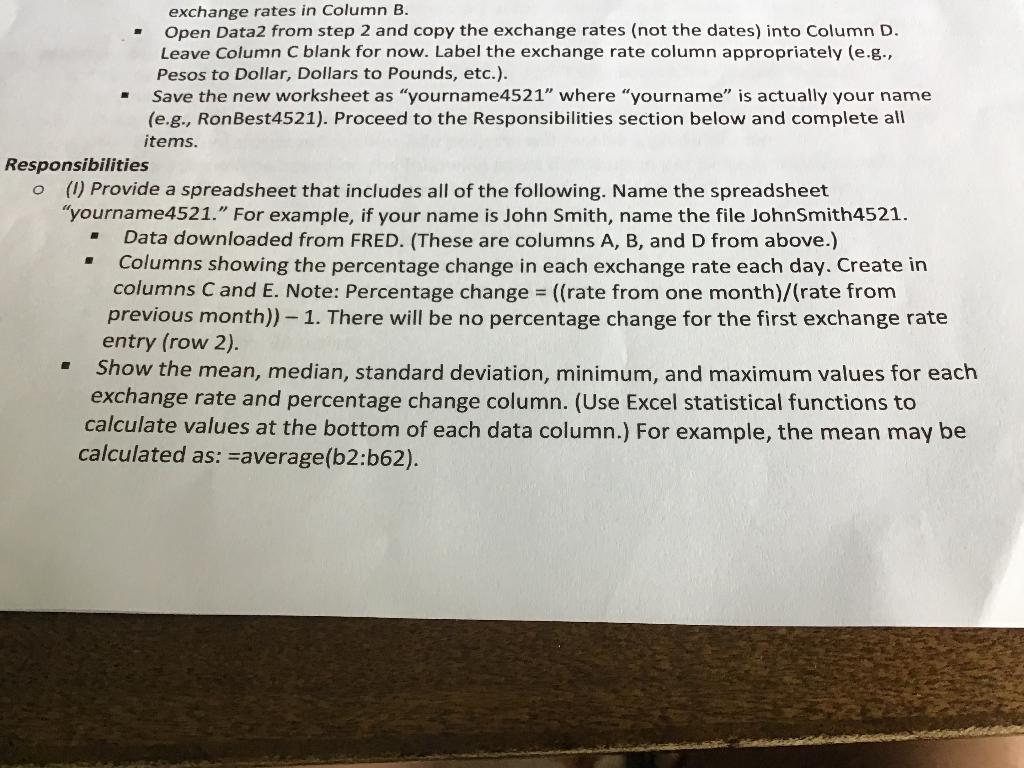
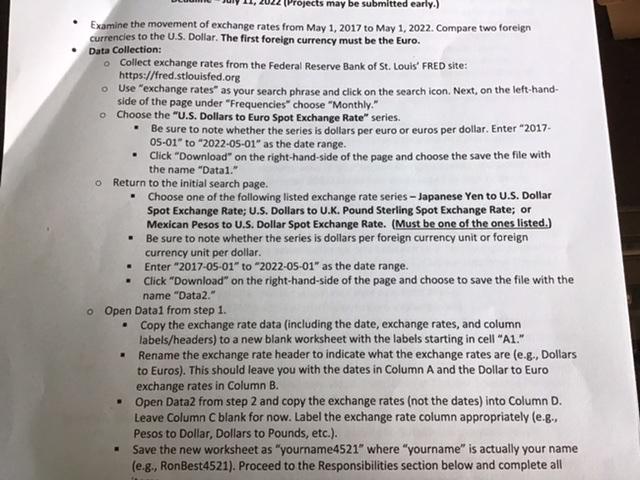
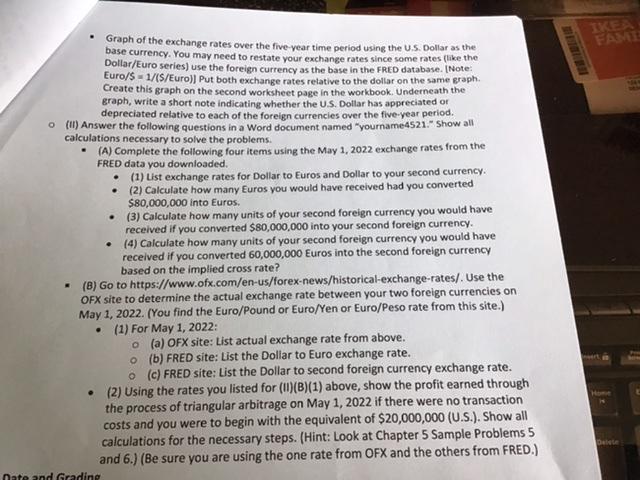
(Projects may be submitted early.) Examine the movement of exchange rates from May 1, 2017 to May 1, 2022. Compare two foreign currencies to the U.S. Dollar. The first foreign currency must be the Euro. Data Collection: o Collect exchange rates from the Federal Reserve Bank of St. Louis' FRED site: https://fred.stlouisfed.org o Use "exchange rates" as your search phrase and click on the search icon. Next, on the left-hand- side of the page under "Frequencies" choose "Monthly." Choose the "U.S. Dollars to Euro Spot Exchange Rate" series. . Be sure to note whether the series is dollars per euro or euros per dollar. Enter "2017- 05-01" to "2022-05-01" as the date range. Click "Download" on the right-hand-side of the page and choose the save the file with the name "Datal." o o Return to the initial search page. o Open Datal from step 1. . Choose one of the following listed exchange rate series - Japanese Yen to U.S. Dollar Spot Exchange Rate; U.S. Dollars to U.K. Pound Sterling Spot Exchange Rate; or Mexican Pesos to U.S. Dollar Spot Exchange Rate. (Must be one of the ones listed.) Be sure to note whether the series is dollars per foreign currency unit or foreign currency unit per dollar. Enter "2017-05-01" to "2022-05-01" as the date range. . Click "Download" on the right-hand-side of the page and choose to save the file with the name "Data2." . . . . Copy the exchange rate data (including the date, exchange rates, and column labels/headers) to a new blank worksheet with the labels starting in cell "A1." Rename the exchange rate header to indicate what the exchange rates are (e.g., Dollars to Euros). This should leave you with the dates in Column A and the Dollar to Euro exchange rates in Column B. Open Data2 from step 2 and copy the exchange rates (not the dates) into Column D. Leave Column C blank for now. Label the exchange rate column appropriately (e.g., Pesos to Dollar, Dollars to Pounds, etc.). Save the new worksheet as "yourname4521" where "yourname" is actually your name (e.g., RonBest4521). Proceed to the Responsibilities section below and complete all Graph of the exchange rates over the five-year time period using the U.S. Dollar as the base currency. You may need to restate your exchange rates since some rates (like the Dollar/Euro series) use the foreign currency as the base in the FRED database. [Note: Euro/$= 1/(S/Euro)] Put both exchange rates relative to the dollar on the same graph. Create this graph on the second worksheet page in the workbook. Underneath the graph, write a short note indicating whether the U.S. Dollar has appreciated or depreciated relative to each of the foreign currencies over the five-year period. o(II) Answer the following questions in a Word document named "yourname4521." Show all calculations necessary to solve the problems. (A) Complete the following four items using the May 1, 2022 exchange rates from the FRED data you downloaded. . . Date and Grading (1) List exchange rates for Dollar to Euros and Dollar to your second currency. (2) Calculate how many Euros you would have received had you converted $80,000,000 into Euros. (3) Calculate how many units of your second foreign currency you would have received if you converted $80,000,000 into your second foreign currency. . (4) Calculate how many units of your second foreign currency you would have received if you converted 60,000,000 Euros into the second foreign currency based on the implied cross rate? . (B) Go to https://www.ofx.com/en-us/forex-news/historical-exchange-rates/. Use the OFX site to determine the actual exchange rate between your two foreign currencies on May 1, 2022. (You find the Euro/Pound or Euro/Yen or Euro/Peso rate from this site.) . (1) For May 1, 2022: (a) OFX site: List actual exchange rate from above. o (b) FRED site: List the Dollar to Euro exchange rate. o (c) FRED site: List the Dollar to second foreign currency exchange rate. . (2) Using the rates you listed for (II)(B)(1) above, show the profit earned through the process of triangular arbitrage on May 1, 2022 if there were no transaction costs and you were to begin with the equivalent of $20,000,000 (U.S.). Show all calculations for the necessary steps. (Hint: Look at Chapter 5 Sample Problems 5 and 6.) (Be sure you are using the one rate from OFX and the others from FRED.) o FAME Home Delete ER - exchange rates in Column B. Open Data2 from step 2 and copy the exchange rates (not the dates) into Column D. Leave Column C blank for now. Label the exchange rate column appropriately (e.g., Pesos to Dollar, Dollars to Pounds, etc.). Save the new worksheet as "yourname4521" where "yourname" is actually your name (e.g., RonBest4521). Proceed to the Responsibilities section below and complete all items. Responsibilities O (1) Provide a spreadsheet that includes all of the following. Name the spreadsheet "yourname4521." For example, if your name is John Smith, name the file JohnSmith4521. Data downloaded from FRED. (These are columns A, B, and D from above.) Columns showing the percentage change in each exchange rate each day. Create in columns C and E. Note: Percentage change = ((rate from one month)/(rate from previous month))-1. There will be no percentage change for the first exchange rate entry (row 2). Show the mean, median, standard deviation, minimum, and maximum values for each exchange rate and percentage change column. (Use Excel statistical functions to calculate values at the bottom of each data column.) For example, the mean may be calculated as: average(b2:b62). (Projects may be submitted early.) Examine the movement of exchange rates from May 1, 2017 to May 1, 2022. Compare two foreign currencies to the U.S. Dollar. The first foreign currency must be the Euro. Data Collection: o Collect exchange rates from the Federal Reserve Bank of St. Louis' FRED site: https://fred.stlouisfed.org o Use "exchange rates" as your search phrase and click on the search icon. Next, on the left-hand- side of the page under "Frequencies" choose "Monthly." Choose the "U.S. Dollars to Euro Spot Exchange Rate" series. . Be sure to note whether the series is dollars per euro or euros per dollar. Enter "2017- 05-01" to "2022-05-01" as the date range. Click "Download" on the right-hand-side of the page and choose the save the file with the name "Datal." o o Return to the initial search page. o Open Datal from step 1. . Choose one of the following listed exchange rate series - Japanese Yen to U.S. Dollar Spot Exchange Rate; U.S. Dollars to U.K. Pound Sterling Spot Exchange Rate; or Mexican Pesos to U.S. Dollar Spot Exchange Rate. (Must be one of the ones listed.) Be sure to note whether the series is dollars per foreign currency unit or foreign currency unit per dollar. Enter "2017-05-01" to "2022-05-01" as the date range. . Click "Download" on the right-hand-side of the page and choose to save the file with the name "Data2." . . . . Copy the exchange rate data (including the date, exchange rates, and column labels/headers) to a new blank worksheet with the labels starting in cell "A1." Rename the exchange rate header to indicate what the exchange rates are (e.g., Dollars to Euros). This should leave you with the dates in Column A and the Dollar to Euro exchange rates in Column B. Open Data2 from step 2 and copy the exchange rates (not the dates) into Column D. Leave Column C blank for now. Label the exchange rate column appropriately (e.g., Pesos to Dollar, Dollars to Pounds, etc.). Save the new worksheet as "yourname4521" where "yourname" is actually your name (e.g., RonBest4521). Proceed to the Responsibilities section below and complete all Graph of the exchange rates over the five-year time period using the U.S. Dollar as the base currency. You may need to restate your exchange rates since some rates (like the Dollar/Euro series) use the foreign currency as the base in the FRED database. [Note: Euro/$= 1/(S/Euro)] Put both exchange rates relative to the dollar on the same graph. Create this graph on the second worksheet page in the workbook. Underneath the graph, write a short note indicating whether the U.S. Dollar has appreciated or depreciated relative to each of the foreign currencies over the five-year period. o(II) Answer the following questions in a Word document named "yourname4521." Show all calculations necessary to solve the problems. (A) Complete the following four items using the May 1, 2022 exchange rates from the FRED data you downloaded. . . Date and Grading (1) List exchange rates for Dollar to Euros and Dollar to your second currency. (2) Calculate how many Euros you would have received had you converted $80,000,000 into Euros. (3) Calculate how many units of your second foreign currency you would have received if you converted $80,000,000 into your second foreign currency. . (4) Calculate how many units of your second foreign currency you would have received if you converted 60,000,000 Euros into the second foreign currency based on the implied cross rate? . (B) Go to https://www.ofx.com/en-us/forex-news/historical-exchange-rates/. Use the OFX site to determine the actual exchange rate between your two foreign currencies on May 1, 2022. (You find the Euro/Pound or Euro/Yen or Euro/Peso rate from this site.) . (1) For May 1, 2022: (a) OFX site: List actual exchange rate from above. o (b) FRED site: List the Dollar to Euro exchange rate. o (c) FRED site: List the Dollar to second foreign currency exchange rate. . (2) Using the rates you listed for (II)(B)(1) above, show the profit earned through the process of triangular arbitrage on May 1, 2022 if there were no transaction costs and you were to begin with the equivalent of $20,000,000 (U.S.). Show all calculations for the necessary steps. (Hint: Look at Chapter 5 Sample Problems 5 and 6.) (Be sure you are using the one rate from OFX and the others from FRED.) o FAME Home Delete ER - exchange rates in Column B. Open Data2 from step 2 and copy the exchange rates (not the dates) into Column D. Leave Column C blank for now. Label the exchange rate column appropriately (e.g., Pesos to Dollar, Dollars to Pounds, etc.). Save the new worksheet as "yourname4521" where "yourname" is actually your name (e.g., RonBest4521). Proceed to the Responsibilities section below and complete all items. Responsibilities O (1) Provide a spreadsheet that includes all of the following. Name the spreadsheet "yourname4521." For example, if your name is John Smith, name the file JohnSmith4521. Data downloaded from FRED. (These are columns A, B, and D from above.) Columns showing the percentage change in each exchange rate each day. Create in columns C and E. Note: Percentage change = ((rate from one month)/(rate from previous month))-1. There will be no percentage change for the first exchange rate entry (row 2). Show the mean, median, standard deviation, minimum, and maximum values for each exchange rate and percentage change column. (Use Excel statistical functions to calculate values at the bottom of each data column.) For example, the mean may be calculated as: average(b2:b62)
Step by Step Solution
There are 3 Steps involved in it

Get step-by-step solutions from verified subject matter experts
 Study Help