







Question: I just need the code. H Bridge Motor Control Code #define M _ ENABLE 5 #define M _ DIRECTION 1 0 4 #define M _
I just need the code.
H Bridge Motor Control Code
#define MENABLE
#define MDIRECTION
#define MDIRECTION
void setup
pinModeMENABLE, OUTPUT;
pinModeMDIRECTION OUTPUT;
pinModeMDIRECTION OUTPUT;
void loop
analogWriteMENABLE, ;
digitalWriteMDIRECTION; digitalWriteMDIRECTION;
delay;
analogWriteMENABLE, ;
digitalWriteMDIRECTION; digitalWriteMDIRECTION;
delay;
analogWriteMENABLE, ;
digitalWriteMDIRECTION; digitalWriteMDIRECTION;
delay;
analogWriteMENABLE, ;
digitalWriteMDIRECTION; digitalWriteMDIRECTION;
delay;
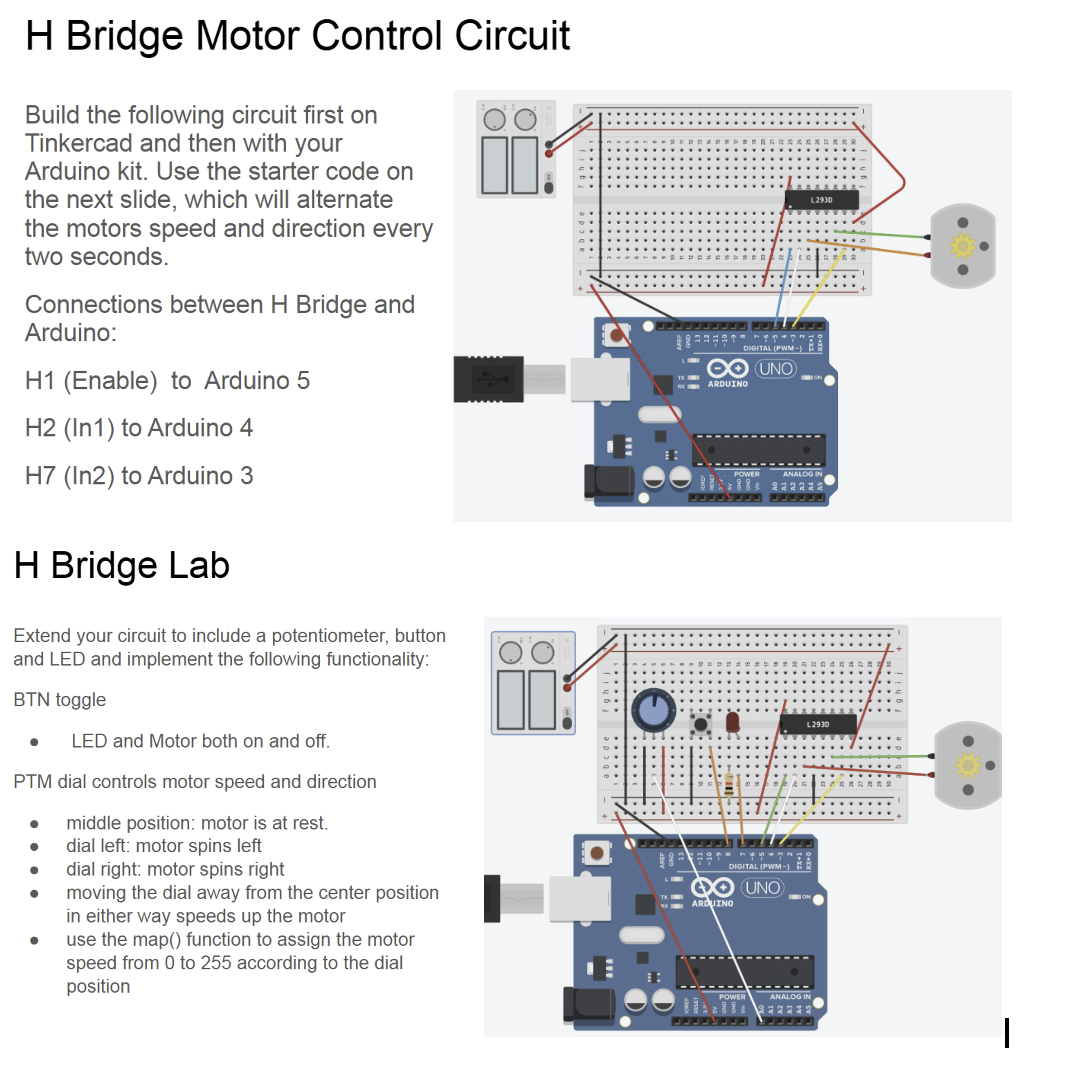
H Bridge Motor Control Circuit
Build the following circuit first on Tinkercad and then with your Arduino kit. Use the starter code on the next slide, which will alternate the motors speed and direction every two seconds.
Connections between H Bridge and Arduino:
HEnable to Arduino
Hln to Arduino
HIn to Arduino
H Bridge Lab
Extend your circuit to include a potentiometer, button and LED and implement the following functionality:
BTN toggle
LED and Motor both on and off.
PTM dial controls motor speed and direction
middle position: motor is at rest.
dial left: motor spins left
dial right: motor spins right
moving the dial away from the center position in either way speeds up the motor
use the operatornamemap function to assign the motor speed from to according to the dial position
Step by Step Solution
There are 3 Steps involved in it
1 Expert Approved Answer
Step: 1 Unlock

Question Has Been Solved by an Expert!
Get step-by-step solutions from verified subject matter experts
Step: 2 Unlock
Step: 3 Unlock
 Study Help