





Question: I just needs help with calculating ALL THESE DATA using excel because honestly i do not know how ? 1. Help Desk Performance at Virtual-Soft

I just needs help with calculating ALL THESE DATA using excel because honestly i do not know how ?
I just needs help with calculating ALL THESE DATA
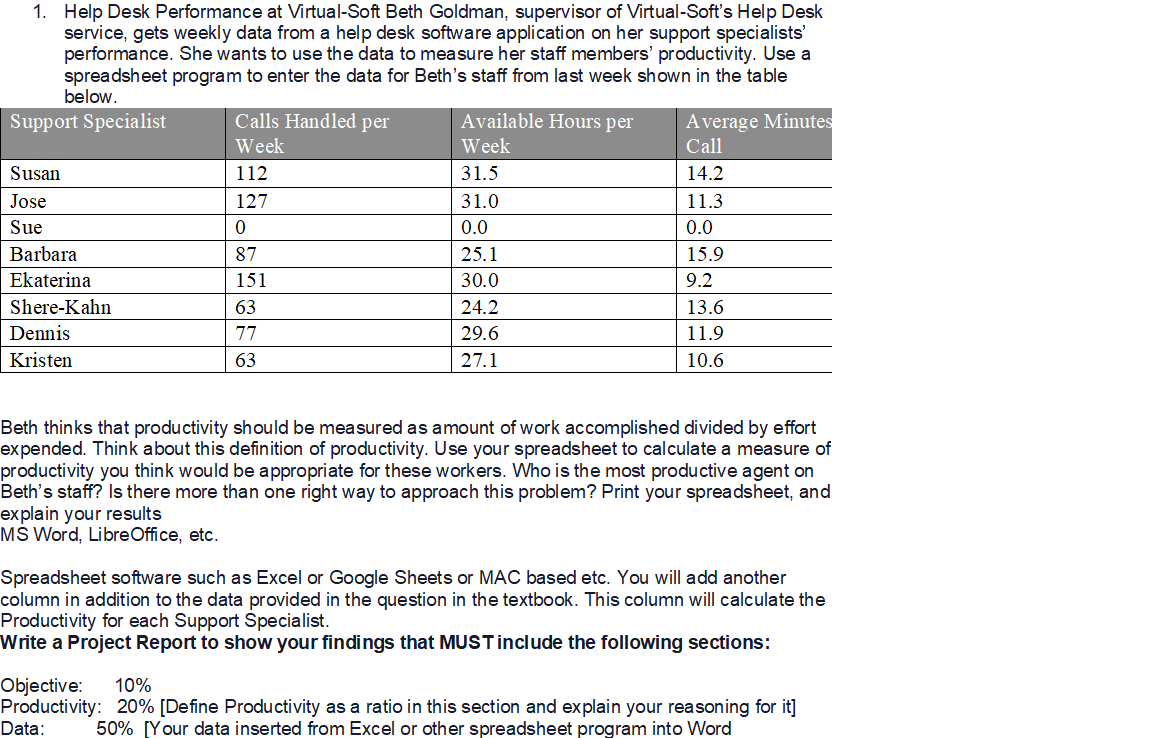
1. Help Desk Performance at Virtual-Soft Beth Goldman, supervisor of Virtual-Soft's Help Desk service, gets weekly data from a help desk software application on her support specialists' performance. She wants to use the data to measure her staff members' productivity. Use a below. spreadsheet program to enter the data for Beth's staff from last week shown in the table Support Specialist Calls Handled per Available Hours per Average Minutes Week Week Call Susan 112 31.5 14.2 Jose 127 31.0 11.3 Sue 0 0.0 0.0 Barbara 87 25.1 15.9 Ekaterina 151 30.0 9.2 Shere-Kahn 63 24.2 13.6 Dennis 77 29.6 11.9 Kristen 63 27.1 10.6 Beth thinks that productivity should be measured as amount of work accomplished divided by effort expended. Think about this definition of productivity. Use your spreadsheet to calculate a measure of productivity you think would be appropriate for these workers. Who is the most productive agent on Beth's staff? Is there more than one right way to approach this problem? Print your spreadsheet, and explain your results MS Word, LibreOffice, etc. Spreadsheet software such as Excel or Google Sheets or MAC based etc. You will add another column in addition to the data provided in the question in the textbook. This column will calculate the Productivity for each Support Specialist. Write a Project Report to show your findings that MUST include the following sections: Objective: 10% Productivity: 20% [Define Productivity as a ratio in this section and explain your reasoning for it] Data: 50% [Your data inserted from Excel or other spreadsheet program into Word

Step by Step Solution

There are 3 Steps involved in it

1 Expert Approved Answer
Step: 1 Unlock blur-text-image

Question Has Been Solved by an Expert!

Get step-by-step solutions from verified subject matter experts

Step: 2 Unlock
Step: 3 Unlock

Students Have Also Explored These Related General Management Questions!