







Question: I keep getting errors in the code when solving this question need help plz , i need Matlab scripts based on the question that can
I keep getting errors in the code when solving this question need help plz i need Matlab scripts based on the question that can solve them fullscript explanation of your codes did be great thanks, the given script from Agenerate fix it and generate the other scripts needed.This is the Script NonInsulatedRod Shooting.m Inputs
NOTE: PLEASE SEARCH THE FILE FOR TO DO COMMENT THESE ARE LINES THAT
YOU NEED TO MODIFY!!
Parameters of mathematical model
TO DO
System of ODEs
store dependent variables in y Tz ie y T and y z
dydx dTdxdzdx
dTdx @xy; TO DO
dzdx @xy; TO DO
dydx dTdxdzdx;
Parameters for numerical method
TO DO
Onestep algorithm for solving IVP
algorithm RK; choose 'Euler, 'Heun', RK
Plot True Solution
True linear solution
TO DO
Plot analytical solution
TO DO
Nonlinear Shooting Method
Define function handle to onestep IVP solver
switch algorithm
case 'Euler', oneStep @xyEulerSystemxydydxh;
case 'Heun', oneStep @xyHeunSystemxydydxh;
case RK oneStep @xyRKSystemxydydxh;
otherwise
errorAlgorithm must be EulerHeun or RK;
end
Solve rootfinding problem for a
TO DO NEED ALGORITHMIC PARAMETERS
f @aboundaryValueMismatcha; TO DO NEED ADDITIONAL INPUTS
TO DO CALL TO ROOT FINDING FUNCTION
Solve IVP with all intermediate values of a and plot solutions
Note this is redundant IVP has already been solved for each value of a
during rootfinding to keep the implementation simple, we do not worry
about outputting solutions to the IVP during rootfinding and resolve
the IVPs here use a loop over a
TO DO
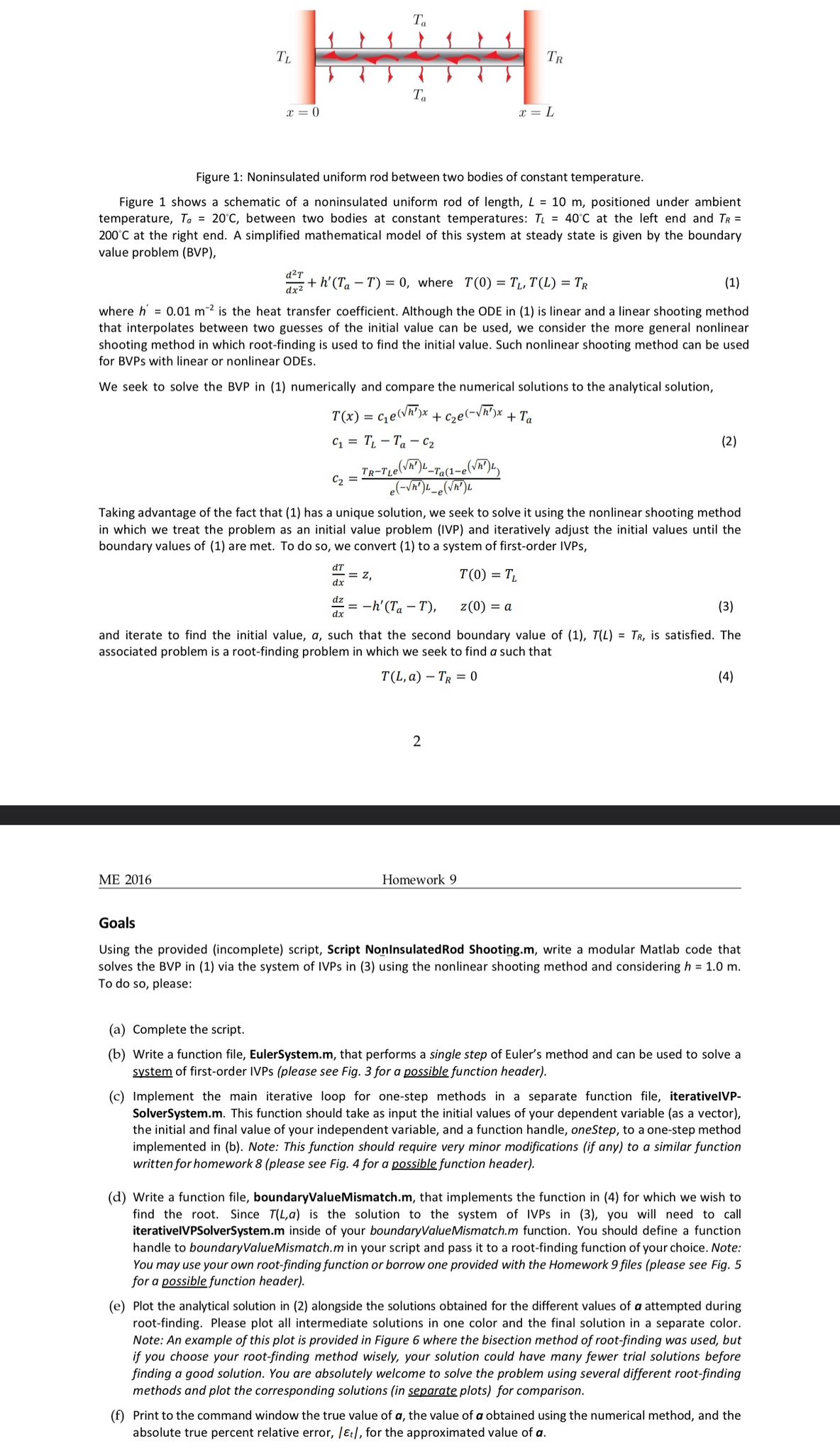
Figure : Noninsulated uniform rod between two bodies of constant temperature.
Figure shows a schematic of a noninsulated uniform rod length, positioned under ambient
temperature, between two bodies at constant temperatures: at the left end and
at the right end. A simplified mathematical model of this system at steady state is given by the boundary
value problem BVP
where
where is the heat transfer coefficient. Although the ODE in is linear and a linear shooting method
that interpolates between two guesses of the initial value can be used, we consider the more general nonlinear
shooting method in which rootfinding is used to find the initial value. Such nonlinear shooting method can be used
for BVPs with linear or nonlinear ODEs.
We seek to solve the BVP in numerically and compare the numerical solutions to the analytical solution,
Taking advantage of the fact that has a unique solution, we seek to solve it using the nonlinear shooting method
in which we treat the problem as an initial value problem IVP and iteratively adjust the initial values until the
boundary values of are met. To do so we convert to a system of firstorder IVPs,
and iterate to find the initial value, such that the second boundary value of is satisfied. The
associated problem is a rootfinding problem in which we seek to find a such that
Goals
Using the provided incomplete script, Script NonInsulatedRod Shooting.m write a modular Matlab code that
solves the BVP in via the system of IVPs in using the nonlinear shooting method and considering
To do so please:
a Complete the script.
b Write a function file, EulerSystem.m that performs a single step of Euler's method and can be used to solve a
system of firstorder IVPs please see Fig. for a possible function header
c Implement the main iterative loop for onestep methods in a separate function file, iterativelVP
SolverSystem.m This function should take as input the initial values of your dependent variable as a vector
the initial and final value of your independent variable, and a function handle, onestep, to a onestep method
implemented in b Note: This function should require very minor modifications if any to a similar function
written for homework please see Fig. for a possible function header
d Write a function file, boundaryValueMismatch.m that implements the function in for which we wish to
find the root. Since
Step by Step Solution
There are 3 Steps involved in it
1 Expert Approved Answer
Step: 1 Unlock

Question Has Been Solved by an Expert!
Get step-by-step solutions from verified subject matter experts
Step: 2 Unlock
Step: 3 Unlock
 Study Help