







Question: I Know this is not computer science! This is visual basic and needs to be in visual basic code! Declare a module level variable for
I Know this is not computer science! This is visual basic and needs to be in visual basic code! Declare a module level variable for Base Pay for commission people. 500.00 Declare a module level variable for Bonus Rate for commission people 10%
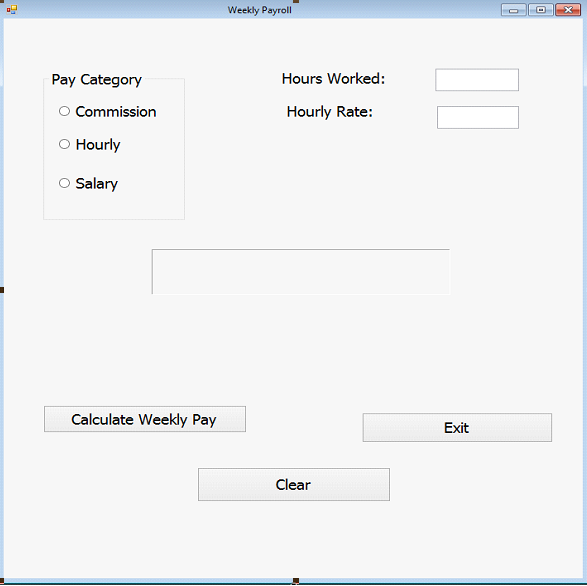
The following pages will contain layout for the If structure and pseudocode for the Function procedures. Where I am using Else Is would be ElseIF when actually using the syntax in a program. Make sure that you do not have a pay category already selected when you first execute the program. (You may have to change the Tab Index order. Refer to chapter 2)
The goal for this project is to have 3 function procedures that will determine weekly pay for commission, salary, and hourly employees. Each of these functions will be called from the Calculate button procedure.
Behind the Calculate Button: Check for which radio button was selected. Is Commission checked Call Commission function
Else Is hourly checked Build Variables for user input: Hours and Hourly rate Convert user input to decimal data types for both hours and hourly rate. Call hourly function and pass values from hours and hourly rate
Else Is Salary checked Call Salary Function Else Message box tell users to make a pay selection End If
Commission Function Ask for Sales Amount through InputBox Ask for Quota Amount through InputBox Convert information from InputBoxes Is Sales greater than quota Find the difference of Sales quota Find amount over by taking the difference and multiply by bonus rate Find Weekly pay by Adding bonus amount to base salary Otherwise, Weekly Pay = Base Pay End Return Weekly Pay
Hourly Function and receive values from the Calculate Procedure Is hours greater than 40 Find Reg Pay = 40 * Hourly rate Find Ot Pay = (Hours 40) * 1.5 * Hourly Rate Find Weekly Pay = Reg + OT
Otherwise (Else would be used for syntax.)
Weekly Pay = Hours * Hourly Rate End Return Weekly Pay
Salary Function Ask for annual salary with Input Box Convert input to a decimal data type Take annual salary and divide by 52 Return Weekly Pay
Weekly Payroll Pay Category Hours Worked: Hourly Rate: O Commission O Hourly O Salary Calculate Weekly Pay Exit Clear
Step by Step Solution
There are 3 Steps involved in it

Get step-by-step solutions from verified subject matter experts
 Study Help