







Question: I made some more significant changes to my code but it is still incomplete. Could you help me complete it and correct and mistakes if
I made some more significant changes to my code but it is still incomplete. Could you help me complete it and correct and mistakes if you find any ? Thank you so much in advance !
Project4.java:
import javax.swing.*;import java.awt.*;import java.awt.event.ActionEvent;import java.awt.event.ActionListener;import java.util.TreeMap;import javax.swing.JOptionPane;public class Project4 extends java.awt.Dialog { //define a TreeMap as my in-memory database private TreeMap db = new TreeMap(); /** * Creates new form Project4 */ public Project4(java.awt.Frame parent, boolean modal) { super(parent, modal); initComponents(); // load the status combo box with value of Status for (Status s : Status.values()) { String status = String.valueOf(s); statusComboBox.addItem(status); } statusComboBox.setSelectedIndex(0); } /** * This method is called from within the constructor to initialize the form. * WARNING: Do NOT modify this code. The content of this method is always * regenerated by the Form Editor. */ private static class realEstateDbPanel extends JPanel { //JLabels for all the fields private JLabel transactionLabel = new JLabel("Transaction No:"); private JLabel addressLabel = new JLabel("Address:"); private JLabel bedroomsLabel = new JLabel("Bedrooms:"); private JLabel squareLabel = new JLabel("Square Footage:"); private JLabel priceLabel = new JLabel("Price:"); //JComboBox and entries for database operations private String[] dbOperations = {"Insert", "Delete", "Find"}; private JComboBox dbList = new JComboBox(dbOperations); //JComboBox and entries for status private Status[] statuses = {Status.FOR_SALE, Status.UNDER_CONTRACT, Status.SOLD}; private JComboBox statusList = new JComboBox(statuses); //Text fields for property information and transaction id private JTextField transactionField = new JTextField(""); private JTextField addressField = new JTextField(""); private JTextField bedroomsField = new JTextField(""); private JTextField squareField = new JTextField(""); private JTextField priceField = new JTextField(""); TreeMap propertyDb = new TreeMap(); public realEstateDbPanel() { setLayout(new GridLayout(7,2, 7,10)); this.add(transactionLabel); this.add(transactionField); this.add(addressLabel); this.add(addressField); this.add(bedroomsLabel); this.add(bedroomsField); this.add(squareLabel); this.add(squareField); this.add(priceLabel); this.add(priceField); /** * Closes the dialog */ private void closeDialog(java.awt.event.WindowEvent evt) { setVisible(false); dispose(); } /** * Utility method to check that the value is not null * * @param inputType * @throws Exception */ private void checkInput(String inputType, String input) throws Exception { if (input == null || input.isEmpty()) { throw new Exception("Input error: Unspecified " + inputType); } } // resets the form to it's default state private void resetForm() { txTextField.setText(""); addrTextField.setText(""); txTextField.setText(""); brTextField.setText(""); sqFtTextField.setText(""); priceTextField.setText(""); dbActionComboBox.setSelectedIndex(0); statusComboBox.setSelectedIndex(0); } private void processButtonActionPerformed(java.awt.event.ActionEvent evt) { // TODO add your handling code here: // Get the transaction Id String txId = txTextField.getText(); String address = null; String bedrooms = null; String sqFootage = null; String price = null; if(txId != null && !txId.isEmpty()) { // check to see if property exists in db Property prop = this.db.get(Integer.parseInt(txId)); // get the database action selection Integer index = dbActionComboBox.getSelectedIndex(); // if there is no property in the db and selection is "insert" // then create a new property and insert it into the db //make sure that all entry forms have values String msg = ""; if (prop == null) { String selection = dbActionComboBox.getItemAt(index); //insert new Property if action is "insert" if (selection.equalsIgnoreCase("insert")) { try { address = addrTextField.getText(); this.checkInput("Address", address); bedrooms = brTextField.getText(); this.checkInput("Bedrooms", bedrooms); sqFootage = sqFtTextField.getText(); this.checkInput("Square Footage", sqFootage); price = priceTextField.getText(); this.checkInput("Price", price); /ow create a new Property in the database prop = new Property(address, Integer.parseInt(bedrooms), Integer.parseInt(sqFootage), Integer.parseInt(price)); this.db.put(Integer.parseInt(txId), prop); msg = "Successfully added the following property to the db." + System.lineSeparator(); msg += prop.toString(); JOptionPane.showMessageDialog(this, msg); } catch (Exception ex) { JOptionPane.showMessageDialog(this, "Error: " + ex.getMessage()); } } else { JOptionPane.showMessageDialog(this, "Error: Insert Mode not selected."); } } else { // property exists // process based on selection switch (index) { case 0: // insert JOptionPane.showMessageDialog(this, "Error: Property Transaction No. " + txId + " already in db."); break; case 1: // Delete // remove property from db and reset all fields this.db.remove(Integer.parseInt(txId)); msg = "Successfully deleted the following property from the db." + System.lineSeparator(); msg += prop.toString(); JOptionPane.showMessageDialog(this, msg); break; default: // find option is the default } } } else { JOptionPane.showMessageDialog(this, "Error: You must specify a Property Transaction No."); } //make sure the form is reset this.resetForm(); } private void statusButtonActionPerformed(java.awt.event.ActionEvent evt) { // TODO add your handling code here: // grab the transaction number String txId = txTextField.getText(); // if it exists see if there is a property associated with it if (txId != null && !txId.isEmpty()) { // check to see if property exists in db Property prop = this.db.get(Integer.parseInt(txId)); if (prop != null) { // property exists // change its state to whatever has been selected Integer index = statusComboBox.getSelectedIndex(); String selection = statusComboBox.getItemAt(index); Status status = Status.valueOf(selection); prop.changeState(status); String msg = "Successfully changed status for the following property and updated the db."; msg += prop.toString(); JOptionPane.showMessageDialog(this,msg); } } else { } this.resetForm(); } /** * @param args the command line arguments */ public static void main(String args[]) { java.awt.EventQueue.invokeLater(new Runnable() { public void run() { Project4 dialog = new Project4(new java.awt.Frame(), true); dialog.addWindowListener(new java.awt.event.WindowAdapter() { public void windowClosing(java.awt.event.WindowEvent e) { System.exit(0); } }); dialog.setVisible(true); } }); } // Variables declaration - do not modify private javax.swing.JTextField addrTextField; private javax.swing.JTextField brTextField; private private private private private private}
Property.java:
public class Property implements StateChangeableStatus> { private String address; private int numBedrooms; private int squareFootage; private int price; private Status status = Status.FOR_SALE; public Property(String address, int numBedrooms, int sqFootage, int price) { this.address = address; this.numBedrooms = numBedrooms; this.squareFootage = sqFootage; this.price = price; } public void changeState(Status state) { this.status = state; } public String toString() { String descr = "Address: " + this.address + System.lineSeparator(); descr += "Bedrooms: " + String.valueOf(this.numBedrooms) + System.lineSeparator(); descr += "Sq. Footage: " + String.valueOf(this.squareFootage) + System.lineSeparator(); descr += "Price: " + String.valueOf(this.price) + System.lineSeparator(); descr += "Status: " + String.valueOf(this.status) + System.lineSeparator(); return descr; }}
StateChangeable.java:
public interface StateChangeableT> { public void changeState(T state); }
Status.java:
public enum Status { FOR_SALE, UNDER_CONTRACT, SOLD;}
Project description:
The fourth programming project involves writing a program to manage a real estate database. This program should be comprised of an enumerated type, an interface and two classes. The enumerated type should be namedStatusand should contain three enumeration literals,FOR_SALE,UNDER_CONTRACTandSOLD.
The interface should be a generic interface namedStateChangeableand it should have a bounded generic type parameter whose type must be an enumerated type. It should contain one abstract methodchangeStatethat has a parameter whose type of the generic type parameter.
The first of the two classes should be namedProperty. It should implement theStateChangeableinterface. It should contain five instance variables, the property address stored as a string, the number of bedrooms, the square footage and the price, all stored as integers, and the status of the property whose type should be the enumerated typeStatus. In addition, it should have the following three methods:
- A constructor that accepts four parameters for the purpose of initializing the characteristics of the property, the address, the number of bedrooms, the square footage and the price. The status of the property should be set toFOR_SALE.
- A method namedchangeStatethat allows the status of the property to be changed.
- An overriddentoStringmethod that returns a string containing the property address, the
- number of bedrooms, the square footage, the price and the current status, appropriately labeled.
The second class namedProject4should contain the main method. In addition, it should contain an instance variable that defines the database of property records, which is implemented as aTreeMap, with the transaction number field as the key and aPropertyobject as the value. It should generate the GUI shown below:
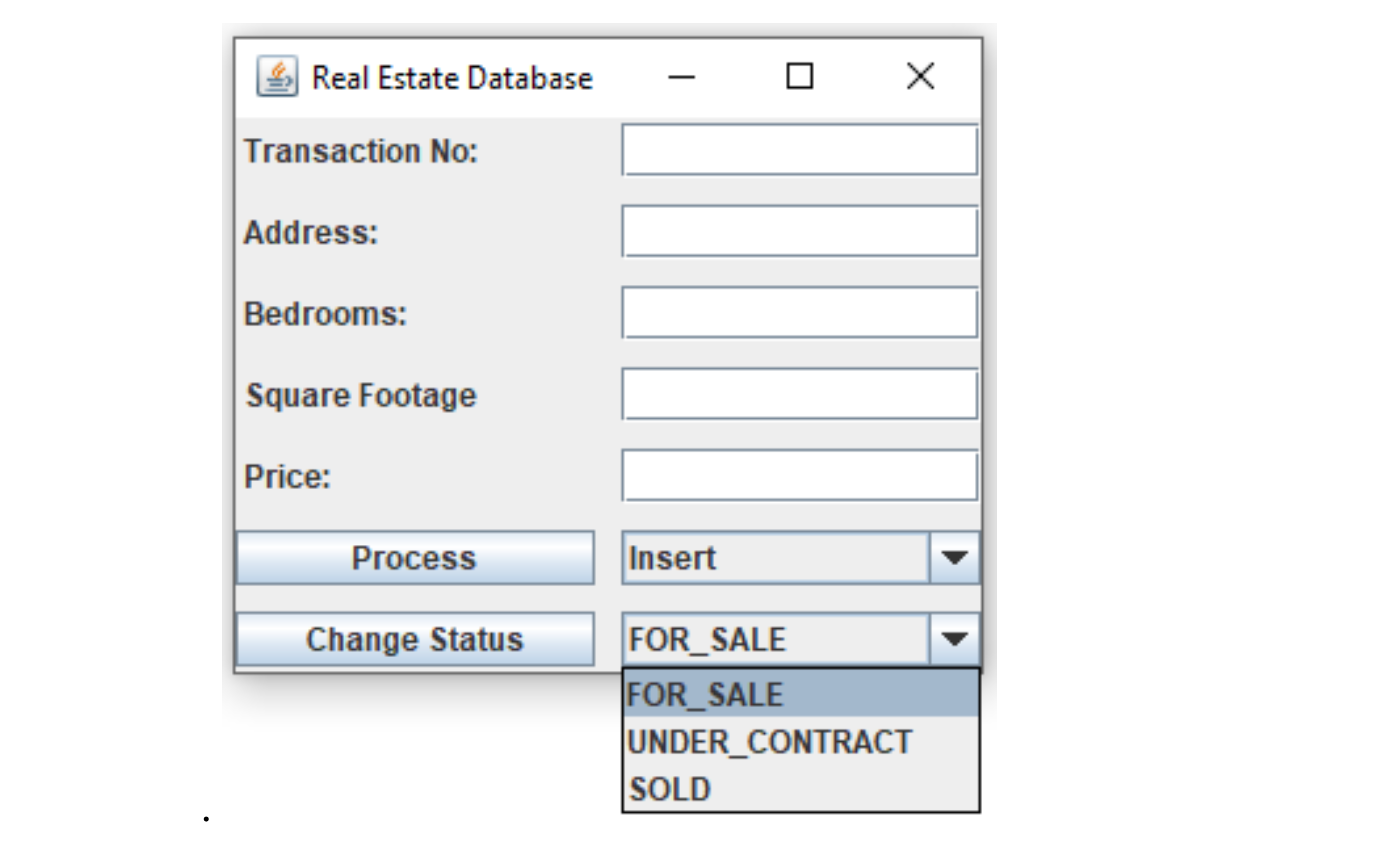
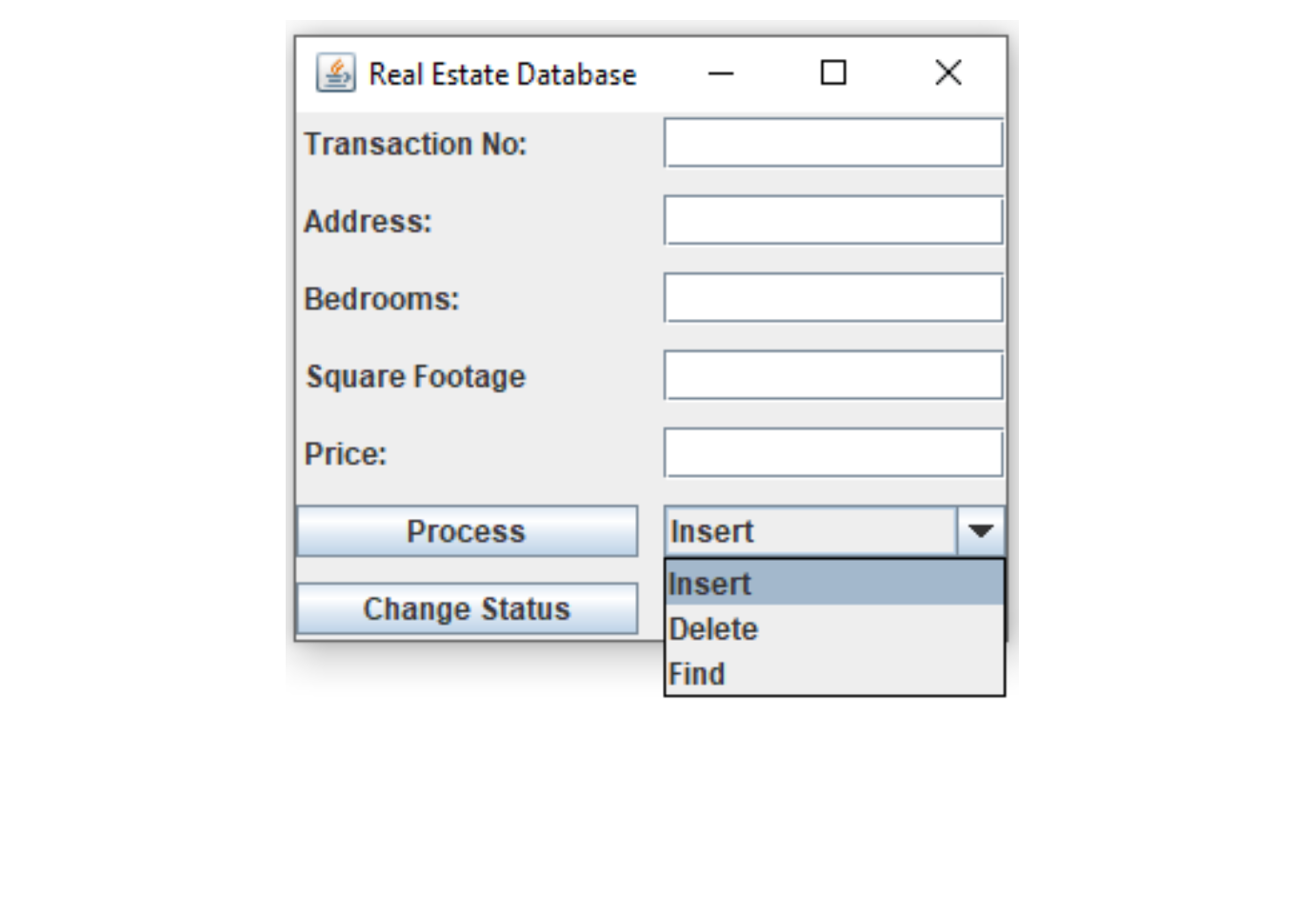
Real Estate Database 0 X Transaction No: Address: Bedrooms: Square Footage Price: Process Insert Change Status FOR SALE FOR SALE UNDER CONTRACT SOLDReal Estate Database 0 X Transaction No: Address: Bedrooms: Square Footage Price: Process Insert Insert Change Status Delete Find
Step by Step Solution
There are 3 Steps involved in it

Get step-by-step solutions from verified subject matter experts
 Study Help