







Question: I mainly need help with my css file. This is the CSS code. Can you please show me where within the code this was placed?
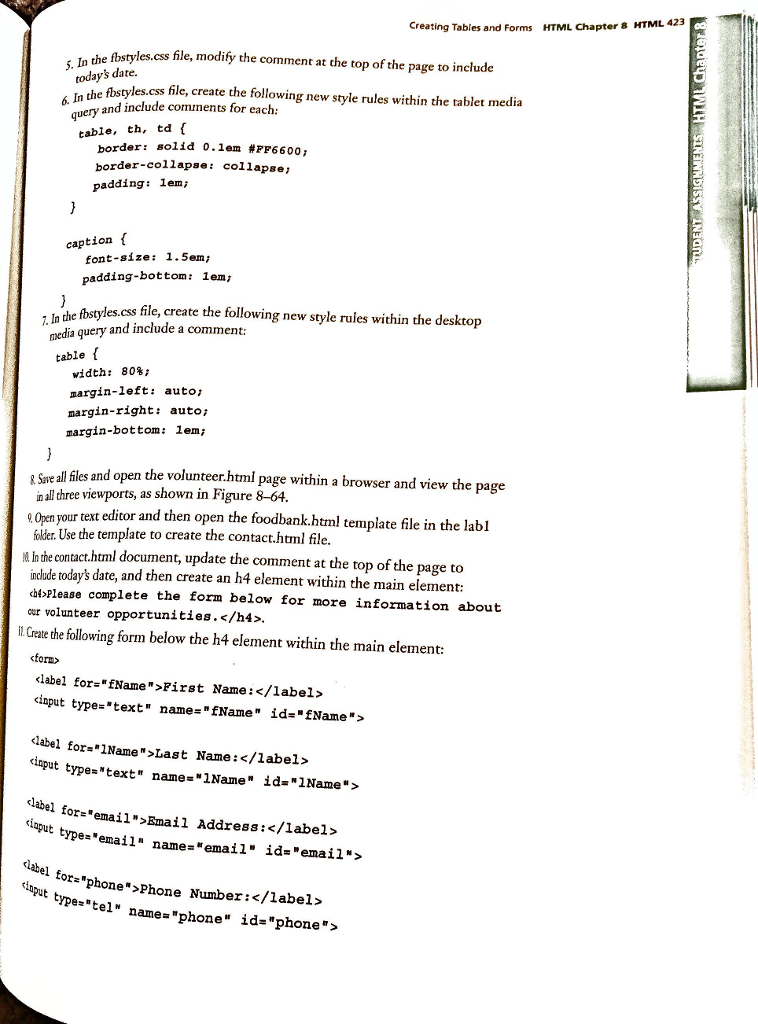
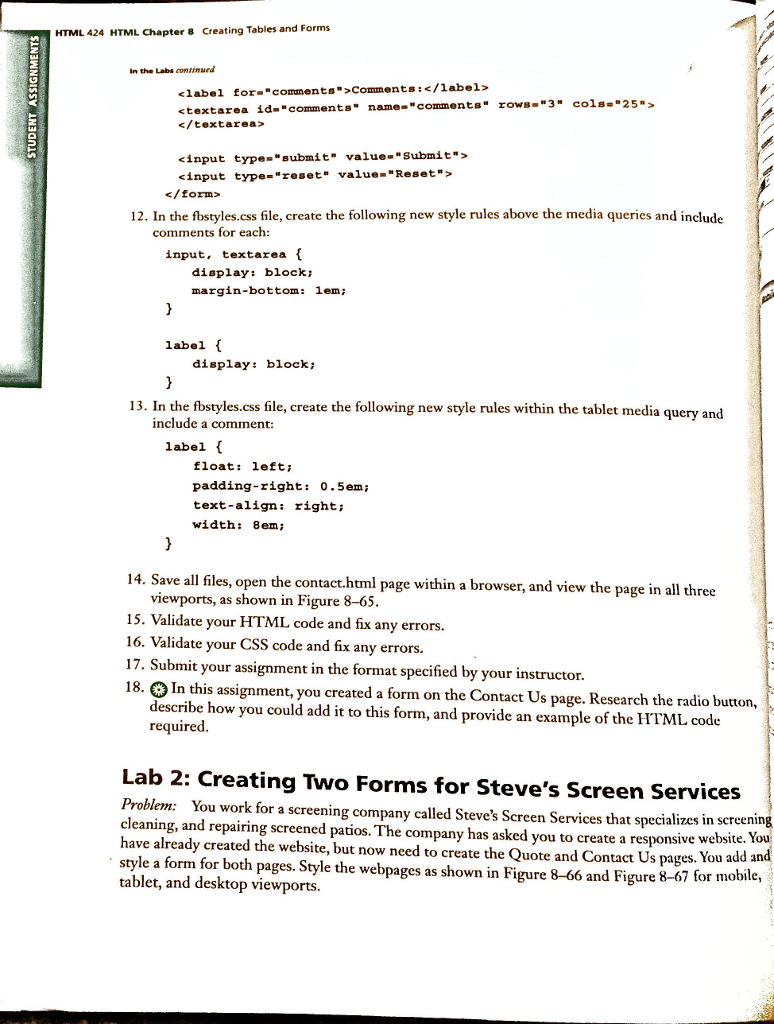
I mainly need help with my css file.
This is the CSS code. Can you please show me where within the code this was placed?
/* Style sheet created by: Student's First Name Student's Last Name, 04/19/2017 */
/* Style for body specifies a background color */
body {
background-color: #FFFFFF;
}
/* Style to create a fluid image */
img {
max-width: 100%;
}
/* Styles for Mobile Layout */
/* Style for the container centers the page and specifies the width */
#container {
width: 100%;
margin-left: auto;
margin-right: auto;
}
/* Style for the header specifies top margin, background color, rounded corners, and center align content */
header {
font-family: Verdana, Arial, serif;
font-size: 2em;
margin-top: 0.2em;
background-color: #FFFFFF;
border-radius: 0.5em;
text-align: center;
}
/* Style for nav specifies text properties */
nav {
font-family: Georgia, "Times New Roman", serif;
font-size: 1em;
font-weight: bold;
text-align: center;
}
/* Style specifies padding and margins for unorderd list */
nav ul {
padding: 0;
margin-top: 0.5em;
margin-bottom: 0.5em;
}
/* Style for nav li specifies the background color, rounded corners, removes bullet style, and applies margins and padding for list items within the navigation*/
nav li {
background-color: #FF6600;
border-radius: 1em;
list-style-type: none;
margin: 0.3em;
padding: 0.4em;
}
/* Style for the main specifies a block display, text properties, margins, padding, rounded corners, and borders */
main {
display: block;
font-family: Georgia, "Times New Roman", sans-serif;
font-size: 1em;
margin-top: 0.2em;
padding: 0.5em;
border-top: solid 0.2em #FF6600;
border-bottom: solid 0.2em #FF6600;
}
/* Style for the footer specifies font size, text alignment, and top margin */
footer {
font-size: .70em;
text-align: center;
margin-top: 2em;
}
/* Style displays the mobile class */
.mobile {
display: inline;
}
@media screen and (min-width: 481px) { /* tablet */
img {
width: 25%
float: left;
}
header p {
margin-bottom: 4em;
padding-top: 1.5em;
}
nav li {
display: inline;
float: left;
margin-left: 1%;
margin-right: 1%;
padding-left: 0;
padding-right: 0;
width: 23%;
}
main {
clear: left;
margin-top: 12 em;
}
.mobile {
display: none;
}
.desktop {
display: inline;
}
}
@media screen and (min-width: 769px) { /* desktop */
#container {
width: 80%
}
nav {
margin-top: -5 em;
}
nav ul {
margin: 0;
padding-left: 0.50%;
padding-right: 0.50%
}
nav li {
background-color: #FFFFFF;
border-radius: 0;
margin-left: 0;
margin-right: 0;
padding: 0;
width: 18%;
}
nav li a {
color: #FF6600;
display: inline-block;
padding: 0.7 em;
font-size: 1.25 em;
}
nav li a:link {
color: #FF6600;
}
nav li a:hover {
color: #4C1F00;
font-style: italic;
}
main {
border: none;
border-radius: 1em;
box-shadow: 1em 1em 1em #331400;
margin-top: 1em;
}
}
//small screen sizes
@media (max-width: 481px) {
.mobile-only {
display:block !important;
}
.desktop-only {
display:none !important;
}
}
Creating Tables and Forms HTML Chapter 8 HTML 423 che fbstyles.css file, modify the comment at che top of the page to include In todays date. les.css file, create the following new style rules within the tablet media 6. In the o. guery and include comments for each table, th, td solid 0.1em#7F6600; border: border-collapse: collapse padding: lem caption font-size: 1.5em padding-bottom: lem, es.css file, create the following new style ruies within the desktop 7. In dia query and include a comment: me table f width: 808 margin-left: auto, margin-right: auto margin-bottom: 1em; Save all files and open th n all three viewports, as shown in Figure 8-64 e volunteerhtmi page within a browser and view the page ur text editor and then open the foodbank.html template file in the labl older. Use the template to create the contact.html file. In the contact.html document, update the comment at the top of the page to nclude today's date, and then create an h4 element within the main element: cdtoPlease complete the form below for more information about cur volunteer opportunities.l Create the following form below the h4 element within the main element: form> cinput type-"text" name-fName" id-'fName"> l for-1Name">Last Name: ut type "text" names "INane" ?da "Mame "> or-"email">Email Address:1abel> t type "email" name-email" id "email"? el tor"phone">phone Number: u tyetel" name- "phone" id-"phone"> Creating Tables and Forms HTML Chapter 8 HTML 423 che fbstyles.css file, modify the comment at che top of the page to include In todays date. les.css file, create the following new style rules within the tablet media 6. In the o. guery and include comments for each table, th, td solid 0.1em#7F6600; border: border-collapse: collapse padding: lem caption font-size: 1.5em padding-bottom: lem, es.css file, create the following new style ruies within the desktop 7. In dia query and include a comment: me table f width: 808 margin-left: auto, margin-right: auto margin-bottom: 1em; Save all files and open th n all three viewports, as shown in Figure 8-64 e volunteerhtmi page within a browser and view the page ur text editor and then open the foodbank.html template file in the labl older. Use the template to create the contact.html file. In the contact.html document, update the comment at the top of the page to nclude today's date, and then create an h4 element within the main element: cdtoPlease complete the form below for more information about cur volunteer opportunities.l Create the following form below the h4 element within the main element: form> cinput type-"text" name-fName" id-'fName"> l for-1Name">Last Name: ut type "text" names "INane" ?da "Mame "> or-"email">Email Address:1abel> t type "email" name-email" id "email"? el tor"phone">phone Number: u tyetel" name- "phone" id-"phone">
Step by Step Solution
There are 3 Steps involved in it

Get step-by-step solutions from verified subject matter experts
 Study Help