







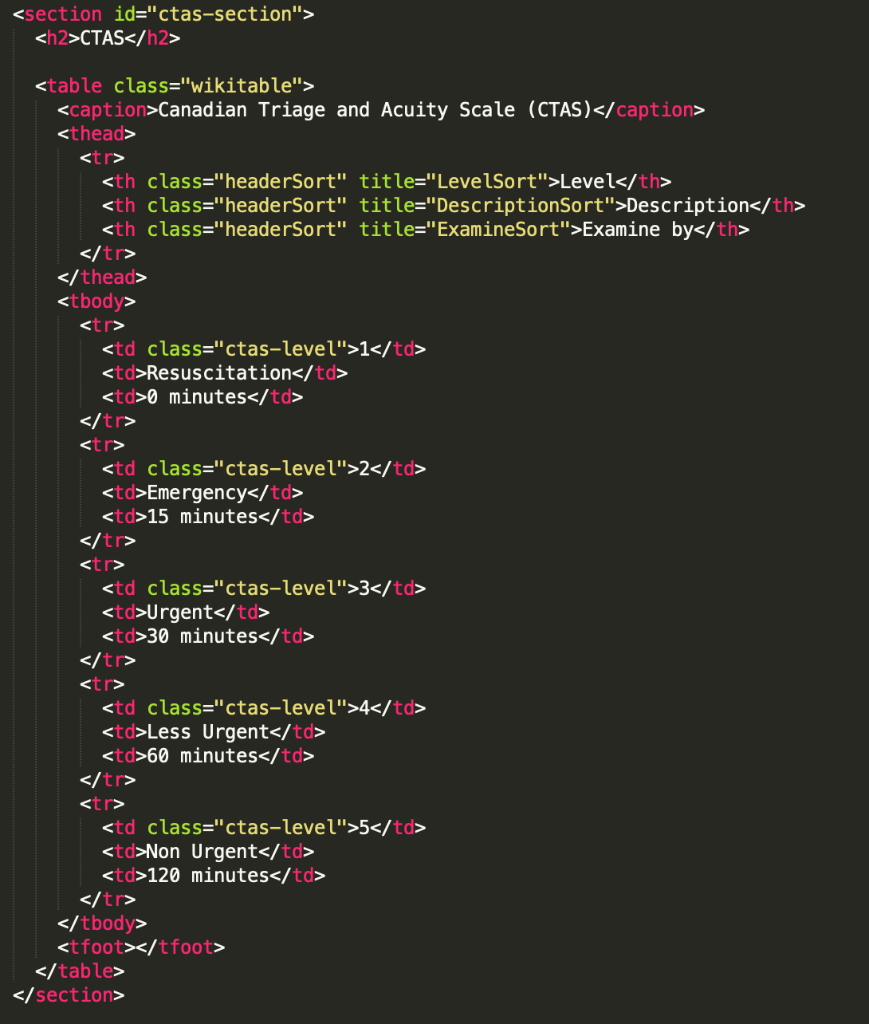
Question: I need A & B, and also need console.log to showcase in the console CTAS Canadian Triage and Acuity Scale (CTAS) Level Description Examine by
I need A & B, and also need console.log to showcase in the console
CTAS
| Level | Description | Examine by |
|---|---|---|
| 1 | Resuscitation | 0 minutes |
| 2 | Emergency | 15 minutes |
| 3 | Urgent | 30 minutes |
| 4 | Less Urgent | 60 minutes |
| 5 | Non Urgent | 120 minutes |
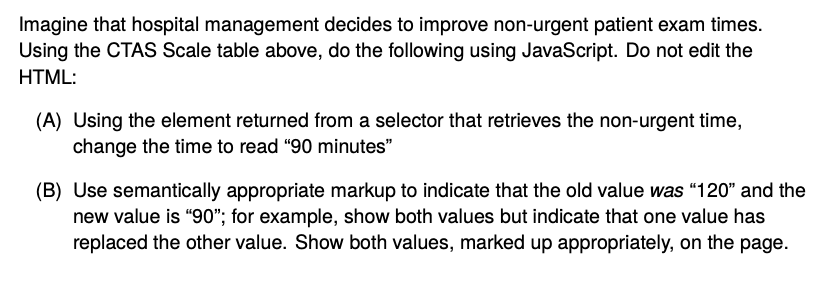
Imagine that hospital management decides to improve non-urgent patient exam times. Using the CTAS Scale table above, do the following using JavaScript. Do not edit the HTML: (A) Using the element returned from a selector that retrieves the non-urgent time, change the time to read "90 minutes" (B) Use semantically appropriate markup to indicate that the old value was 120" and the new value is "90"; for example, show both values but indicate that one value has replaced the other value. Show both values, marked up appropriately, on the page
Step by Step Solution
There are 3 Steps involved in it
1 Expert Approved Answer
Step: 1 Unlock

Question Has Been Solved by an Expert!
Get step-by-step solutions from verified subject matter experts
Step: 2 Unlock
Step: 3 Unlock
 Study Help