







Question: I need a JAVA program for the following PAYROLL SYSTEM with the following requirements this prograam is a part of the bigger project, So it
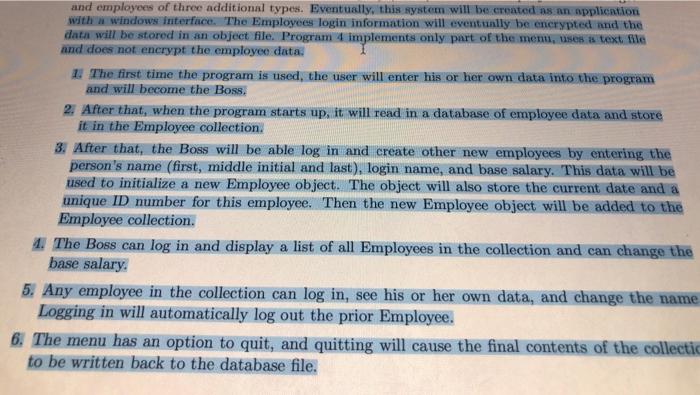
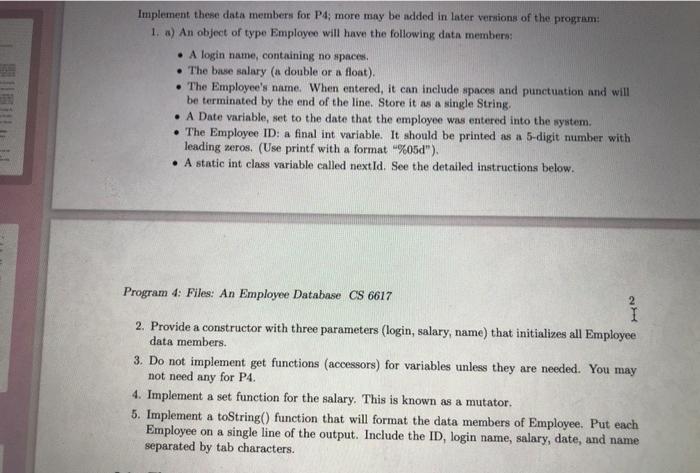
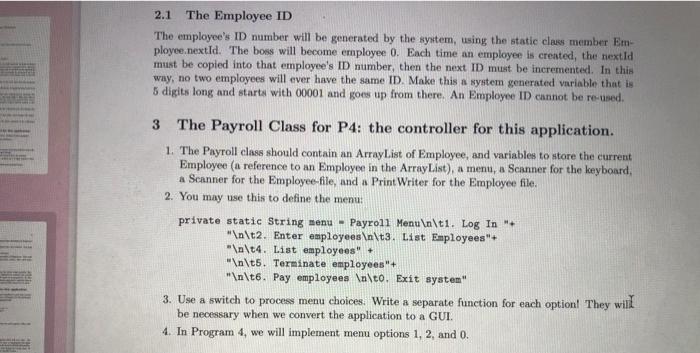
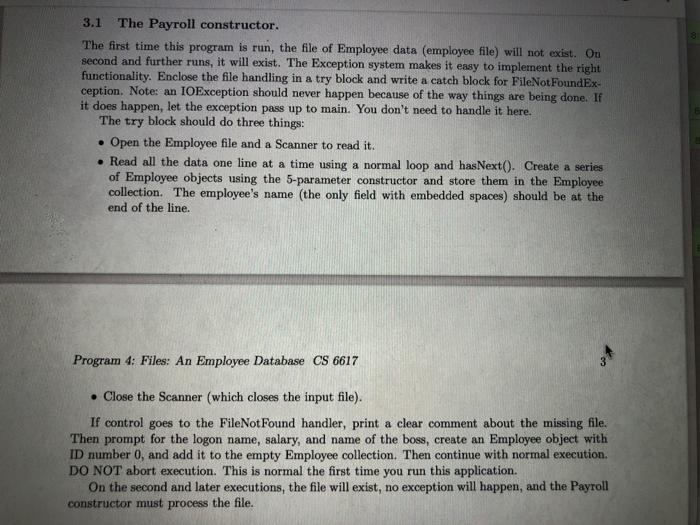
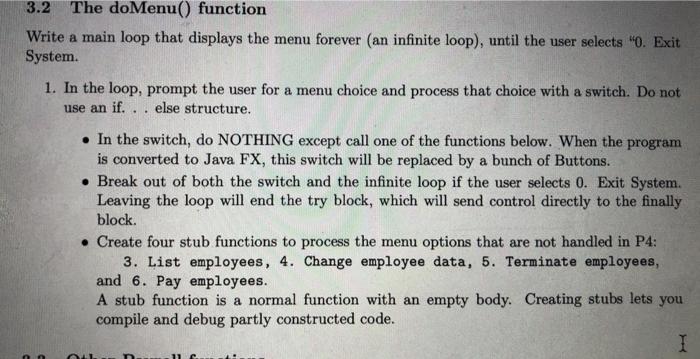
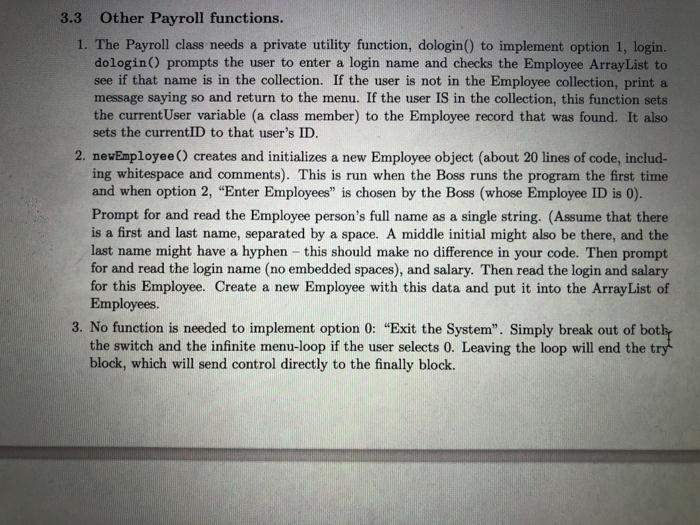
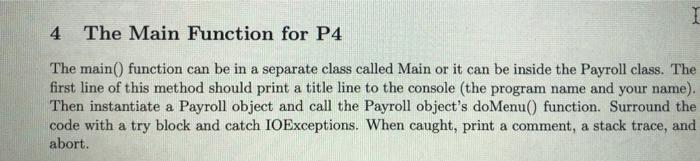
and employees of three additional types. Eventually, this system will be created as an application with a windows interface. The Employees login information will eventually be encrypted and the data will be stored in an object file. Program implements only part of the mem uses a text file and does not encrypt the employee data 1. The first time the program is used, the user will enter his or her own data into the program and will become the Boss. 2. After that, when the program starts up, it will read in a database of employee data and store it in the Employee collection. 3. After that, the Boss will be able log in and create other new employees by entering the person's name (first, middle initial and last), login name, and base salary. This data will be used to initialize a new Employee object. The object will also store the current date and a unique ID number for this employee. Then the new Employee object will be added to the Employee collection. 4 The Boss can log in and display a list of all Employees in the collection and can change the base salary. 5. Any employee in the collection can log in, see his or her own data, and change the name Logging in will automatically log out the prior Employee. 6. The menu has an option to quit, and quitting will cause the final contents of the collectic to be written back to the database file. Implement these data members for P4, more may be added in later versions of the program: 1. a) An object of type Employee will have the following data members: A login name, containing no spaces. The base salary ( double or a float). The Employee's name. When entered, it can include spaces and punctuation and will be terminated by the end of the line. Store it as a single String, A Date variable, set to the date that the employee was entered into the system. The Employee ID: a final int variable. It should be printed as a 5-digit number with leading meros. (Use printf with a format "%05d"). A static int class variable called next Id. See the detailed instructions below. Program 4: Files: An Employee Database CS 6617 2. Provide a constructor with three parameters (login, salary, name) that initializes all Employee data members. 3. Do not implement get functions (accessors) for variables unless they are needed. You may not need any for P4. 4. Implement a set function for the salary. This is known as a mutator. 5. Implement a toString() function that will format the data members of Employee. Put each Employee on a single line of the output. Include the ID, login name, salary, date, and name separated by tab characters. 2.1 The Employee ID The employee's ID number will be generated by the system, using the static class member Em- ployee.nextId. The boss will become employee 0. Each time an employee is created, the nextid must be copied into that employee's ID number, then the next ID must be incremented. In this way, no two employees will ever have the same ID. Make this a system generated variable that is 5 digits long and starts with 00001 and goes up from there. An Employee ID cannot be re-used. The Payroll Class for P4: the controller for this application. 1. The Payroll class should contain an ArrayList of Employee, and variables to store the current Employee (a reference to an Employee in the ArrayList), a menu, a Scanner for the keyboard, a Scanner for the Employee-file, and a Print Writer for the Employee file. 2. You may use this to define the menu: private static String menu - Payroll Menu \t1. Log In + " \t2. Enter employees \t3. List Employees" " \t4. List employees" + " \t5. Terminate employees + " \t6. Pay employees \to. Exit system" 3. Use a switch to process menu choices. Write a separate function for each option! They will be necessary when we convert the application to a GUI. 4. In Program 4, we will implement menu options 1, 2, and 0. 3.1 The Payroll constructor. The first time this program is run, the file of Employee data (employee file) will not exist. On second and further runs, it will exist. The Exception system makes it easy to implement the right functionality. Enclose the file handling in a try block and write a catch block for FileNotFoundEx- ception. Note: an IOException should never happen because of the way things are being done. If it does happen, let the exception pass up to main. You don't need to handle it here. The try block should do three things: Open the Employee file and a Scanner to read it. . Read all the data one line at a time using a normal loop and hasNexto. Create a series of Employee objects using the 5-parameter constructor and store them in the Employee collection. The employee's name (the only field with embedded spaces) should be at the end of the line. Program 4: Files: An Employee Database CS 6617 Close the Scanner (which closes the input file). If control goes to the FileNotFound handler, print a clear comment about the missing file. Then prompt for the logon name, salary, and name of the boss, create an Employee object with ID number 0, and add it to the empty Employee collection. Then continue with normal execution. DO NOT abort execution. This is normal the first time you run this application. On the second and later executions, the file will exist, no exception will happen, and the Payroll constructor must process the file. 3.2 The doMenu() function Write a main loop that displays the menu forever (an infinite loop), until the user selects "0. Exit System. 1. In the loop, prompt the user for a menu choice and process that choice with a switch. Do not use an if...else structure. . In the switch, do NOTHING except call one of the functions below. When the program is converted to Java FX, this switch will be replaced by a bunch of Buttons. Break out of both the switch and the infinite loop if the user selects 0. Exit System. Leaving the loop will end the try block, which will send control directly to the finally block Create four stub functions to process the menu options that are not handled in P4: 3. List employees, 4. Change employee data, 5. Terminate employees, and 6. Pay employees. A stub function is a normal function with an empty body. Creating stubs lets you compile and debug partly constructed code. 1 D 11 3.3 Other Payroll functions. 1. The Payroll class needs a private utility function, dologin() to implement option 1, login. dologin() prompts the user to enter a login name and checks the Employee ArrayList to see if that name is in the collection. If the user is not in the Employee collection, print a message saying so and return to the menu. If the user IS in the collection, this function sets the currentUser variable (a class member) to the Employee record that was found. It also sets the current ID to that user's ID. 2. newEmployee() creates and initializes a new Employee object (about 20 lines of code, includ- ing whitespace and comments). This is run when the Boss runs the program the first time and when option 2, "Enter Employees" is chosen by the Boss (whose Employee ID is 0). Prompt for and read the Employee person's full name as a single string. (Assume that there is a first and last name, separated by a space. A middle initial might also be there, and the last name might have a hyphen - this should make no difference in your code. Then prompt for and read the login name (no embedded spaces), and salary. Then read the login and salary for this Employee. Create a new Employee with this data and put it into the ArrayList of Employees. 3. No function is needed to implement option 0: "Exit the System". Simply break out of bothy the switch and the infinite menu-loop if the user selects 0. Leaving the loop will end the try block, which will send control directly to the finally block. 1 4 The Main Function for P4 The main() function can be in a separate class called Main or it can be inside the Payroll class. The first line of this method should print a title line to the console (the program name and your name). Then instantiate a Payroll object and call the Payroll object's doMenu() function. Surround the code with a try block and catch IOExceptions. When caught, print a comment, a stack trace, and abort. and employees of three additional types. Eventually, this system will be created as an application with a windows interface. The Employees login information will eventually be encrypted and the data will be stored in an object file. Program implements only part of the mem uses a text file and does not encrypt the employee data 1. The first time the program is used, the user will enter his or her own data into the program and will become the Boss. 2. After that, when the program starts up, it will read in a database of employee data and store it in the Employee collection. 3. After that, the Boss will be able log in and create other new employees by entering the person's name (first, middle initial and last), login name, and base salary. This data will be used to initialize a new Employee object. The object will also store the current date and a unique ID number for this employee. Then the new Employee object will be added to the Employee collection. 4 The Boss can log in and display a list of all Employees in the collection and can change the base salary. 5. Any employee in the collection can log in, see his or her own data, and change the name Logging in will automatically log out the prior Employee. 6. The menu has an option to quit, and quitting will cause the final contents of the collectic to be written back to the database file. Implement these data members for P4, more may be added in later versions of the program: 1. a) An object of type Employee will have the following data members: A login name, containing no spaces. The base salary ( double or a float). The Employee's name. When entered, it can include spaces and punctuation and will be terminated by the end of the line. Store it as a single String, A Date variable, set to the date that the employee was entered into the system. The Employee ID: a final int variable. It should be printed as a 5-digit number with leading meros. (Use printf with a format "%05d"). A static int class variable called next Id. See the detailed instructions below. Program 4: Files: An Employee Database CS 6617 2. Provide a constructor with three parameters (login, salary, name) that initializes all Employee data members. 3. Do not implement get functions (accessors) for variables unless they are needed. You may not need any for P4. 4. Implement a set function for the salary. This is known as a mutator. 5. Implement a toString() function that will format the data members of Employee. Put each Employee on a single line of the output. Include the ID, login name, salary, date, and name separated by tab characters. 2.1 The Employee ID The employee's ID number will be generated by the system, using the static class member Em- ployee.nextId. The boss will become employee 0. Each time an employee is created, the nextid must be copied into that employee's ID number, then the next ID must be incremented. In this way, no two employees will ever have the same ID. Make this a system generated variable that is 5 digits long and starts with 00001 and goes up from there. An Employee ID cannot be re-used. The Payroll Class for P4: the controller for this application. 1. The Payroll class should contain an ArrayList of Employee, and variables to store the current Employee (a reference to an Employee in the ArrayList), a menu, a Scanner for the keyboard, a Scanner for the Employee-file, and a Print Writer for the Employee file. 2. You may use this to define the menu: private static String menu - Payroll Menu \t1. Log In + " \t2. Enter employees \t3. List Employees" " \t4. List employees" + " \t5. Terminate employees + " \t6. Pay employees \to. Exit system" 3. Use a switch to process menu choices. Write a separate function for each option! They will be necessary when we convert the application to a GUI. 4. In Program 4, we will implement menu options 1, 2, and 0. 3.1 The Payroll constructor. The first time this program is run, the file of Employee data (employee file) will not exist. On second and further runs, it will exist. The Exception system makes it easy to implement the right functionality. Enclose the file handling in a try block and write a catch block for FileNotFoundEx- ception. Note: an IOException should never happen because of the way things are being done. If it does happen, let the exception pass up to main. You don't need to handle it here. The try block should do three things: Open the Employee file and a Scanner to read it. . Read all the data one line at a time using a normal loop and hasNexto. Create a series of Employee objects using the 5-parameter constructor and store them in the Employee collection. The employee's name (the only field with embedded spaces) should be at the end of the line. Program 4: Files: An Employee Database CS 6617 Close the Scanner (which closes the input file). If control goes to the FileNotFound handler, print a clear comment about the missing file. Then prompt for the logon name, salary, and name of the boss, create an Employee object with ID number 0, and add it to the empty Employee collection. Then continue with normal execution. DO NOT abort execution. This is normal the first time you run this application. On the second and later executions, the file will exist, no exception will happen, and the Payroll constructor must process the file. 3.2 The doMenu() function Write a main loop that displays the menu forever (an infinite loop), until the user selects "0. Exit System. 1. In the loop, prompt the user for a menu choice and process that choice with a switch. Do not use an if...else structure. . In the switch, do NOTHING except call one of the functions below. When the program is converted to Java FX, this switch will be replaced by a bunch of Buttons. Break out of both the switch and the infinite loop if the user selects 0. Exit System. Leaving the loop will end the try block, which will send control directly to the finally block Create four stub functions to process the menu options that are not handled in P4: 3. List employees, 4. Change employee data, 5. Terminate employees, and 6. Pay employees. A stub function is a normal function with an empty body. Creating stubs lets you compile and debug partly constructed code. 1 D 11 3.3 Other Payroll functions. 1. The Payroll class needs a private utility function, dologin() to implement option 1, login. dologin() prompts the user to enter a login name and checks the Employee ArrayList to see if that name is in the collection. If the user is not in the Employee collection, print a message saying so and return to the menu. If the user IS in the collection, this function sets the currentUser variable (a class member) to the Employee record that was found. It also sets the current ID to that user's ID. 2. newEmployee() creates and initializes a new Employee object (about 20 lines of code, includ- ing whitespace and comments). This is run when the Boss runs the program the first time and when option 2, "Enter Employees" is chosen by the Boss (whose Employee ID is 0). Prompt for and read the Employee person's full name as a single string. (Assume that there is a first and last name, separated by a space. A middle initial might also be there, and the last name might have a hyphen - this should make no difference in your code. Then prompt for and read the login name (no embedded spaces), and salary. Then read the login and salary for this Employee. Create a new Employee with this data and put it into the ArrayList of Employees. 3. No function is needed to implement option 0: "Exit the System". Simply break out of bothy the switch and the infinite menu-loop if the user selects 0. Leaving the loop will end the try block, which will send control directly to the finally block. 1 4 The Main Function for P4 The main() function can be in a separate class called Main or it can be inside the Payroll class. The first line of this method should print a title line to the console (the program name and your name). Then instantiate a Payroll object and call the Payroll object's doMenu() function. Surround the code with a try block and catch IOExceptions. When caught, print a comment, a stack trace, and abort
Step by Step Solution
There are 3 Steps involved in it

Get step-by-step solutions from verified subject matter experts
 Study Help