







Question: I need a solution to the task of Excel, today is the last day to deliver 13. Count number of cells that are not blank.
I need a solution to the task of Excel, today is the last day to deliver
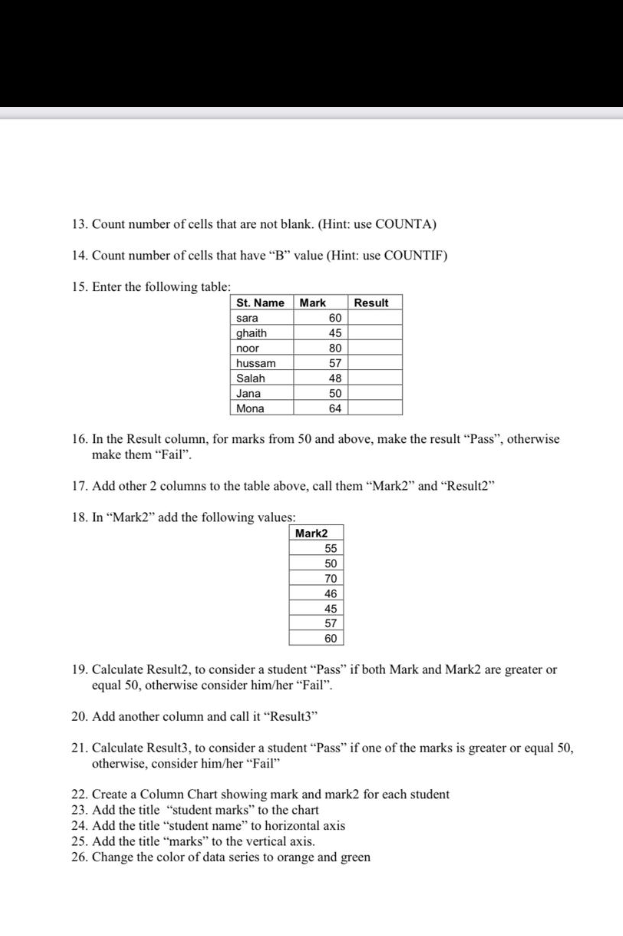
13. Count number of cells that are not blank. (Hint: use COUNTA) 14. Count number of cells that have "B" value (Hint: use COUNTIF) 15. Enter the following table: Result St. Name sara ghaith noor hussam Salah Jana Mona Mark 60 45 80 57 48 50 64 16. In the Result column, for marks from 50 and above, make the result "Pass", otherwise make them "Fail". 17. Add other 2 columns to the table above, call them Mark2 and Result2" 18. In Mark2 add the following values: Mark2 55 8 98 50 70 46 45 19. Calculate Result2, to consider a student Pass if both Mark and Mark2 are greater or equal 50, otherwise consider him/her "Fail". 20. Add another column and call it "Result3" 21. Calculate Result3, to consider a student Pass if one of the marks is greater or equal 50, otherwise, consider him/her "Fail" 22. Create a Column Chart showing mark and mark2 for each student 23. Add the title "student marks" to the chart 24. Add the title "student name to horizontal axis 25. Add the title "marks" to the vertical axis. 26. Change the color of data series to orange and green
Step by Step Solution
There are 3 Steps involved in it

Get step-by-step solutions from verified subject matter experts
 Study Help