







Question: I need a VBA code in excel to accomplish the following assignment:. We are given a spreadsheet for processing and use that has blank rows
I need a VBA code in excel to accomplish the following assignment:.
We are given a spreadsheet for processing and use that has blank rows in it which we wish to eliminate.
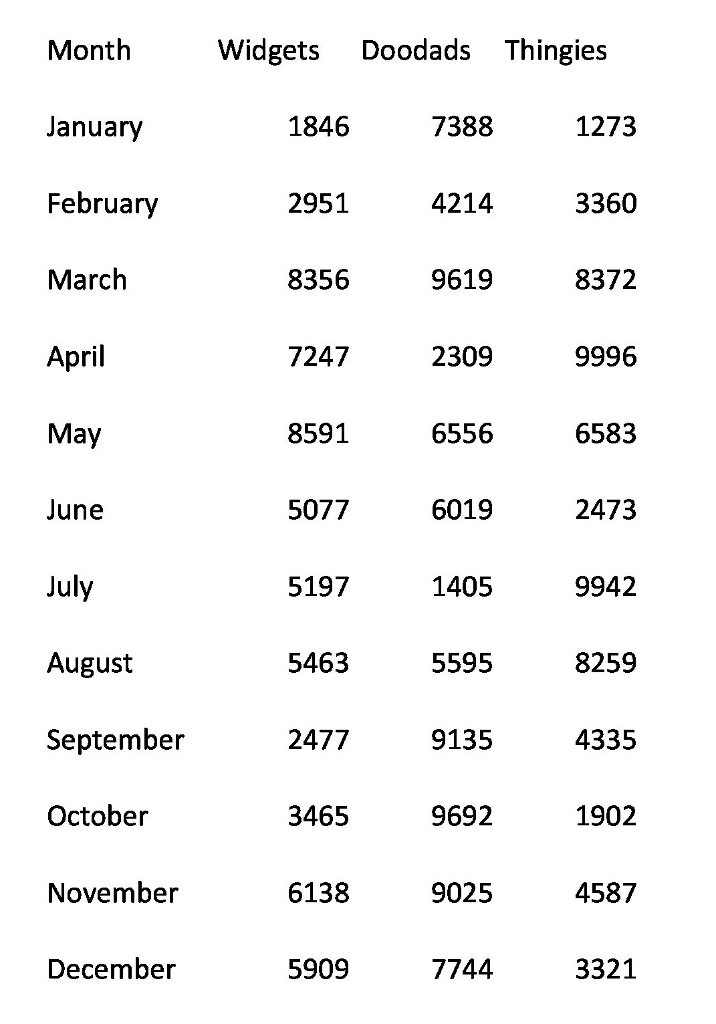
Gather data from the worksheet into array form in the memory. You will need to use multiple arrays because the spreadsheet has two different types of data (text string, and numerical values) and you cant mix data types within a given array. Skip over the blank rows.
Once all your data is in the computer memory, clear the worksheet.
Rewrite the data to the worksheet, without the empty rows.
PRO TIP: Sheet Clears and Rewrites done by VBA cant be undone with the undo button in Excel. When you are in develop/test mode, dont clear the worksheet, and rewrite the data into columns 7-10 (for example) so you can see both old and new formatting at the same time. This way you dont erase anything you are still working on. Once you are sure its working correctly, add in the Sheet1.Cells.Clear statement, and then put your output in columns 1-4 instead.
Month January February March April May June July August September October November December Widgets Doodads Thingies 1846 2951 8356 7388 1273 4214 3360 9619 8372 2309 9996 6583 2473 9942 8259 4335 1902 7247 8591 5077 5197 5463 6556 6019 1405 5595 9135 9692 9025 2477 3465 6138 4587 5909 7744 3321
Step by Step Solution
There are 3 Steps involved in it

Get step-by-step solutions from verified subject matter experts
 Study Help