







Question: I need cell references and formulas for the sheets. The number alone won't be marked as correct. Balance sheet. Reach Manufacturing has lost its computer
I need cell references and formulas for the sheets. The number alone won't be marked as correct.
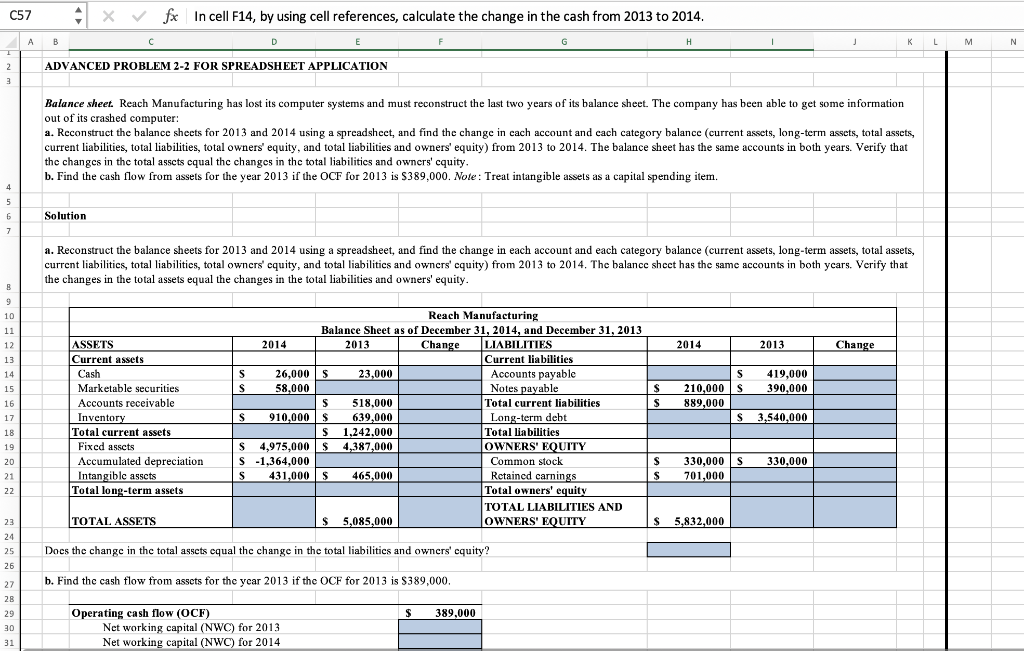
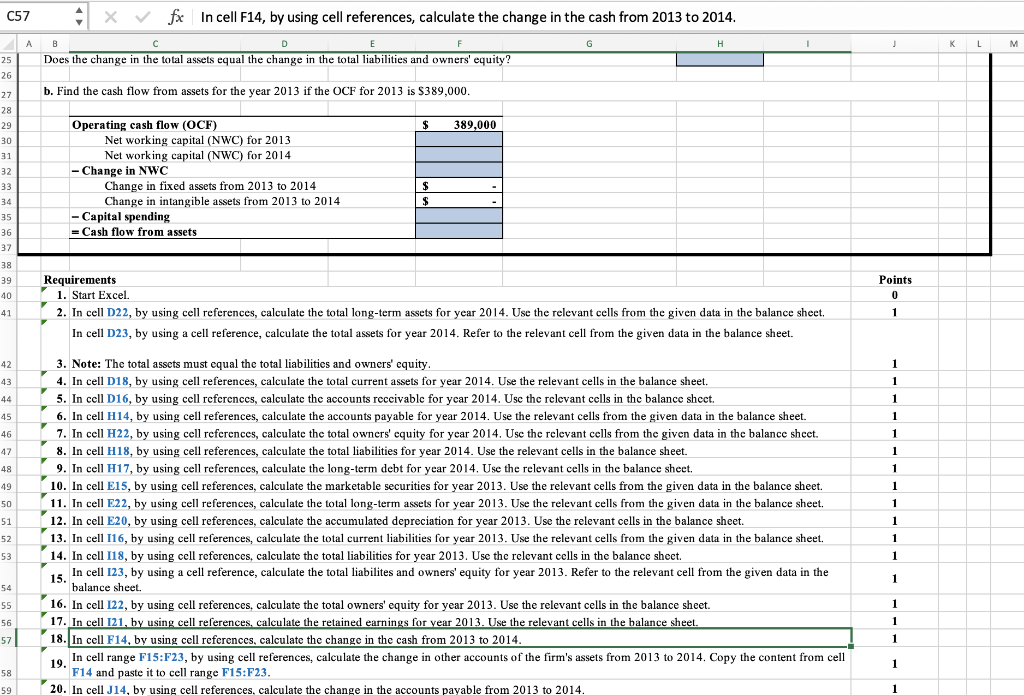
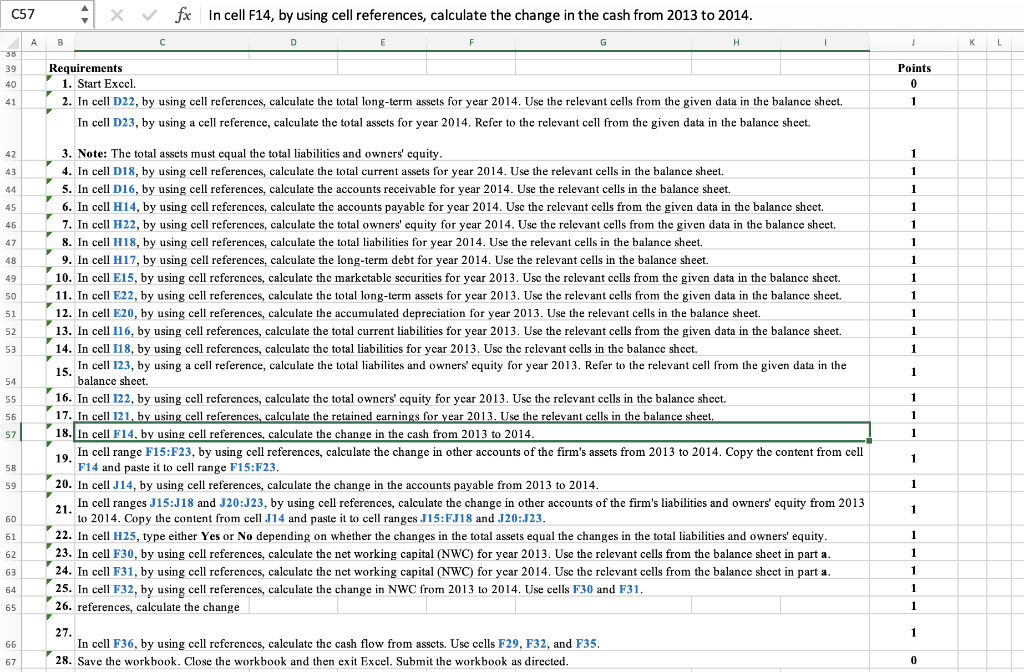
Balance sheet. Reach Manufacturing has lost its computer systems and must reconstruct the last two years of its balance sheet. The company has been able to get some information out of its crashed computer: a. Reconstruct the balance sheets for 2013 and 2014 using a spreadsheet, and find the change in each account and each category balance (current assets, long-term assets, total assets, current liabilities, total liabilities, total owners' equity, and total liabilities and owners' equity) from 2013 to 2014 . The balance sheet has the same accounts in both years. Verify that the changes in the total assets equal the changes in the total liabilitics and owners' cquity. b. Find the cash flow from assets for the year 2013 if the OCF for 2013 is $389,000. Note: Treat intangible assets as a capital spending item. a. Reconstruct the balance sheets for 2013 and 2014 using a spreadsheet, and find the change in each account and each category balance (current assets, long-term assets, total assets, current liabilities, total liabilities, total owners' equity, and total liabilitics and owners' equity) from 2013 to 2014, The balance sheet has the same accounts in both years. Verify that the changes in the total assets equal the changes in the total liabilities and owners' equity. C57 4fx In cell F14, by using cell references, calculate the change in the cash from 2013 to 2014. Requirements 1. Start Excel. 2. In cell D22, by using cell references, calculate the total long-term assets for year 2014. Use the relevant cells from the given data in the balance sheet. In cell D23, by using a cell reference, calculate the total assets for year 2014. Refer to the relevant cell from the given data in the balance sheet. 3. Note: The total assets must equal the total liabilities and owners' equity. 4. In cell D18, by using cell references, calculate the total current assets for year 2014. Use the relevant cells in the balance sheet. 5. In cell D16, by using cell references, calculate the accounts receivable for year 2014. Use the relevant cells in the balance sheet. 6. In cell H14, by using cell references, calculate the accounts payable for year 2014. Use the relevant cells from the given data in the balance sheet. 7. In cell H22, by using cell references, calculate the total owners' equity for year 2014. Use the relevant cells from the given data in the balance sheet. 8. In cell H18, by using cell references, calculate the total liabilities for year 2014. Use the relevant cells in the balance sheet. 9. In cell H17, by using cell references, calculate the long-term debt for year 2014. Use the relevant cells in the balance sheet. 10. In cell E15, by using cell references, calculate the marketable securities for year 2013. Use the relevant cells from the given data in the balance sheet. 11. In cell E22, by using cell references, calculate the total long-term assets for year 2013. Use the relevant cells from the given data in the balance sheet. 12. In cell E20, by using cell references, calculate the accumulated depreciation for year 2013. Use the relevant cells in the balance sheet. 13. In cell I16, by using cell references, calculate the total current liabilities for year 2013 . Use the relevant cells from the given data in the balance sheet. 14. In cell I18, by using cell references, calculate the total liabilities for year 2013. Use the relevant cells in the balance sheet. 15. In cell I23, by using a cell reference, calculate the total liabilites and owners' equity for year 2013. Refer to the relevant cell from the given data in the balance sheet. 16. In cell I22, by using cell references, calculate the total owners' equity for year 2013. Use the relevant cells in the balance sheet. 17. In cell I21, by using cell references, calculate the retained earnings for year 2013. Use the relevant cells in the balance sheet. 18. In cell F14, by using cell references, calculate the change in the cash from 2013 to 2014. 19. In cell range F15:F23, by using cell references, calculate the change in other accounts of the firm's assets from 2013 to 2014 . Copy the content from cell F14 and paste it to cell range F15:F23. 20. In cell J14, by using cell references, calculate the change in the accounts payable from 2013 to 2014. C57 Requirements 1. Start Exccl. 2. In cell D22, by using cell references, calculate the total long-term assets for year 2014 . Use the relevant cells from the given data in the balance sheet. In cell D23, by using a cell reference, calculate the total assets for year 2014 . Refer to the relevant cell from the given data in the balance sheet. 3. Note: The total assets must equal the total liabilities and owners' equity. 4. In cell D18, by using cell references, calculate the total current assets for year 2014 . Use the relevant cells in the balance sheet. 5. In cell D16, by using cell references, calculate the accounts receivable for year 2014 . Use the relevant cells in the balance sheet. 6. In cell H14, by using cell references, calculate the accounts payable for year 2014 . Use the relevant cells from the given data in the balance sheet. 7. In cell H22, by using cell references, calculate the total owners' equity for year 2014 . Use the relevant cells from the given data in the balance sheet. 8. In cell H18, by using cell references, calculate the total liabilities for year 2014 . Use the relevant cells in the balance sheet. 9. In cell H17, by using cell references, calculate the long-term debt for year 2014 . Use the relevant cells in the balance sheet. 10. In cell E15, by using cell references, calculate the marketable securities for year 2013 . Use the relevant cells from the given data in the balance sheet. 11. In cell E22, by using cell references, calculate the total long-term assets for year 2013 . Use the relevant cells from the given data in the balance sheet. 12. In cell E20, by using cell references, calculate the accumulated depreciation for year 2013 . Use the relevant cells in the balance sheet. 13. In cell 116 , by using cell references, calculate the total current liabilities for year 2013 . Use the relevant cells from the given data in the balance sheet. 14. In cell 118, by using cell references, calculate the total liabilities for year 2013 . Use the relevant cells in the balance sheet. 15. In cell I23, by 16. In cell I22, by using cell references, calculate the total owners' equity for year 2013 . Use the relevant cells in the balance sheet. 17. In cell I21, by using cell references, calculate the retained earnings for year 2013 . Use the relevant cells in the balance sheet. 18. In cell F14, by using cell references, calculate the change in the cash from 2013 to 2014. 19. In cell range F15:F23, by using cell references, calculate the change in other accounts of the firm's assets from 2013 to 2014 . Copy the content from cell F14 and paste it to cell range F15:F23. 20. In cell J14, by using cell references, calculate the change in the accounts payable from 2013 to 2014. 21. In cell ranges J15:J18 and J20:J23, by using cell references, calculate the change in other accounts of the firm's liabilities and owners' equity from 2013 to 2014. Copy the content from cell J14 and paste it to cell ranges J15:FJ18 and J20:J23. 22. In cell H25, type either Yes or No depending on whether the changes in the total assets equal the changes in the total liabilities and owners' equity. 23. In cell F30, by using cell references, calculate the net working capital (NWC) for year 2013. Use the relevant cells from the balance sheet in part a. 24. In cell F31, by using cell references, calculate the net working capital (NWC) for year 2014 . Use the relevant cells from the balance sheet in part a. 25. In cell F32, by using cell references, calculate the change in NWC from 2013 to 2014 . Use cells F30 and F31. 26. references, calculate the change 27. In cell F36, by using cell references, calculate the cash flow from assets. Use cells F29, F32, and F35. 28. Save the workbook. Close the workbook and then exit Excel. Submit the workbook as directed. Balance sheet. Reach Manufacturing has lost its computer systems and must reconstruct the last two years of its balance sheet. The company has been able to get some information out of its crashed computer: a. Reconstruct the balance sheets for 2013 and 2014 using a spreadsheet, and find the change in each account and each category balance (current assets, long-term assets, total assets, current liabilities, total liabilities, total owners' equity, and total liabilities and owners' equity) from 2013 to 2014 . The balance sheet has the same accounts in both years. Verify that the changes in the total assets equal the changes in the total liabilitics and owners' cquity. b. Find the cash flow from assets for the year 2013 if the OCF for 2013 is $389,000. Note: Treat intangible assets as a capital spending item. a. Reconstruct the balance sheets for 2013 and 2014 using a spreadsheet, and find the change in each account and each category balance (current assets, long-term assets, total assets, current liabilities, total liabilities, total owners' equity, and total liabilitics and owners' equity) from 2013 to 2014, The balance sheet has the same accounts in both years. Verify that the changes in the total assets equal the changes in the total liabilities and owners' equity. C57 4fx In cell F14, by using cell references, calculate the change in the cash from 2013 to 2014. Requirements 1. Start Excel. 2. In cell D22, by using cell references, calculate the total long-term assets for year 2014. Use the relevant cells from the given data in the balance sheet. In cell D23, by using a cell reference, calculate the total assets for year 2014. Refer to the relevant cell from the given data in the balance sheet. 3. Note: The total assets must equal the total liabilities and owners' equity. 4. In cell D18, by using cell references, calculate the total current assets for year 2014. Use the relevant cells in the balance sheet. 5. In cell D16, by using cell references, calculate the accounts receivable for year 2014. Use the relevant cells in the balance sheet. 6. In cell H14, by using cell references, calculate the accounts payable for year 2014. Use the relevant cells from the given data in the balance sheet. 7. In cell H22, by using cell references, calculate the total owners' equity for year 2014. Use the relevant cells from the given data in the balance sheet. 8. In cell H18, by using cell references, calculate the total liabilities for year 2014. Use the relevant cells in the balance sheet. 9. In cell H17, by using cell references, calculate the long-term debt for year 2014. Use the relevant cells in the balance sheet. 10. In cell E15, by using cell references, calculate the marketable securities for year 2013. Use the relevant cells from the given data in the balance sheet. 11. In cell E22, by using cell references, calculate the total long-term assets for year 2013. Use the relevant cells from the given data in the balance sheet. 12. In cell E20, by using cell references, calculate the accumulated depreciation for year 2013. Use the relevant cells in the balance sheet. 13. In cell I16, by using cell references, calculate the total current liabilities for year 2013 . Use the relevant cells from the given data in the balance sheet. 14. In cell I18, by using cell references, calculate the total liabilities for year 2013. Use the relevant cells in the balance sheet. 15. In cell I23, by using a cell reference, calculate the total liabilites and owners' equity for year 2013. Refer to the relevant cell from the given data in the balance sheet. 16. In cell I22, by using cell references, calculate the total owners' equity for year 2013. Use the relevant cells in the balance sheet. 17. In cell I21, by using cell references, calculate the retained earnings for year 2013. Use the relevant cells in the balance sheet. 18. In cell F14, by using cell references, calculate the change in the cash from 2013 to 2014. 19. In cell range F15:F23, by using cell references, calculate the change in other accounts of the firm's assets from 2013 to 2014 . Copy the content from cell F14 and paste it to cell range F15:F23. 20. In cell J14, by using cell references, calculate the change in the accounts payable from 2013 to 2014. C57 Requirements 1. Start Exccl. 2. In cell D22, by using cell references, calculate the total long-term assets for year 2014 . Use the relevant cells from the given data in the balance sheet. In cell D23, by using a cell reference, calculate the total assets for year 2014 . Refer to the relevant cell from the given data in the balance sheet. 3. Note: The total assets must equal the total liabilities and owners' equity. 4. In cell D18, by using cell references, calculate the total current assets for year 2014 . Use the relevant cells in the balance sheet. 5. In cell D16, by using cell references, calculate the accounts receivable for year 2014 . Use the relevant cells in the balance sheet. 6. In cell H14, by using cell references, calculate the accounts payable for year 2014 . Use the relevant cells from the given data in the balance sheet. 7. In cell H22, by using cell references, calculate the total owners' equity for year 2014 . Use the relevant cells from the given data in the balance sheet. 8. In cell H18, by using cell references, calculate the total liabilities for year 2014 . Use the relevant cells in the balance sheet. 9. In cell H17, by using cell references, calculate the long-term debt for year 2014 . Use the relevant cells in the balance sheet. 10. In cell E15, by using cell references, calculate the marketable securities for year 2013 . Use the relevant cells from the given data in the balance sheet. 11. In cell E22, by using cell references, calculate the total long-term assets for year 2013 . Use the relevant cells from the given data in the balance sheet. 12. In cell E20, by using cell references, calculate the accumulated depreciation for year 2013 . Use the relevant cells in the balance sheet. 13. In cell 116 , by using cell references, calculate the total current liabilities for year 2013 . Use the relevant cells from the given data in the balance sheet. 14. In cell 118, by using cell references, calculate the total liabilities for year 2013 . Use the relevant cells in the balance sheet. 15. In cell I23, by 16. In cell I22, by using cell references, calculate the total owners' equity for year 2013 . Use the relevant cells in the balance sheet. 17. In cell I21, by using cell references, calculate the retained earnings for year 2013 . Use the relevant cells in the balance sheet. 18. In cell F14, by using cell references, calculate the change in the cash from 2013 to 2014. 19. In cell range F15:F23, by using cell references, calculate the change in other accounts of the firm's assets from 2013 to 2014 . Copy the content from cell F14 and paste it to cell range F15:F23. 20. In cell J14, by using cell references, calculate the change in the accounts payable from 2013 to 2014. 21. In cell ranges J15:J18 and J20:J23, by using cell references, calculate the change in other accounts of the firm's liabilities and owners' equity from 2013 to 2014. Copy the content from cell J14 and paste it to cell ranges J15:FJ18 and J20:J23. 22. In cell H25, type either Yes or No depending on whether the changes in the total assets equal the changes in the total liabilities and owners' equity. 23. In cell F30, by using cell references, calculate the net working capital (NWC) for year 2013. Use the relevant cells from the balance sheet in part a. 24. In cell F31, by using cell references, calculate the net working capital (NWC) for year 2014 . Use the relevant cells from the balance sheet in part a. 25. In cell F32, by using cell references, calculate the change in NWC from 2013 to 2014 . Use cells F30 and F31. 26. references, calculate the change 27. In cell F36, by using cell references, calculate the cash flow from assets. Use cells F29, F32, and F35. 28. Save the workbook. Close the workbook and then exit Excel. Submit the workbook as directed
Step by Step Solution
There are 3 Steps involved in it

Get step-by-step solutions from verified subject matter experts
 Study Help