







Question: I need creating a flow chart Lab 1 This is a one-week individual lab assignment. You should demonstrate your software at the beginning of next
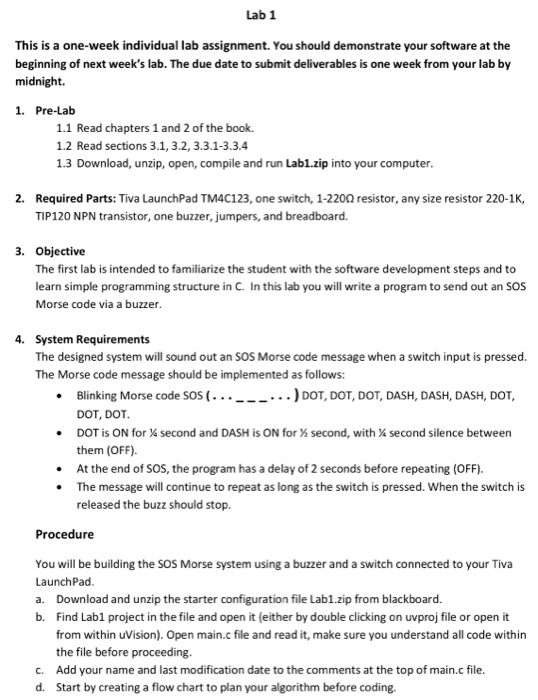
Lab 1 This is a one-week individual lab assignment. You should demonstrate your software at the beginning of next week's lab. The due date to submit deliverables is one week from your lab by midnight. 1. Pre-Lab 1.1 Read chapters 1 and 2 of the book. 1.2 Read sections 3.1, 3.2, 3.3.1-3.3.4 1.3 Download, unzip, open, compile and run Lab1.zip into your computer. 2. Required Parts: Tiva LaunchPad TM4C123, one switch, 1-2200 resistor, any size resistor 220-1K, TIP120 NPN transistor, one buzzer, jumpers, and breadboard. 3. Objective The first lab is intended to familiarize the student with the software development steps and to learn simple programming structure in C. In this lab you will write a program to send out an SOS Morse code via a buzzer. 4. System Requirements The designed system will sound out an SOS Morse code message when a switch input is pressed. The Morse code message should be implemented as follows: Blinking Morse code SOS (...___...) DOT, DOT, DOT, DASH, DASH, DASH, DOT, DOT, DOT. DOT is ON for a second and DASH is ON for X second, with X second silence between them (OFF). At the end of SOS, the program has a delay of 2 seconds before repeating (OFF). The message will continue to repeat as long as the switch is pressed. When the switch is released the buzz should stop. Procedure You will be building the SOS Morse system using a buzzer and a switch connected to your Tiva LaunchPad a. Download and unzip the starter configuration file Lab1.zip from blackboard. b. Find Lab1 project in the file and open it (either by double clicking on uvproj file or open it from within uVision). Open main.c file and read it, make sure you understand all code within the file before proceeding. C. Add your name and last modification date to the comments at the top of main.c file. d. Start by creating a flow chart to plan your algorithm before coding. Lab 1 This is a one-week individual lab assignment. You should demonstrate your software at the beginning of next week's lab. The due date to submit deliverables is one week from your lab by midnight. 1. Pre-Lab 1.1 Read chapters 1 and 2 of the book. 1.2 Read sections 3.1, 3.2, 3.3.1-3.3.4 1.3 Download, unzip, open, compile and run Lab1.zip into your computer. 2. Required Parts: Tiva LaunchPad TM4C123, one switch, 1-2200 resistor, any size resistor 220-1K, TIP120 NPN transistor, one buzzer, jumpers, and breadboard. 3. Objective The first lab is intended to familiarize the student with the software development steps and to learn simple programming structure in C. In this lab you will write a program to send out an SOS Morse code via a buzzer. 4. System Requirements The designed system will sound out an SOS Morse code message when a switch input is pressed. The Morse code message should be implemented as follows: Blinking Morse code SOS (...___...) DOT, DOT, DOT, DASH, DASH, DASH, DOT, DOT, DOT. DOT is ON for a second and DASH is ON for X second, with X second silence between them (OFF). At the end of SOS, the program has a delay of 2 seconds before repeating (OFF). The message will continue to repeat as long as the switch is pressed. When the switch is released the buzz should stop. Procedure You will be building the SOS Morse system using a buzzer and a switch connected to your Tiva LaunchPad a. Download and unzip the starter configuration file Lab1.zip from blackboard. b. Find Lab1 project in the file and open it (either by double clicking on uvproj file or open it from within uVision). Open main.c file and read it, make sure you understand all code within the file before proceeding. C. Add your name and last modification date to the comments at the top of main.c file. d. Start by creating a flow chart to plan your algorithm before coding
Step by Step Solution
There are 3 Steps involved in it

Get step-by-step solutions from verified subject matter experts
 Study Help