







Question: I need full answer from 1 to 1 0 Advanced Web Programming - Assignment 2 ( You need to use chapters 5 - 1 4
I need full answer from to
Advanced Web Programming Assignment You need to use chapters
A group of students may work together
Dr Yousef Kilani
marks Write an html document that shows the following output. Allow the user to enter student name, the marks of the first exam from second exam from final exam from choose the mark for participation from marks and selects the number of absences the students absent from the class.
marks Make an appropriate video that demonstrates how to use the form. Add this video to the end of the form. The video must have an audio that demonstrates how to use your application in details. hint: You may use the Camtasia studio software
mark The audio bird is played all the time while the document is opened.
marks Apply the following events:
a When the user focused the textboxes of ids: Name, fi se fn and p The audio rain mp is played and the audio
bird.mp is stopped.
b When the user blurred the textboxes of ids: Name, fi se fn and the audio bird. is replayed and the audio rain is stopped.
marks Compute the total grades for student as follows:
Total first second final participation
If the student absences exceeds times then his Grade is F
Else
If the number of absences for the students does not exceed times, then the grade is based on the total as follows:
tableTotalGradeFEDCBA
Put the student name, Total and grade in the textbox near the button as shown in the form above after the student pressed the compute button.
marks The user must enter a valid student name. A valid student name must contain only letters and spaces. Eg of valid names, "Ahmad Ali", "Yousef kitand" "Mona ahmad mahmoud". Eg of invalid names: ali". "rev "Mahmoud & If the user enters an invalid a message in red color below the textbox appears to indicate there is an error, a in red color beside the textbox is appeared, the border of the textbox becomes red, and the Audio noisy mp is played:
Student Name
Error: The name must contain only letters and spaces
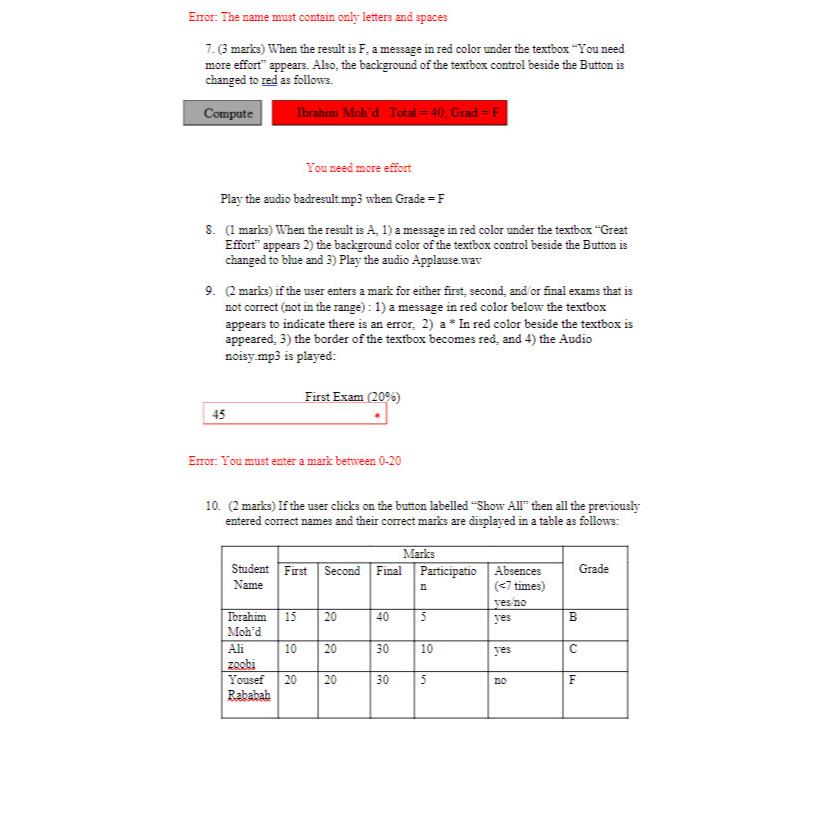
marks When the result is F a message in red color under the textbox "You need more effort" appears. Also, the background of the textbox control beside the Button is changed to red as follows.
You need more effort
Play the audio badresult when Grade
marks When the result is A a message in red color under the textbox "Great Effort" appears the background color of the textbox control beside the Button is changed to blue and Play the audio Applause.wav
marks if the user enters a mark for either first, second, and or final exams that is not correct not in the range : a message in red color below the textbox appears to indicate there is an error, a In red color beside the textbox is appeared, the border of the textbox becomes red, and the Audio noisy m is played:
Error: You must enter a mark between
marks If the user clicks on the button labelled "Show All" then all the previously entered correct names and their correct marks are displayed in a table as follows:
tabletableStudentNameFirst,Second,Final,tableParticipationtableAbsences timesyes noGradeyes,BtableAlizocbiyes,CtableYousefRababahnoF
Step by Step Solution
There are 3 Steps involved in it
1 Expert Approved Answer
Step: 1 Unlock

Question Has Been Solved by an Expert!
Get step-by-step solutions from verified subject matter experts
Step: 2 Unlock
Step: 3 Unlock
 Study Help