







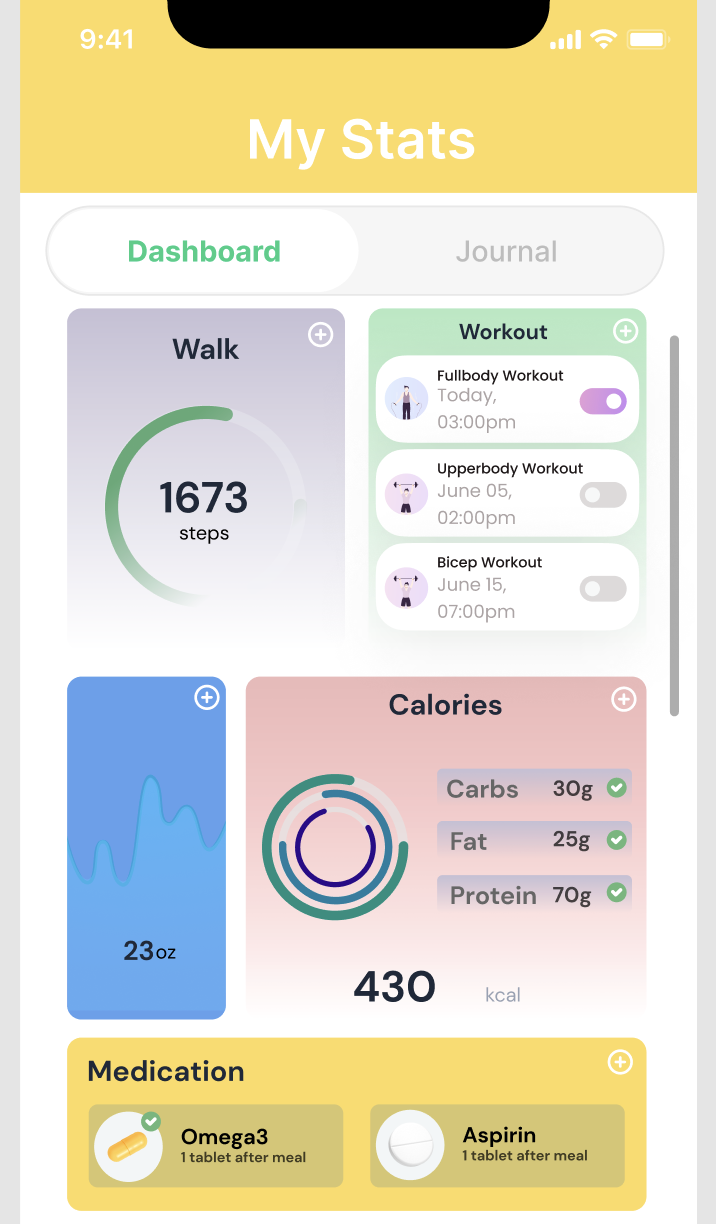
Question: I need full ReactNative code to directly replicate the following screenshot of an iPhone app page called 'MyStats' I have a rough outline of how
I need full ReactNative code to directly replicate the following screenshot of an iPhone app page called 'MyStats'
I have a rough outline of how the structure of React Native components would be based on the screenshot:
Header Section This would contain the signal strength, WiFi and battery icons, as well as the time and My Stats" title.
Navigation Tabs Two tabs Dashboard and "Journal" possibly using reactnativetabview or a custom component.
Content Cards Custom components for each section like Walk, Workout, Water Intake, Calories, and Medication. These would be scrollable horizontally.
Walk Card A circular progress bar that shows steps taken.
Workout Card A list of upcoming workouts with date and time.
Water Intake Card A visual representation of water intake.
Calories Card A donut chart displaying the macronutrient distribution and total calories.
Medication Card A section listing medications with a checkmark to indicate taken status.
Pseudocode of what the main page component could look like:
import React from 'react';
import View, Text, StyleSheet, ScrollView from 'reactnative';
const MyStatsScreen
return
Icons and My Stats" title
Dashboard and Journal tabs
;
;
const WalkCard
Custom component with a circular progress bar
;
const WorkoutCard
Custom component for workouts
;
const WaterIntakeCard
Custom component for water intake
;
const CaloriesCard
Custom component for calories
;
const MedicationCard
Custom component for medication
;
const styles StyleSheet.create
Styles for the components
;
export default MyStatsScreen;
Each card component WalkCard WorkoutCard, etc. would have its own internal structure and styling to match the design in the screenshot. Additionally, for the progress bars and charts, use libraries like reactnativesvg and reactnativechartkit.
I also need help with the corresponding CSS using StyleSheet.create to match the design as closely as possible.
Step by Step Solution
There are 3 Steps involved in it
1 Expert Approved Answer
Step: 1 Unlock

Question Has Been Solved by an Expert!
Get step-by-step solutions from verified subject matter experts
Step: 2 Unlock
Step: 3 Unlock
 Study Help