



Question: I need help accomplishing task 6 and I have pasted my sql code below, but I cannot get those statments to work properly. Im not
I need help accomplishing task 6 and I have pasted my sql code below, but I cannot get those statments to work properly. Im not sure how to set up the foreign keys in my creat statements and would like to know what changes I should make to them to have task 6 perform.
/* Delete the tables if they already exist */ drop table if exists Movie; drop table if exists Reviewer; drop table if exists Rating;
/* Create the schema for our tables */ create table Movie(mID int, title VARCHAR(200), year int, director VARCHAR(200)); create table Reviewer(rID int , name VARCHAR(200) ); create table Rating(rID int, mID int, stars int , ratingDate date);
/* Populate the tables with our data */ insert into Movie values(101, 'Gone with the Wind', 1939, 'Victor Fleming'); insert into Movie values(102, 'Star Wars', 1977, 'George Lucas'); insert into Movie values(103, 'The Sound of Music', 1965, 'Robert Wise'); insert into Movie values(104, 'E.T.', 1982, 'Steven Spielberg'); insert into Movie values(105, 'Titanic', 1997, 'James Cameron'); insert into Movie values(106, 'Snow White', 1937, null); insert into Movie values(107, 'Avatar', 2009, 'James Cameron'); insert into Movie values(108, 'Raiders of the Lost Ark', 1981, 'Steven Spielberg');
insert into Reviewer values(201, 'Sarah Martinez'); insert into Reviewer values(202, 'Daniel Lewis'); insert into Reviewer values(203, 'Brittany Harris'); insert into Reviewer values(204, 'Mike Anderson'); insert into Reviewer values(205, 'Chris Jackson'); insert into Reviewer values(206, 'Elizabeth Thomas'); insert into Reviewer values(207, 'James Cameron'); insert into Reviewer values(208, 'Ashley White');
insert into Rating values(201, 101, 2, '2011-01-22'); insert into Rating values(201, 101, 4, '2011-01-27'); insert into Rating values(202, 106, 4, null); insert into Rating values(203, 103, 2, '2011-01-20'); insert into Rating values(203, 108, 4, '2011-01-12'); insert into Rating values(203, 108, 2, '2011-01-30'); insert into Rating values(204, 101, 3, '2011-01-09'); insert into Rating values(205, 103, 3, '2011-01-27'); insert into Rating values(205, 104, 2, '2011-01-22'); insert into Rating values(205, 108, 4, null); insert into Rating values(206, 107, 3, '2011-01-15'); insert into Rating values(206, 106, 5, '2011-01-19'); insert into Rating values(207, 107, 5, '2011-01-20'); insert into Rating values(208, 104, 3, '2011-01-02');
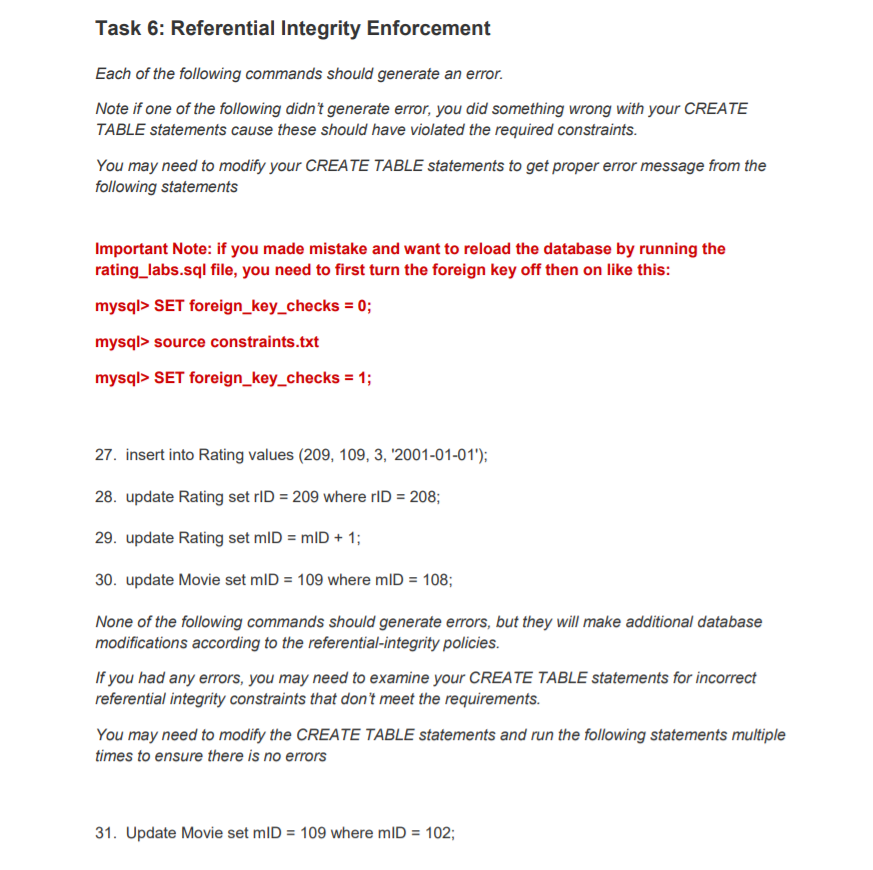
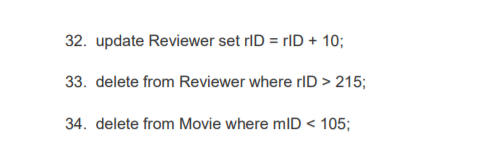
Task 6: Referential Integrity Enforcement Each of the following commands should generate an error. Note if one of the following didn't generate error, you did something wrong with your CREATE TABLE statements cause these should have violated the required constraints. You may need to moditfy your CREATE TABLE statements to get proper error message from the following statements Important Note: if you made mistake and want to reload the database by running the rating_labs.sql file, you need to first turn the foreign key off then on like this: mysql> SET foreign-key-checks = 0; mysql> source constraints.txt mysql> SET foreign_key_ checks1; 27. insert into Rating values (209, 109, 3, 2001-01-01"); 28. update Rating set rID = 209 where rlD = 208; 29. update Rating set miD = mID + 1 ; 30. update Movie set mlD = 109 where m|D-108; None of the following commands should generate errors, but they will make additional database modifications according to the referential-integrity policies. If you had any errors, you may need to examine your CREATE TABLE statements for incorrect referential integrity constraints that don't meet the requirements. You may need to modify the CREATE TABLE statements and run the following statements multiple times to ensure there is no errors 31. Update Movie set mlD = 109 where mlD 102; Task 6: Referential Integrity Enforcement Each of the following commands should generate an error. Note if one of the following didn't generate error, you did something wrong with your CREATE TABLE statements cause these should have violated the required constraints. You may need to moditfy your CREATE TABLE statements to get proper error message from the following statements Important Note: if you made mistake and want to reload the database by running the rating_labs.sql file, you need to first turn the foreign key off then on like this: mysql> SET foreign-key-checks = 0; mysql> source constraints.txt mysql> SET foreign_key_ checks1; 27. insert into Rating values (209, 109, 3, 2001-01-01"); 28. update Rating set rID = 209 where rlD = 208; 29. update Rating set miD = mID + 1 ; 30. update Movie set mlD = 109 where m|D-108; None of the following commands should generate errors, but they will make additional database modifications according to the referential-integrity policies. If you had any errors, you may need to examine your CREATE TABLE statements for incorrect referential integrity constraints that don't meet the requirements. You may need to modify the CREATE TABLE statements and run the following statements multiple times to ensure there is no errors 31. Update Movie set mlD = 109 where mlD 102
Step by Step Solution
There are 3 Steps involved in it

Get step-by-step solutions from verified subject matter experts