







Question: I need help adding rule 8 5 to the following excel. I am unsure how to enter the formula. I attached a jpg of the
I need help adding rule to the following excel. I am unsure how to enter the formula. I attached a jpg of the excel as well as the instructions below that tries to explain it I am lost.
With Excel open and ready to go your job is to:
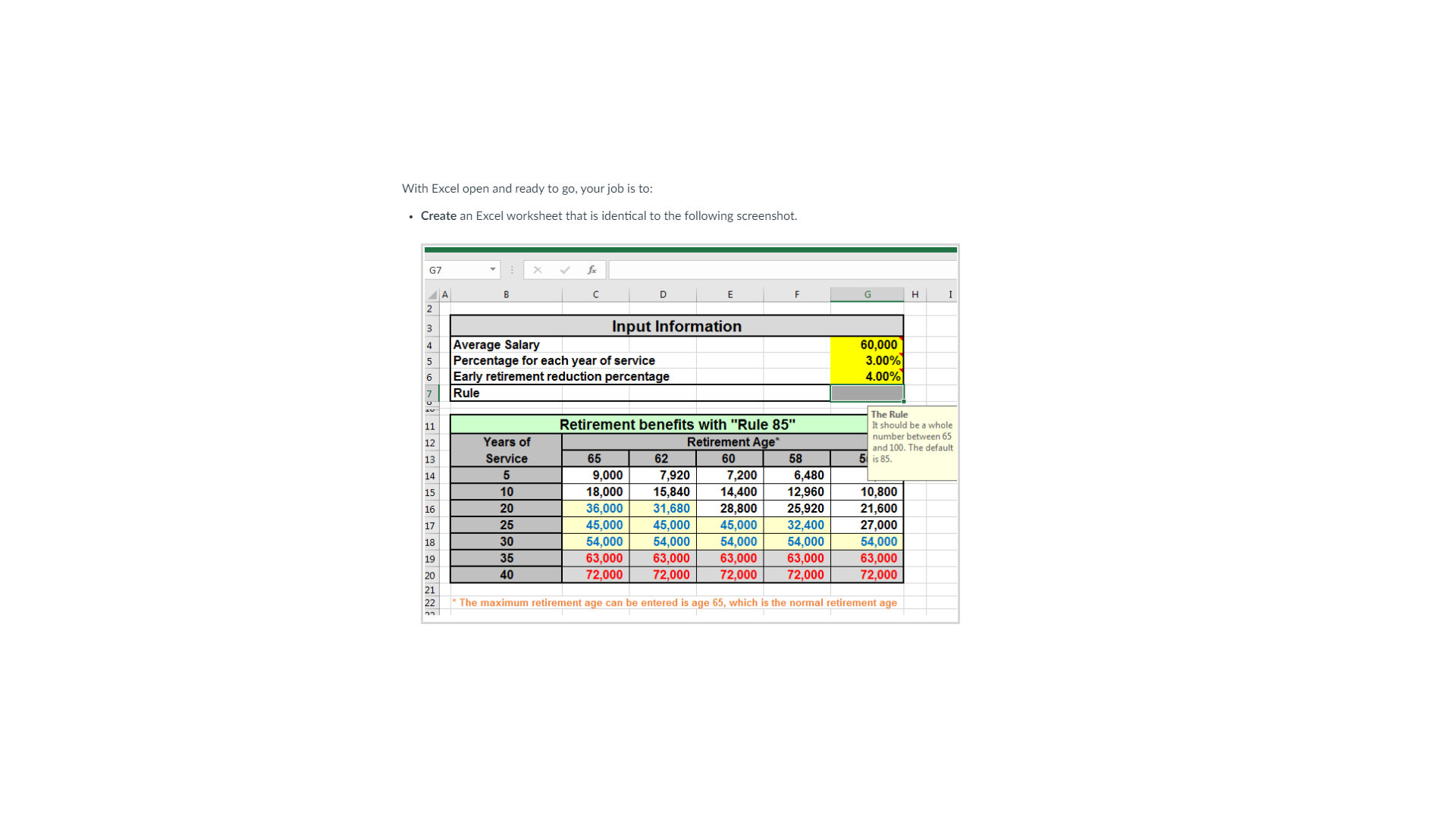
Create an Excel worksheet that is identical to the following screenshot.
Notes on This Screenshot: There are three major input items, highlighted with yellow background, for the average salary, the percentage for each year of service, and early retirement reduction percentage. The normal retirement age could be another input item to make the model more flexible, in case that the normal retirement age is not age However, you can assume the normal retirement age.
You should have an input cell to hold "the rule of age plus service requirement for unreduced early retirement benefit, as noted in the Rule Other popular rules are Rule and Rule Once you have a firm understanding of this, then:
Format the Excel worksheet with the following requirements:
Use proper page formats and print setup
Include the retirement ages and years of service in the row headings and column headings.
Include the default rule of Rule which means no early retirement reduction if age plus service is at least The input for the Rule should be a whole number between and
Use Excel formulas to calculate the body of the table which are the retirement benefits.
Notes on Color: If the benefit in a given cell divided by the average salary is above but below then it should be bold and in blue color with a light yellow fill color for the background. if the benefit in a cell divided by the average salary is at least then this cell should be bold and in red color with a gray background color.
Provide comment instructions Like the Rule comment instructions in the screenshot above for the Average salary, percentage for each year of service and early retirement reduction percentage.
Create the formula in one cell in the table and copypaste to the rest of the table.
Step by Step Solution
There are 3 Steps involved in it
1 Expert Approved Answer
Step: 1 Unlock

Question Has Been Solved by an Expert!
Get step-by-step solutions from verified subject matter experts
Step: 2 Unlock
Step: 3 Unlock
 Study Help