







Question: I need help adding the maditory instructions 5-8 please, thank you! c++. The code is code: //************************************************************************** // Program: Charge Account Numbers // // Purpose:
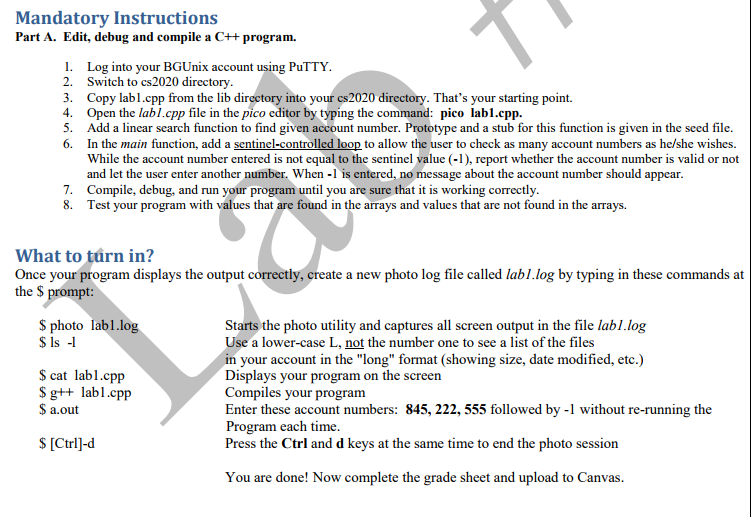 I need help adding the maditory instructions 5-8 please, thank you! c++. The code is
code:
//**************************************************************************
// Program: Charge Account Numbers
//
// Purpose: This program checks whether a number entered by the user is a
// valid charge account number.
//
// Input: The user is asked to enter a three-digit number to be checked.
//
// Processing: The main function uses an initialization list to initialize
// an array with charge account numbers. Then it calls a function
// to display the list. The user is asked to enter a charge
// number. The main function calls another function to check the
// validity of this number and then it displays a message
// reporting the results.
//
// Output: The program displays the list of account numbers and a message
// indicating whether the number entered by the user is valid
// or not.
//
// Author: Your name
// Class: CS 2020
// Semester: Spring 2018
//**************************************************************************
#include
#include
using namespace std;
// Function prototypes
void displayAcctNos(int[], int);
// Parameters: array, value2find, num_of_elements
int searchList(int[], int, int);
int main()
{
const int ARY_SIZE = 9;
// Array of account numbers
int accounts[ARY_SIZE] =
{ 565, 452, 789,
877, 845, 130,
808, 456, 555 };
int accountNumber;
int position;
//********************************************************
// Display account numbers
//********************************************************
displayAcctNos(accounts, ARY_SIZE);
//********************************************************
// Get an account number from the user.
//********************************************************
cout
cin >> accountNumber;
//***********************************************************
// Locate given account number in the array accounts.
// Display appropriate message to the user about the account.
// Allow multiple account lookups until -1 if entered by the user.
//***********************************************************
cout
return 0;
}
//*********************************************************************
// Function: displayAcctNos
// Description: Displays the list of charge numbers.
// Parameters: array of account numbers
// howmany - number of elements to process
// Returns: void
//*********************************************************************
void displayAcctNos(int acctNos[], int howmany)
{
cout
cout
for (int k = 0; k
cout
}
//*********************************************************************
// Function: searchList
// Description: This function searches the array of charge numbers for the
// number passed into value using the linear search algorithm.
// If the number is found the function returns the position of
// the value in the array.
// Parameters: array of account numbers
// value - locate this account number in the array
// howmany - number of elements to process
// Return: If the number is not found it returns -1.
//*********************************************************************
int searchList(int accounts[], int value, int howmany)
{
return -1;
}
Mandatory Instructions Part A. Edit, debug and compile a C++ program. 1. 2. 3. 4. 5. 6. Log into your BGUnix account using PuTTY Switch to cs2020 directory Copy labl.cpp from the lib directory into your cs2020 directory. That's your starting point. Open the labl.cpp file in the pico editor by typing the command: pico labl.cpp. Add a linear search function to find given account number. Prototype and a stub for this function is given in the seed file. In the main function, add a sentinel-control While the account number entered is not equal to the sentinel value (1), report whether the account number is valid or not and let the user enter another number. When -1 is entered, no message about the account number should appear. Compile, debug, and run your program until you are sure that it is working correctly Test your program to allow the user to check as many account numbers as he/she wishes 7. 8. with values that are found in the arrays and values that are not found in the arrays. What to trn in? Once your program displays the output correctly, create a new photo log file called labI.log by typing in these commands at the $ S photo labl.log $Is Starts the photo utility and captures all screen output in the file labl.log Use a lower-case L, not the number one to see a list of the files in your account in the "long" format (showing size, date modified, etc.) Displays your program on the screen Compiles your program Enter these account numbers: 845,222,555 followed by -1 without re-running the Program each time Press the Ctrl and d keys S cat labl.cpp S gtt labl.cpp $ a.out S [Ctrl]-d at the same time to end the photo session You are done! Now complete the grade sheet and upload to Canvas
Step by Step Solution
There are 3 Steps involved in it

Get step-by-step solutions from verified subject matter experts
 Study Help