







Question: i need help adjusting my java code so that it checks all the boxes for the objectives and outputs the correct terminal results. I need
i need help adjusting my java code so that it checks all the boxes for the objectives and outputs the correct terminal results. I need to know where to put in the input for different bread types and what it looks like in an if else statementa nd I need to know where to ohave the program output the summary of the order with the amount of detail they are asking for including the discount if applicablepackage ICTJava. Project;
import java.util.Scanner;
public class project
public static void mainString args
Scanner scanner new Scanner
System.in;
String menuItems Coffee "Tea", "Sandwich", "Muffin", "Juice";
double prices ;
System.out.printlnWelcome to the Cafe Ordering System!";
System.out.printlnMenu: ;
for int i ; i menuItems.length; i
System.out.printfds $fn i menuItemsi pricesi;
System.out.printlnEnter the number of the item you want to order:";
int itemChoice scanner.nextInt;
System.out.printlnEnter the quantity you want to order:";
int quantity scanner.nextInt;
double customizationCost ;
String customization ;
if itemChoice
System.out.printlnYou selected Coffee.";
double totalCost pricesitemChoice customizationCost quantity;
if totalcost
totalcost;
System.out.printlnOrder Summary:";
System.out.printfItem: sn menuItemsitemChoice;
System.out.printfQuanity: dn quantity;
ifcustomization.isEmpty
zations::sn customization.trim;
System.out.printfCustomizations: sn customization.trim;
System.out.printfTotal cost: $fn totalCost;
scanner.close;
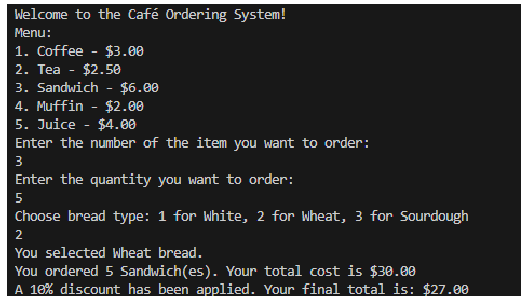
Welcome to the Caf Ordering System!
Menu:
Coffee $
Tea $
Sandwich $
Muffin $
Juice $
Enter the number of the item you want to order ;
Enter the quantity you want to order:
Choose bread type: for White, for Wheat, for Sourdough
You selected Wheat bread.
You ordered Sandwiches Your total cost is $
A discount has been applied. Your final total is: $
Step by Step Solution
There are 3 Steps involved in it
1 Expert Approved Answer
Step: 1 Unlock

Question Has Been Solved by an Expert!
Get step-by-step solutions from verified subject matter experts
Step: 2 Unlock
Step: 3 Unlock
 Study Help