







Question: i need help!! Case Tableau Background: See Chapter 1. The forensic accounting analysis determined that two accounting personnel were identified as inappropriately receiving disbursements through
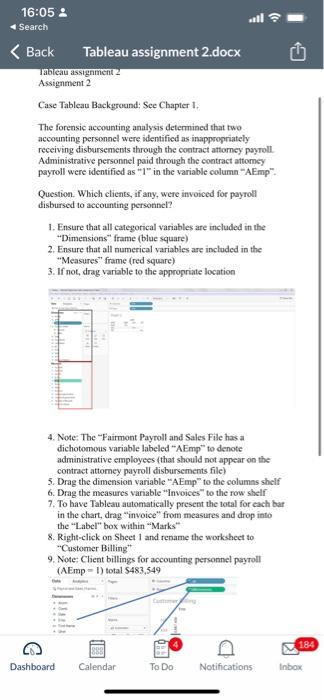
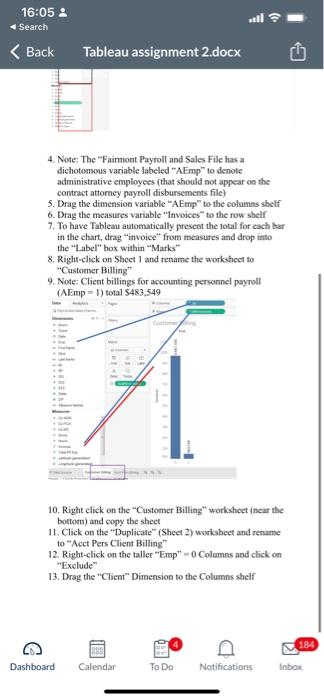
Case Tableau Background: See Chapter 1. The forensic accounting analysis determined that two accounting personnel were identified as inappropriately receiving disbursements through the contract attorncy payroll. Administrative personnel paid through the contract attomey payroll were identified as "1" in the variable column "AEmp". Question. Which clients, if any, were invoiced for payroll disbursed to accounting personnel? 1. Ensure that all categonical variables are included in the "Dimensions" frame (blue square) 2. Ensure that all numerical variables are included in the "Measures" frame (red square) 3. If not, drag variable to the appropriate location 4. Note: The "Fairmont Payroll and Sales File has a dichotomous variable labeled "AEmp" to denote administrative employees (that should not appear on the contract attorney payroll disbursements file) 5. Drag the dimension variable "AEmp" to the columns shelf 6. Drag the measures variable "Invoices" to the row shelf 7. To have Tableau automatically present the lotal for each bar in the chart, drag "invoice" from measures and drop into the "Label" box within "Marks" 8. Right-click on Sheet 1 and rename the worksheet to "Customer Billing" 9. Note; Client billings for accounting personnel payroll ( AEmp =1) total $483.549 4. Note: The "Fairmont Payroll and Sales File has a dichotomous variable labeled "AEmp" to denote administrative employees (that should not appear on the contract attomey payroll disbursements file) 5. Drag the dimension variable "AEmp" to the columns shelf 6. Drag the measures variable "lnvoices" to the row shelf 7. To bave Tableau automatically present the otal for each bar in the chart, drag "invoice" from measures and drop into the "Label" box within "Marks" 8. Right-click on Sheet 1 and rename the worksheet to "Customer Billing" 9. Note: Client billings for accounting personnel payroll (AEmp=1) total $483,549 10. Right click on the "Customer Billing" workshect incar the bottom) and copy the sheet 11. Click on the "Duplicate" (Sheet 2) worksheet and rename to "Acet Pers Client Billing" 12. Right-click on the taller "Emp" =0 Columns and click on "Exclude" 13. Drag the "Client" Dimension to the Columns shelf Case Tableau Background: See Chapter 1. The forensic accounting analysis determined that two accounting personnel were identified as inappropriately receiving disbursements through the contract attorncy payroll. Administrative personnel paid through the contract attomey payroll were identified as "1" in the variable column "AEmp". Question. Which clients, if any, were invoiced for payroll disbursed to accounting personnel? 1. Ensure that all categonical variables are included in the "Dimensions" frame (blue square) 2. Ensure that all numerical variables are included in the "Measures" frame (red square) 3. If not, drag variable to the appropriate location 4. Note: The "Fairmont Payroll and Sales File has a dichotomous variable labeled "AEmp" to denote administrative employees (that should not appear on the contract attorney payroll disbursements file) 5. Drag the dimension variable "AEmp" to the columns shelf 6. Drag the measures variable "Invoices" to the row shelf 7. To have Tableau automatically present the lotal for each bar in the chart, drag "invoice" from measures and drop into the "Label" box within "Marks" 8. Right-click on Sheet 1 and rename the worksheet to "Customer Billing" 9. Note; Client billings for accounting personnel payroll ( AEmp =1) total $483.549 4. Note: The "Fairmont Payroll and Sales File has a dichotomous variable labeled "AEmp" to denote administrative employees (that should not appear on the contract attomey payroll disbursements file) 5. Drag the dimension variable "AEmp" to the columns shelf 6. Drag the measures variable "lnvoices" to the row shelf 7. To bave Tableau automatically present the otal for each bar in the chart, drag "invoice" from measures and drop into the "Label" box within "Marks" 8. Right-click on Sheet 1 and rename the worksheet to "Customer Billing" 9. Note: Client billings for accounting personnel payroll (AEmp=1) total $483,549 10. Right click on the "Customer Billing" workshect incar the bottom) and copy the sheet 11. Click on the "Duplicate" (Sheet 2) worksheet and rename to "Acet Pers Client Billing" 12. Right-click on the taller "Emp" =0 Columns and click on "Exclude" 13. Drag the "Client" Dimension to the Columns shelf
Step by Step Solution
There are 3 Steps involved in it

Get step-by-step solutions from verified subject matter experts
 Study Help