







Question: I need help coding these milestones in the code below: The milestone descriptions: Here's the code to test milestones: c1.txt c2.txt c3.txt Output for the
I need help coding these milestones in the code below: 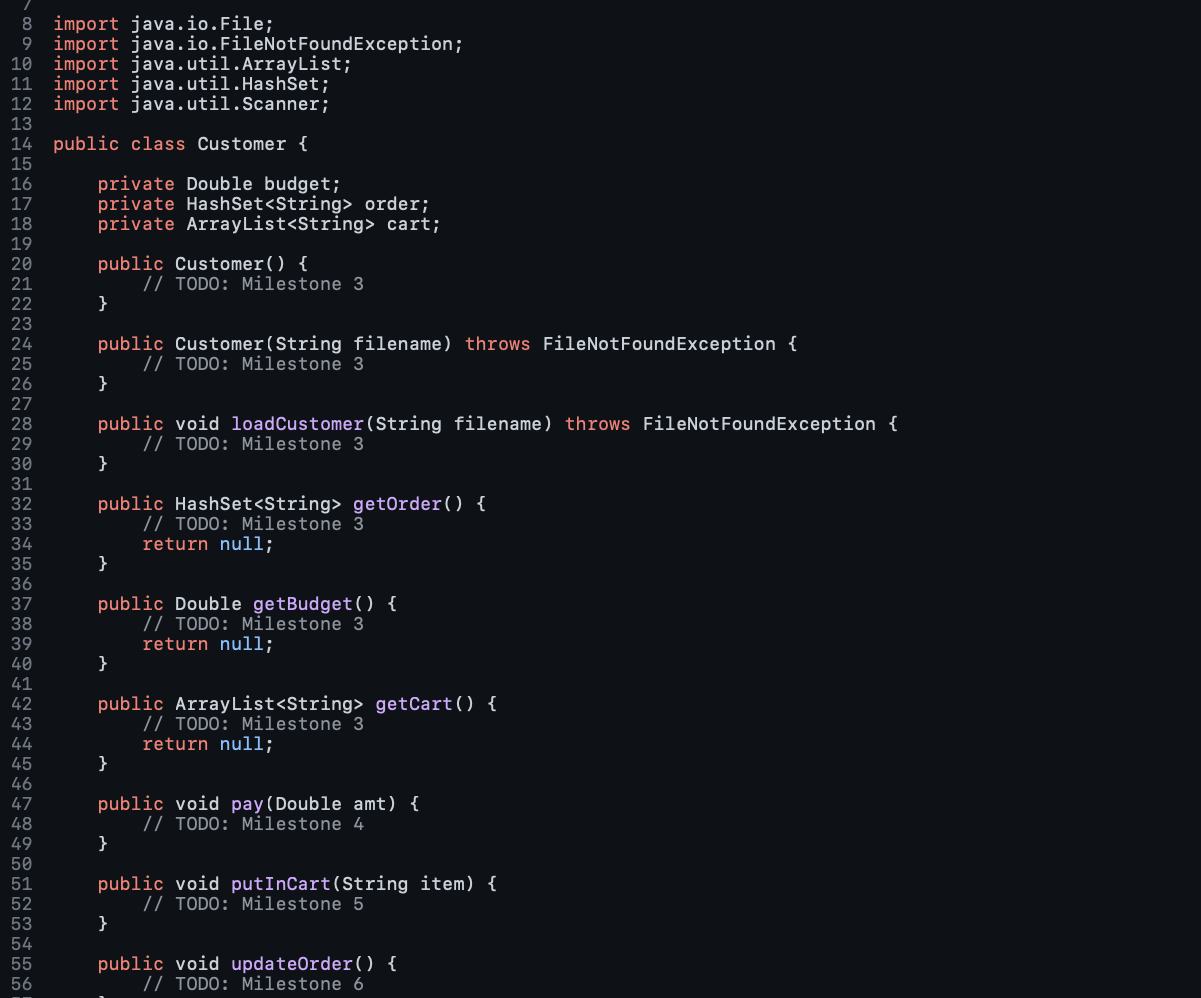
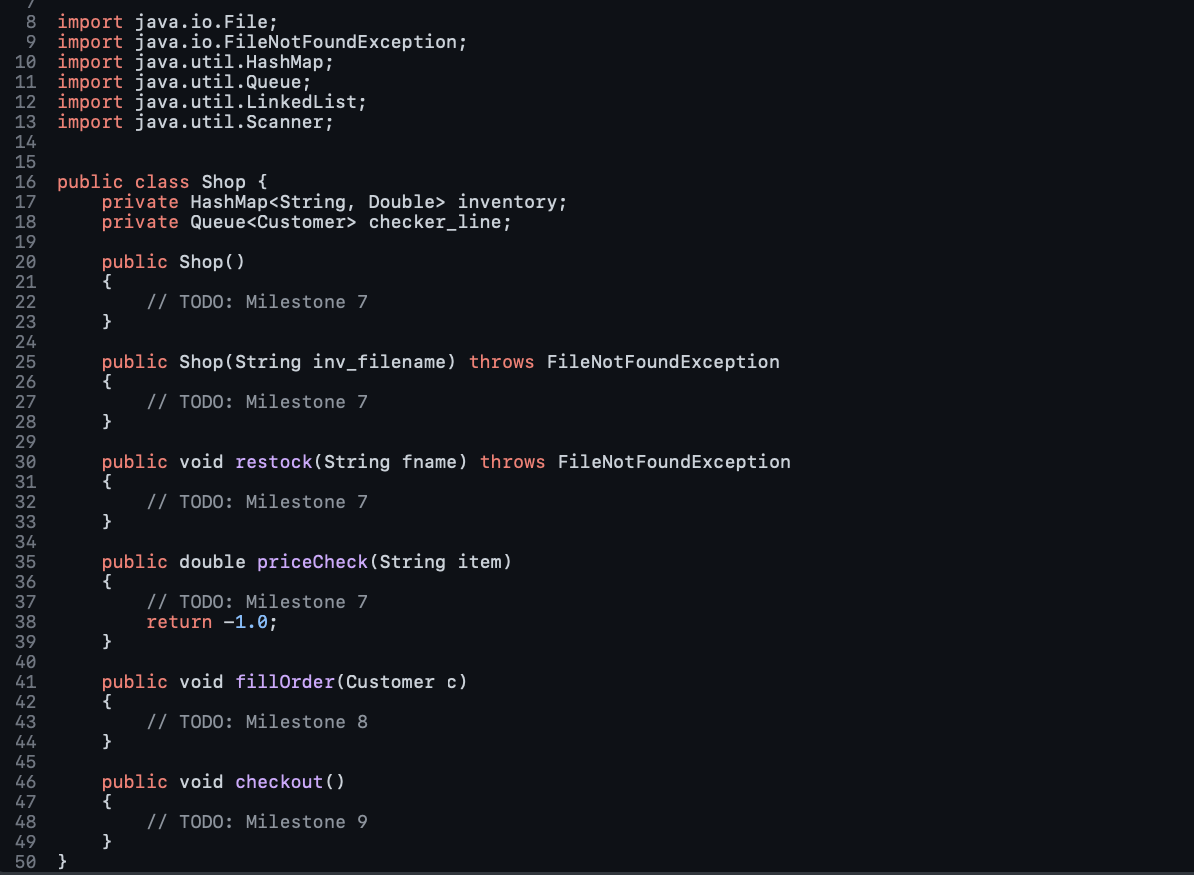
The milestone descriptions:
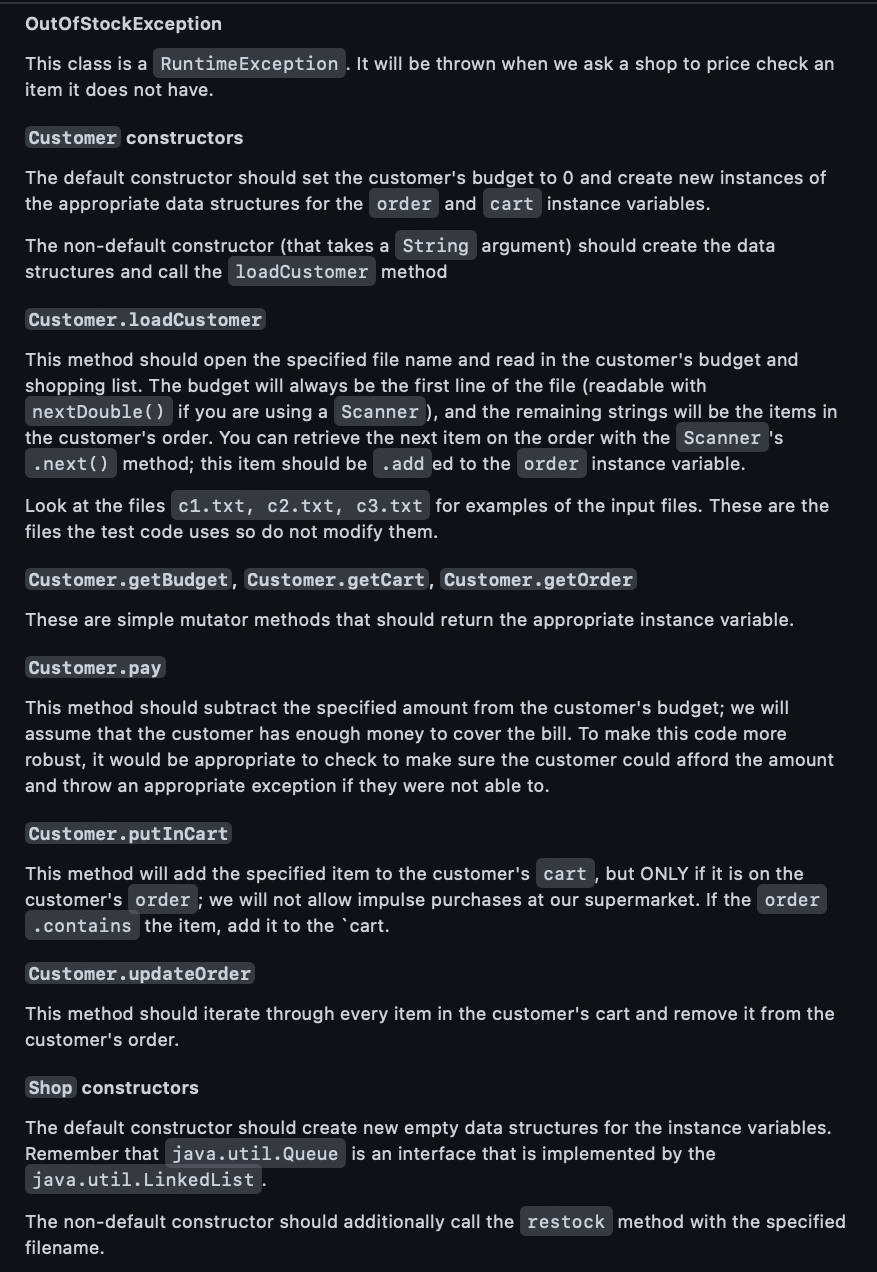
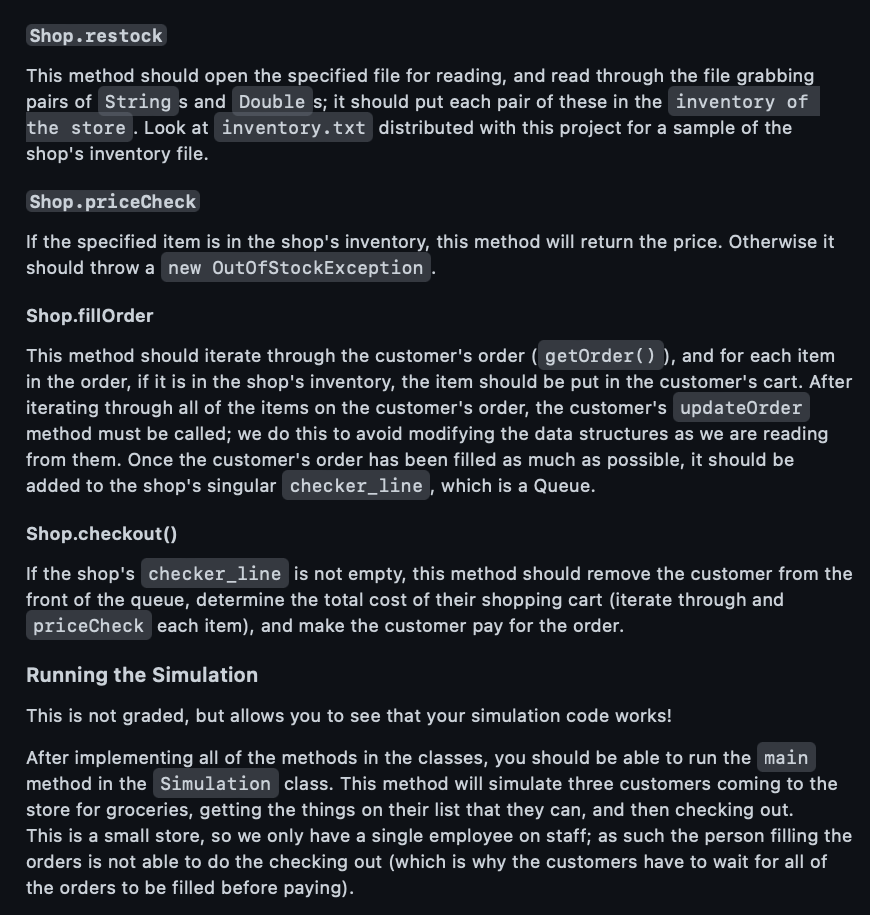
Here's the code to test milestones: 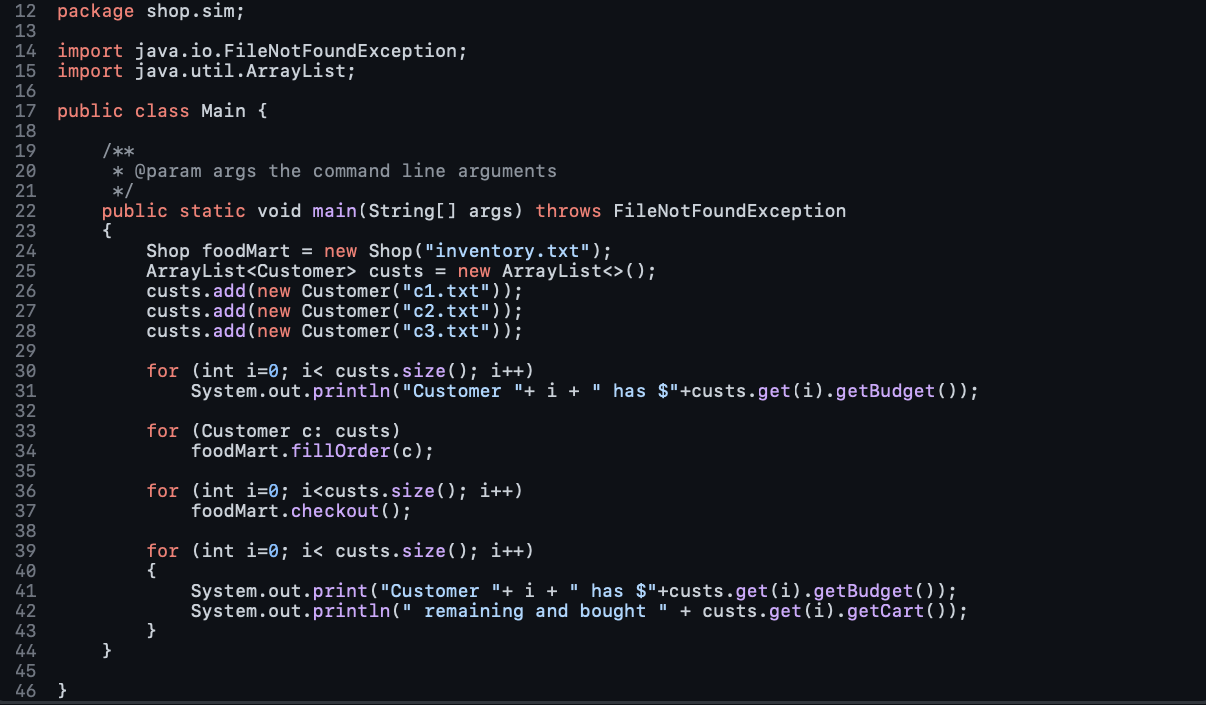 c1.txt
  c2.txt
  c3.txt
  Output for the code: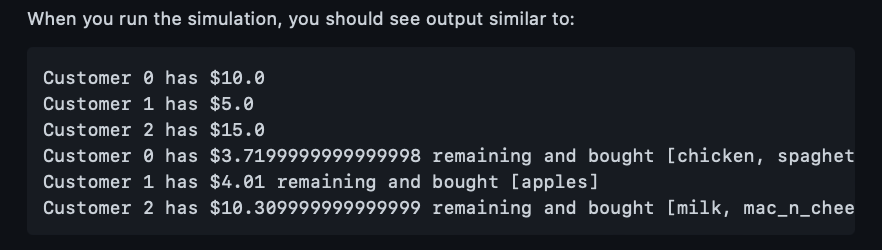
OutOfStockException This class is a RuntimeException. It will be thrown when we ask a shop to price check an item it does not have. Customer constructors The default constructor should set the customer's budget to 0 and create new instances of the appropriate data structures for the order and cart instance variables. The non-default constructor (that takes a String argument) should create the data structures and call the loadCustomer method Customer.loadCustomer This method should open the specified file name and read in the customer's budget and shopping list. The budget will always be the first line of the file (readable with nextDouble () if you are using a Scanner ), and the remaining strings will be the items in the customer's order. You can retrieve the next item on the order with the Scanner 's method; this item should be . add ed to the order instance variable. Look at the files c1.txt, c2.txt, c3.txt for examples of the input files. These are the files the test code uses so do not modify them. Customer.getBudget, Customer.getCart, Customer.get0rder These are simple mutator methods that should return the appropriate instance variable. Customer.pay This method should subtract the specified amount from the customer's budget; we will assume that the customer has enough money to cover the bill. To make this code more robust, it would be appropriate to check to make sure the customer could afford the amount and throw an appropriate exception if they were not able to. Customer.putinCart This method will add the specified item to the customer's cart, but ONLY if it is on the customer's order ; we will not allow impulse purchases at our supermarket. If the the item, add it to the 'cart. This method should iterate through every item in the customer's cart and remove it from the customer's order. Shop constructors The default constructor should create new empty data structures for the instance variables. Remember that java. util. Queue is an interface that is implemented by the java.util. LinkedList . The non-default constructor should additionally call the method with the specified filename. Shop.restock This method should open the specified file for reading, and read through the file grabbing pairs of String s and Double s; it should put each pair of these in the inventory of the store. Look at inventory.txt distributed with this project for a sample of the shop's inventory file. If the specified item is in the shop's inventory, this method will return the price. Otherwise it should throw a new OutOfStockException . Shop.fillorder This method should iterate through the customer's order ( getOrder ( )), and for each item in the order, if it is in the shop's inventory, the item should be put in the customer's cart. After iterating through all of the items on the customer's order, the customer's update0rder method must be called; we do this to avoid modifying the data structures as we are reading from them. Once the customer's order has been filled as much as possible, it should be added to the shop's singular checker_line, which is a Queue. Shop.checkout() If the shop's is not empty, this method should remove the customer from the front of the queue, determine the total cost of their shopping cart (iterate through and each item), and make the customer pay for the order. Running the Simulation This is not graded, but allows you to see that your simulation code works! After implementing all of the methods in the classes, you should be able to run the main method in the Simulation class. This method will simulate three customers coming to the store for groceries, getting the things on their list that they can, and then checking out. This is a small store, so we only have a single employee on staff; as such the person filling the orders is not able to do the checking out (which is why the customers have to wait for all of the orders to be filled before paying). \begin{tabular}{l} 6 lines (6 sloc) | 43 Bytes \\ 12345610.00spaghettiapplesporkcheesechicken \\ \hline \end{tabular} \begin{tabular}{|l|l|l|l|l|} 2 & lines (2 sloc) \\ \hline 12 Bytes \\ 2 & 5.00 \\ 2 & apples \\ \hline \end{tabular} \begin{tabular}{|l|l|} \hline 4 & lines (4 sloc) \\ \multicolumn{1}{|c|}{31 Bytes } \\ \hline 1 & 15.00 \\ 2 & apples \\ 3 & milk \\ 4 & mac_n_cheese \\ \hline \end{tabular} When you run the simulation, you should see output similar to: Customer has $10.0 Customer 1 has $5.0 Customer 2 has $15.0 Customer has $3.7199999999999998 remaining and bought [chicken, spaghet Customer 1 has $4.01 remaining and bought [apples] Customer 2 has $10.309999999999999 remaining and bought [milk, mac_n_chee
Step by Step Solution
There are 3 Steps involved in it

Get step-by-step solutions from verified subject matter experts
 Study Help