







Question: I need help coding this on linux. I am not sure how to start. Please explain line by line on mac linux terminal test.c 1.
I need help coding this on linux. I am not sure how to start. Please explain line by line on mac linux terminal 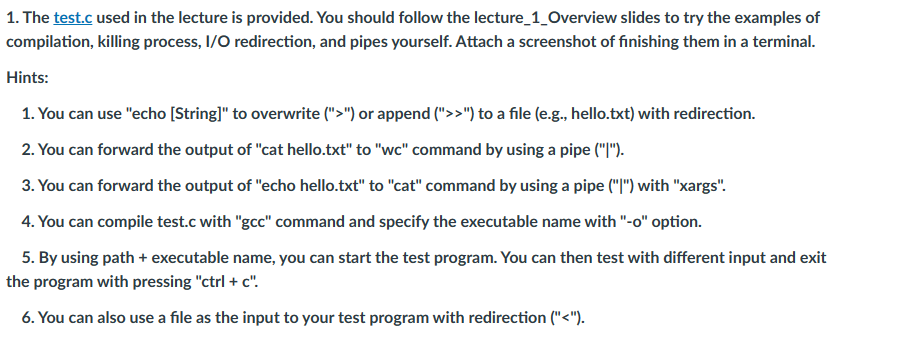
test.c 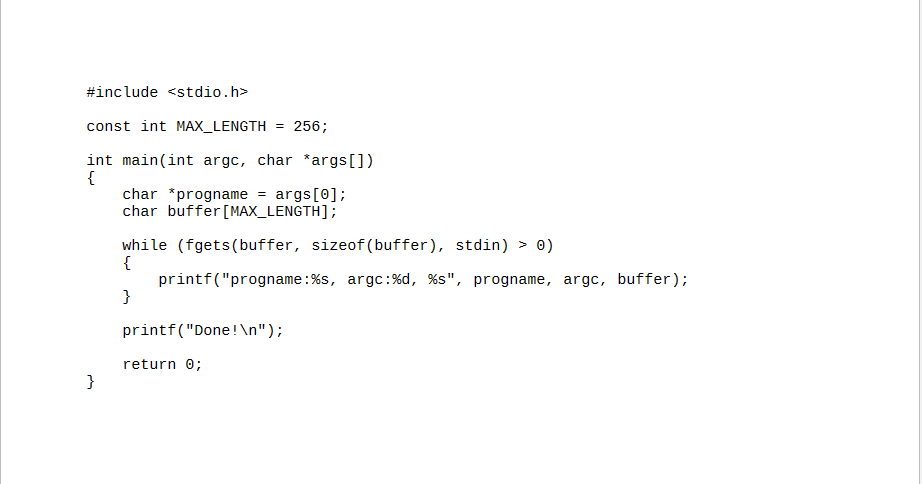
1. The test.c used in the lecture is provided. You should follow the lecture_1_Overview slides to try the examples of compilation, killing process, I/O redirection, and pipes yourself. Attach a screenshot of finishing them in a terminal. Hints: 1. You can use "echo [String]" to overwrite (">") or append (">>") to a file (e.g., hello.txt) with redirection. 2. You can forward the output of "cat hello.txt" to "wc" command by using a pipe ("|"). 3. You can forward the output of "echo hello.txt" to "cat" command by using a pipe ("|") with "xargs". 4. You can compile test.c with "gcc" command and specify the executable name with "-o" option. 5. By using path + executable name, you can start the test program. You can then test with different input and exit the program with pressing "ctrl + ". 6. You can also use a file as the input to your test program with redirection (
Step by Step Solution
There are 3 Steps involved in it

Get step-by-step solutions from verified subject matter experts
 Study Help