







Question: i need help completing HTML 214 HTML Chapter Crating Tables in a wee in a Web Site Using an External Style Sheet In the Lab
i need help completing
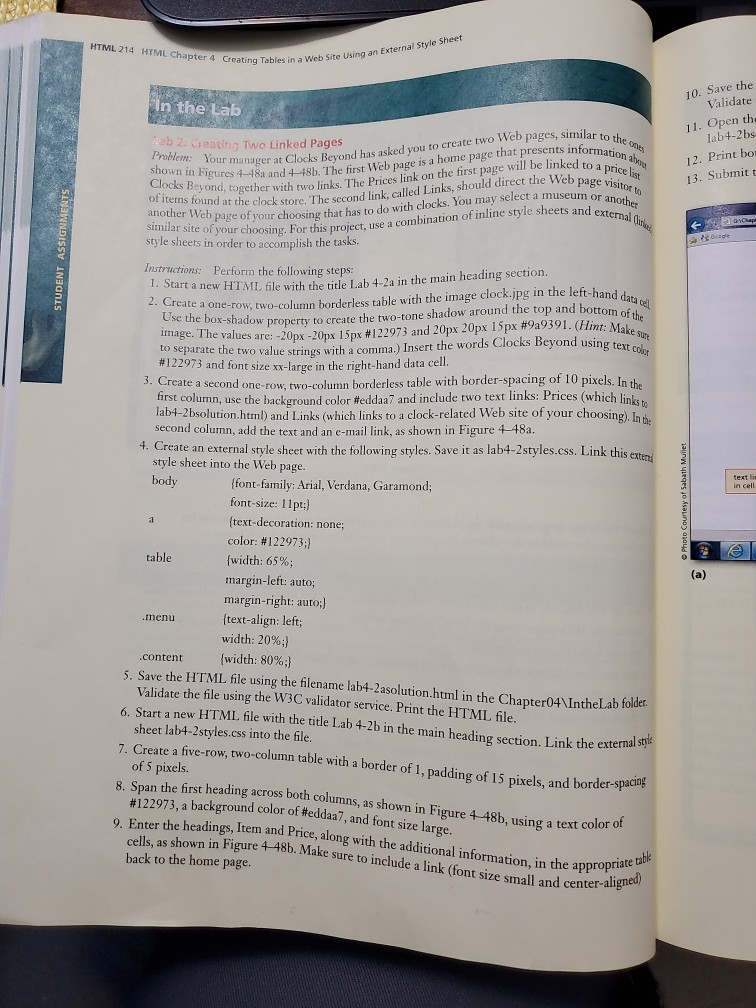
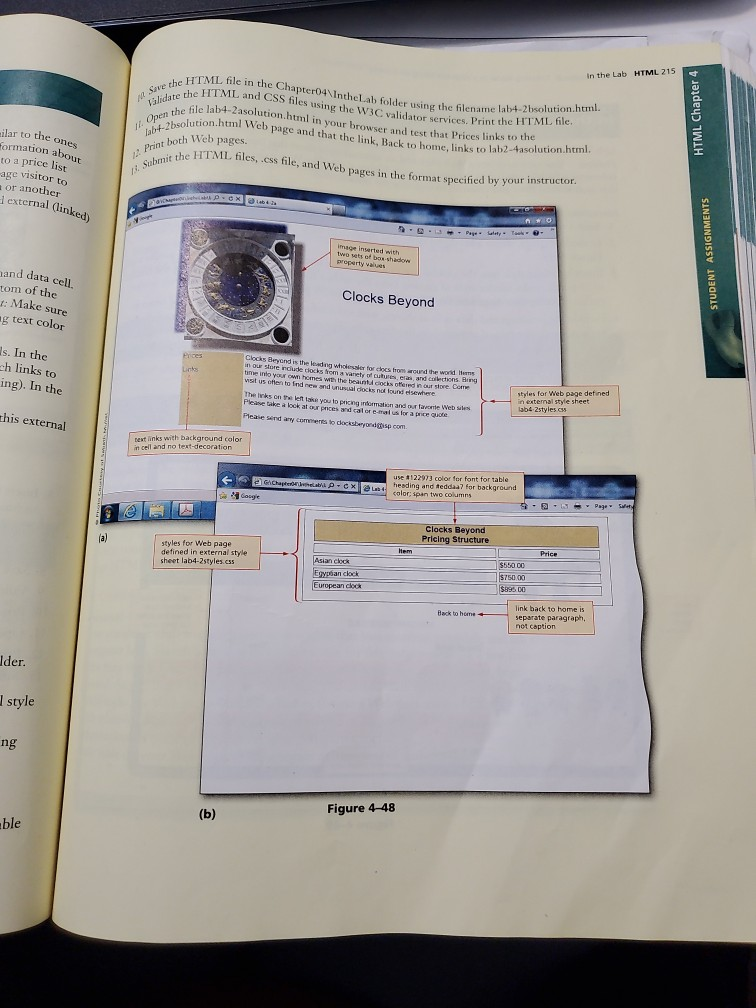
HTML 214 HTML Chapter Crating Tables in a wee in a Web Site Using an External Style Sheet In the Lab lar to the OVE ormation and ab 2. Leating Two Linked Pages Problem: Your manager at Clo shown in Figures 4-48a and 466 Clocks Beyond, together with of items found at the clock store. The 10. Save the Validate 11. Open the lab4-2bs 12. Print bos 13. Submitt to a price list se Web page visitor to manager at Clocks Bevond has asked you to create two Web pages, similar. Figures 4-48a and 48h. The first Web page is a home page that presents informa yond, together with two links The Prices link on the first page will be linked to a ad at the clock store. The second link, called Links, should direct the Web pag of your choosing that has to do with clocks. You may select a museum a combination of inline style sheets and exte or another d external STUDENT ASSIGNMENTS Similar site of your choosing. For this project, use a com style sheets in order to accomplish the tasks. hvand data del int: Make sur ks Beyond using text color Instructions: Perforin the following steps: start a new HTML file with the title Lab 4-2a in the main heading section. 2. Create a one-row, two-column borderless table with the image clock.jpg in the left-hand da ox-shadow property to create the two-tone shadow around the top and bottom of the image. The values are: -20px -20px 15px #122973 and 20px 20px 15px #9a9391. (Hint: Mak to separate the two value strings with a comma.) Insert the words Clocks Beyond using tex #122973 and font size xx-large in the right-hand data cell. te a second one-row, two-column borderless table with border-spacing of 10 pixels. In the t column, use the background color #eddaa7 and include two text links: Prices (which linken lab4-2 bsolution.html) and Links (which links to a clock-related Web site of your choosing). In second column, add the text and an e-mail link, as shown in Figure 4-48a. 4. Create an external style sheet with the following styles. Save it as lab4-2styles.css. Link this exten style sheet into the Web page. body {font-family: Arial,Verdana, Garamond; font-size: 11pt;) (text-decoration: none; color: #122973:1 table {width: 65%; margin-left: auto; margin-right: auto;) .nenu {text-align: left; width: 20%;) .content {width: 80%;} Photo Courtesy of Sabath Mullet 5. Save the HTML file using the filename lab4-2 asolution.html in the Chapter04\IntheLab folder Validate the file using the W3C validator service. Print the HTML file. 6. Start a new HTML file with the title Lab 4-2b in the main the main heading section. Link the external sty sheet lab4-2 styles.css into the file. Create a five-row, two-column table with a border of 1, padding of 15 nixels and border-spacem of 5 pixels. Span the first heading across both columns, as shown in Figure 448b, using a text color of #122973, a background color of #eddaa7, and font size large. headings, Item and Price, along with the additional information in the approp as shown in Figure 4-48b. Make sure to include a link (font size small and center-alig back to the home page. he appropriate table er aligned) In the Lab HTML 215 She the Save validate the Open the file HTML file in the Chapter04\IntheLab folder using the filename la the HTML and CSS files usin sing the W3C validator service Print the HIML hic file lab4-2solution.html in your browser and test that Prices links to e page and that the link. Back to home, links to lab2-4asolt folder using the filename lab4-2bsolution.html HTML Chapter 4 ilar to the ones formation about +-2bsolution.html Web pag print both Web pages. test that Prices links to the o home, links to lab2-4asolution.html the HTML files, .css file, and Web pages in the format specified by your inst Submit the to a price list age visitor to or another external linked PO ne mase inserted with tweets of box-shadow property STUDENT ASSIGNMENTS and data cell. tom of the t: Make sure ng text color Clocks Beyond s. In the ch links to ing). In the Clocks Beyond is the leading w our store include clocks from i e for os from around the world them youtube las and collections. Bing time into your own homes the heat cocks offered in our store. Dom wistusten to find new and unusual docks not found elsewhere The links on the left you to program and our farme Web Please take a look at our prices and calore al for a price quote Please send any comments to dockbyrdisp.com styles for Web page defined 1964- 2styles this external Dext links with background color in cell and no text-decoration E a Gache -cxlest use #122973 color for font for table heading and teddaa for background color: spin two columns Clocks Beyond Pricing Structure styles for Web page defined in external style sheet lab4-2styles.css Asian chick $550 00 $750 00 $883 00 Back to hone link back to home is separate paragraph. not caption Ider. style ng (b) Figure 4-48 ble
Step by Step Solution
There are 3 Steps involved in it

Get step-by-step solutions from verified subject matter experts
 Study Help