







Question: I need help completing this java assignment. The code for the Ball and Button classes are posted below. Thanks! public class Ball extends Actor {
I need help completing this java assignment. The code for the Ball and Button classes are posted below. Thanks!
public class Ball extends Actor { /** * Responds to motion control from the arrow keys and removes * any buttons from the world when it intersects them. */ public void act() {
}
/** * Checks to see if the ball is "touching" an object of the Button class. * If it is, then the ball removes from the World a Button that it touches. * If the ball isn't touching an object of the Button class, then this * method does nothing. */ public void lookForButton() {
}
/** * Handles input from the arrow keys. */ public void handleKeyPress() {
}
/** * Checks to see if the left arrow key is being pressed. * If it is, then the ball sets its rotation angle to zero degrees * and moves backward 5 units. If it is not being pressed, * this method does nothing. */ public void checkLeftArrow() {
}
/** * Checks to see if the right arrow key is being pressed. * If it is, then the ball sets its rotation angle to zero degrees * and moves forward 5 units. If it is not being pressed, * this method does nothing. */ public void checkRightArrow() {
}
/** * Checks to see if the up arrow key is being pressed. * If it is, then the ball sets its rotation angle to 270 degrees * and moves forward 5 units. If it is not being pressed, * this method does nothing. */ public void checkUpArrow() {
}
/** * Checks to see if the down arrow key is being pressed. * If it is, then the ball sets its rotation angle to 90 degrees * and moves forward 5 units. If it is not being pressed, * this method does nothing. */ public void checkDownArrow() {
} }
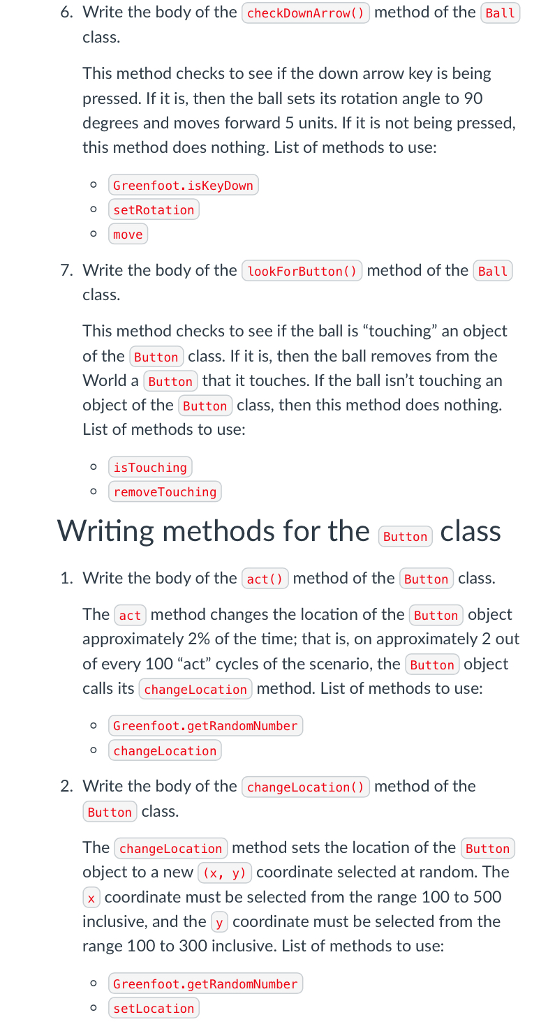
public class Button extends Actor { /** * Changes the location of this button approximately * 2% of the time. */ public void act() { } /** * Sets the location of this Button object to a new (x, y) * coordinate selected at random. The x coordinate wil be in * the range 100 to 500 inclusive, and the y coordinate will * be the range 100 to 300 inclusive. */ public void changeLocation() { } }
import greenfoot.*; // (World, Actor, GreenfootImage, Greenfoot and MouseInfo)
/** * Write a description of class HW4World here. * * @author (your name) * @version (a version number or a date) */ public class HW4World extends World {
/** * Constructor for objects of class HW4World. * */ public HW4World() { // Create a new world with 600x400 cells with a cell size of 1x1 pixels. super(600, 400, 1); } }
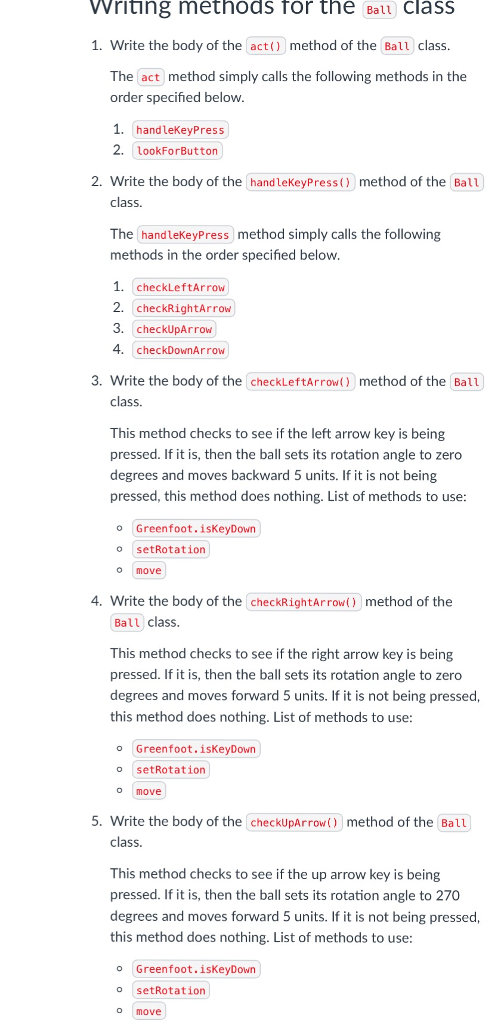
riting methods for the Ball class 1. Write the body of the act() method of the Ball class. The act method simply calls the following methods in the order specified below 1. handleKeyPress 2. LookForButton 2. Write the body of the handleKeyPress() method of the Ball class. The handleKeyPress method simply calls the following methods in the order specified below 1. checkLeftArrow 2. (checkRightArrow 3. checkUpArrow 4. checkDownArrow 3. Write the body of the checkLeftArrow) method of the Ball class. This method checks to see if the left arrow key is being pressed. If it is, then the ball sets its rotation angle to zero degrees and moves backward 5 units. If it is not being pressed, this method does nothing. List of methods to use o Greenfoot.isKeyDown o setRotation O move 4. Write the body of the checkRightArrow) method of the Ball class This method checks to see if the right arrow key is being pressed. If it is, then the ball sets its rotation angle to zero degrees and moves forward 5 units. If it is not being pressed this method does nothing. List of methods to use o Greenfoot.isKeyDown O setRotation O move 5. Write the body of the checkupArrow) method of the Ball class. This method checks to see if the up arrow key is being pressed. If it is, then the ball sets its rotation angle to 270 degrees and moves forward 5 units. If it is not being pressed this method does nothing. List of methods to use o Greenfoot.isKeyDown o setRotation O move riting methods for the Ball class 1. Write the body of the act() method of the Ball class. The act method simply calls the following methods in the order specified below 1. handleKeyPress 2. LookForButton 2. Write the body of the handleKeyPress() method of the Ball class. The handleKeyPress method simply calls the following methods in the order specified below 1. checkLeftArrow 2. (checkRightArrow 3. checkUpArrow 4. checkDownArrow 3. Write the body of the checkLeftArrow) method of the Ball class. This method checks to see if the left arrow key is being pressed. If it is, then the ball sets its rotation angle to zero degrees and moves backward 5 units. If it is not being pressed, this method does nothing. List of methods to use o Greenfoot.isKeyDown o setRotation O move 4. Write the body of the checkRightArrow) method of the Ball class This method checks to see if the right arrow key is being pressed. If it is, then the ball sets its rotation angle to zero degrees and moves forward 5 units. If it is not being pressed this method does nothing. List of methods to use o Greenfoot.isKeyDown O setRotation O move 5. Write the body of the checkupArrow) method of the Ball class. This method checks to see if the up arrow key is being pressed. If it is, then the ball sets its rotation angle to 270 degrees and moves forward 5 units. If it is not being pressed this method does nothing. List of methods to use o Greenfoot.isKeyDown o setRotation O move
Step by Step Solution
There are 3 Steps involved in it

Get step-by-step solutions from verified subject matter experts
 Study Help