







Question: I need help creating SQL queries to create these tables with relationships. ANY HELP WOULD BE GREATLY APPRECIATED!!! A location can have many customers, and
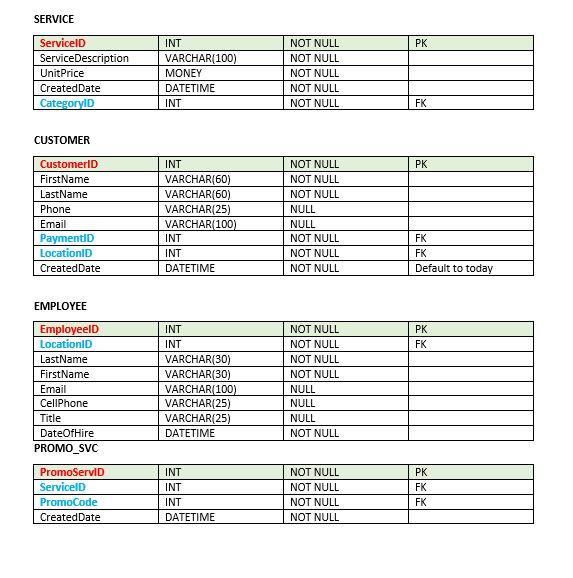
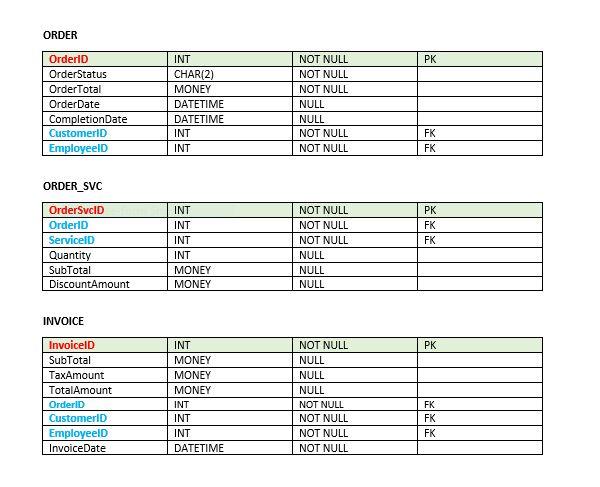
I need help creating SQL queries to create these tables with relationships.
ANY HELP WOULD BE GREATLY APPRECIATED!!!
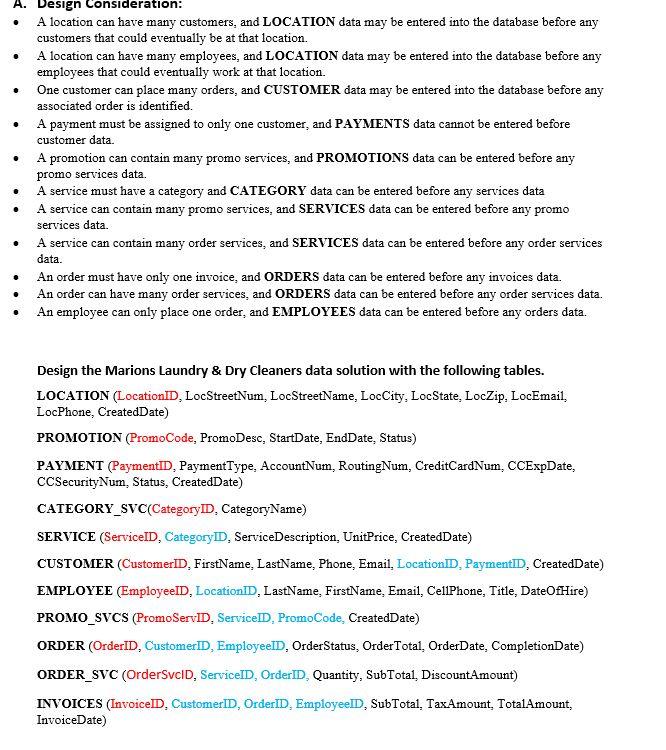
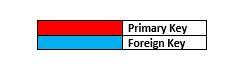
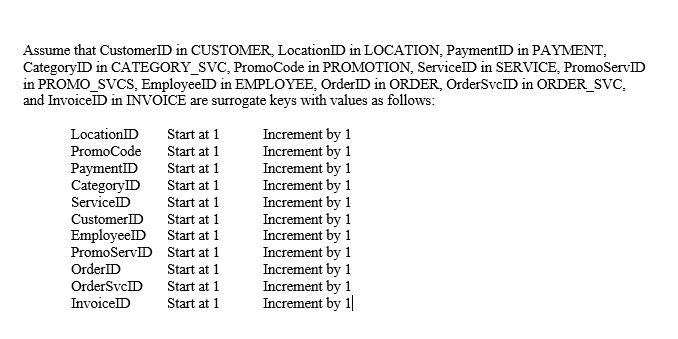
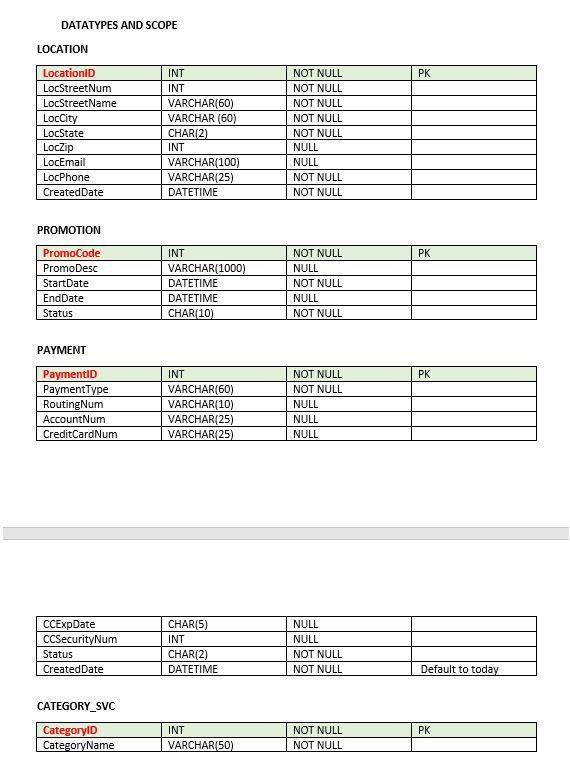
A location can have many customers, and LOCATION data may be entered into the database before any customers that could eventually be at that location. A location can have many employees, and LOCATION data may be entered into the database before any employees that could eventually work at that location. One customer can place many orders, and CUSTOMER data may be entered into the database before any associated order is identified. A payment must be assigned to only one customer, and PAYMENTS data cannot be entered before customer data. A promotion can contain many promo services, and PROMOTIONS data can be entered before any promo services data. A service must have a category and CATEGORY data can be entered before any services data A service can contain many promo services, and SERVICES data can be entered before any promo services data. A service can contain many order services, and SERVICES data can be entered before any order services data. An order must have only one invoice, and ORDERS data can be entered before any invoices data. An order can have many order services, and ORDERS data can be entered before any order services data. An employee can only place one order, and EMPLOYEES data can be entered before any orders data. Design the Marions Laundry \& Dry Cleaners data solution with the following tables. LOCATION (LocationID, LocStreetNum, LocStreetName, LocCity, LocState, LocZip, LocEmail, LocPhone, CreatedDate) PROMOTION (PromoCode, PromoDesc, StartDate, EndDate, Status) PAYMENT (PaymentID, PaymentType, AccountNum, RoutingNum, CreditCardNum, CCExpDate, CCSecurityNum, Status, CreatedDate) CATEGORY_SVC(CategoryID, CategoryName) SERVICE (ServiceID, CategoryW, ServiceDescription, UnitPrice, CreatedDate) CUSTOMER (CustomerID, FirstName, LastName, Phone, Email, LocationID, PaymentID, CreatedDate) EMPLOYEE (EmployeeID, LocationID, LastName, FirstName, Email, CellPhone, Title, DateOfHire) PROMO_SVCS (PromoServID, ServiceID, PromoCode, CreatedDate) ORDER (OrderID, CustomerID, EmployeeID, OrderStatus, OrderTotal, OrderDate, CompletionDate) ORDER_SVC (OrderSvclD, ServiceID, OrderID, Quantity, SubTotal, DiscountAmount) INVOICES (InvoiceID, CustomerID, OrderID, EmployeeID, SubTotal, TaxAmount, TotalAmount, InvoiceDate) \begin{tabular}{|l|l|} \hline & Primary Key \\ \hline & Foreign Key \\ \hline \end{tabular} Assume that CustomerID in CUSTOMER, LocationID in LOCATION, PaymentID in PAYMENT, CategoryID in CATEGORY_SVC, PromoCode in PROMOTION, ServiceID in SERVICE, PromoServID in PROMO_SVCS, EmployeeID in EMPLOYEE, OrderID in ORDER, OrderSvcID in ORDER_SVC, and InvoiceID in INVOICE are surrogate keys with values as follows: DATATYPES AND SCOPE LOCATION PROMOTION PAYMENT CATEGORY_SVC SERVICE CUSTOMER EMPLOYEE ORDER ORDER_SVC INVOICE
Step by Step Solution
There are 3 Steps involved in it

Get step-by-step solutions from verified subject matter experts
 Study Help