







Question: I need help figuring out part e. of this task. When I follow steps a through d, the drop-down lists populate but when I select
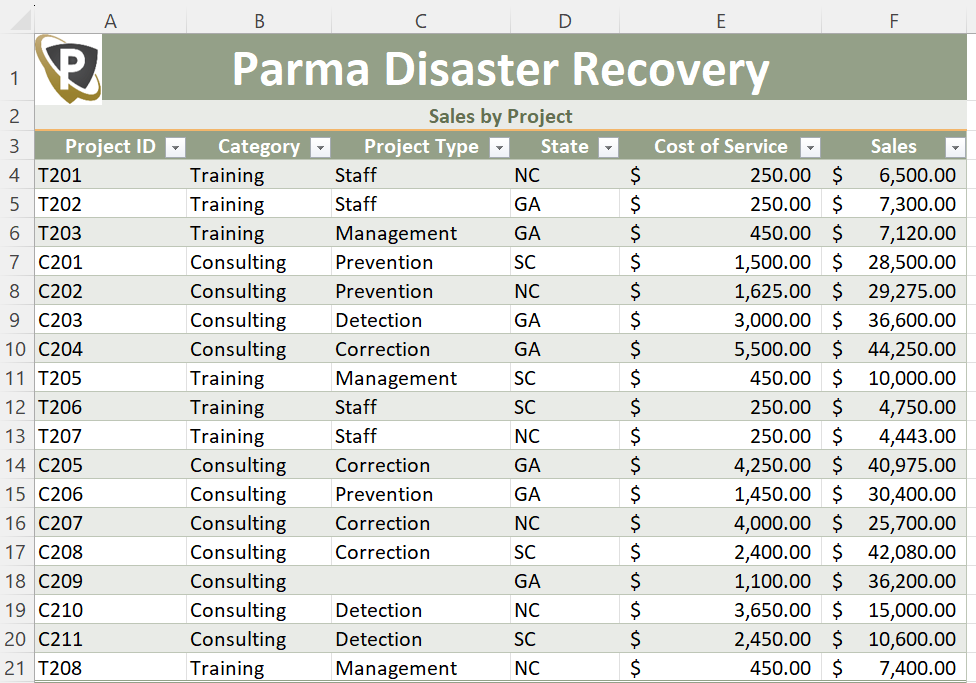
I need help figuring out part e. of this task. When I follow steps a through d, the drop-down lists populate but when I select enter 'Detection' for cell C18, the value comes up as 'blank' when I try to create a chart/graph using the data in the table, as if it does not recognize the 'Detection' entry. What am I doing wrong?
10. Go to the 2020 Sales by Project worksheet. To make it easier to insert the correct project type, add data validation to the range C4:C21 as follows:
a. The cells in the range C4:C21 should allow only values displayed in an in-cell drop-down list and ignore blank cells.
b. Add Correction, Detection, Prevention, Management, Staff as the list of acceptable values.
c. Add an Input Message using Project Type as the Title and Select a project type from the list. (including the period) as the Input message.
d. Add an Error Alert using the Stop style for the Error Alert, and use Project Type Error as the Title and The project type must be one of the listed values. (including the period) as the Error message.
e. Use data validation to enter Detection in cell C18
 .
.
Step by Step Solution
There are 3 Steps involved in it

Get step-by-step solutions from verified subject matter experts
 Study Help