







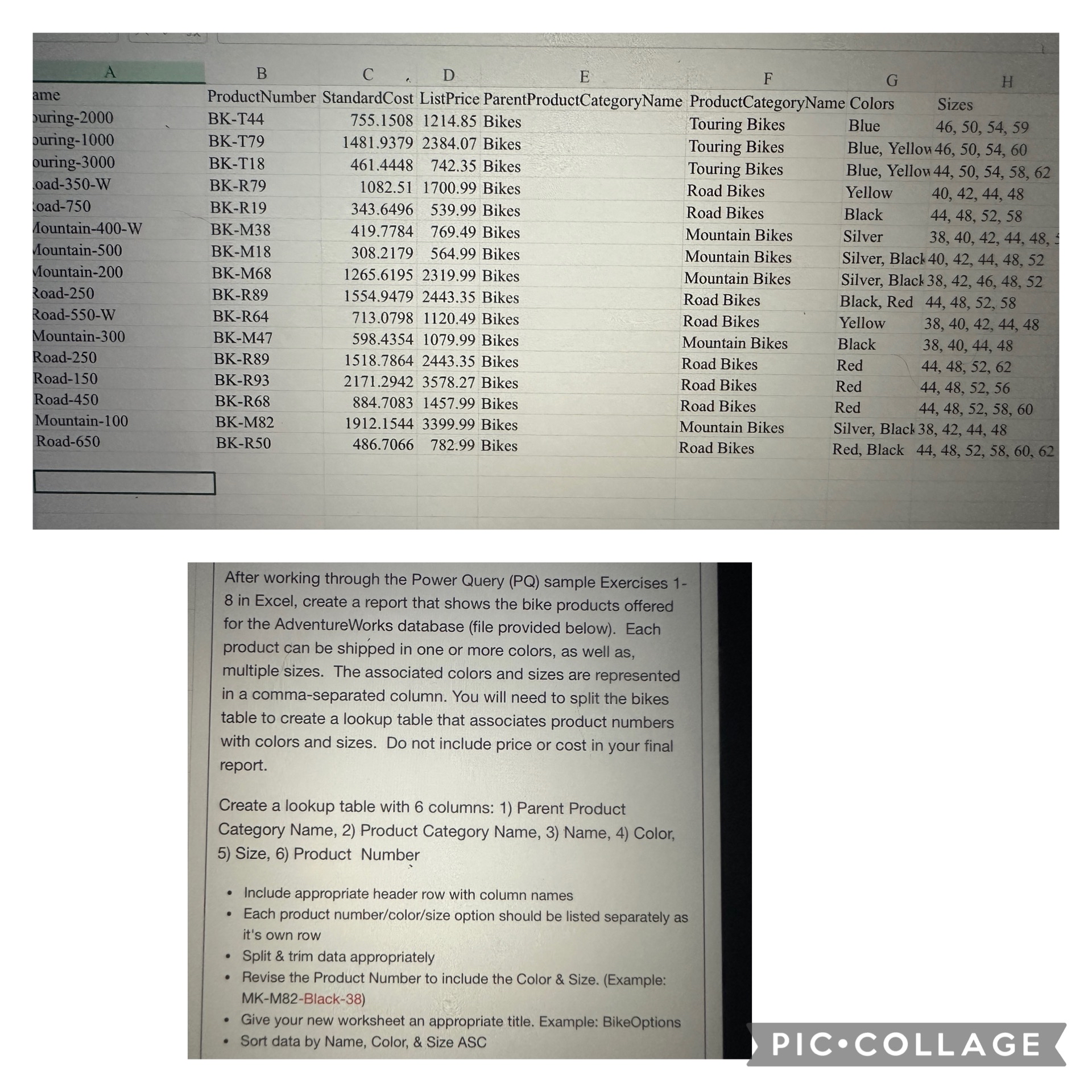
Question: I need help filtering this so that i end up with 1 0 6 rows. I ' m using Power Query. After working through the
I need help filtering this so that i end up with rows. Im using Power Query.
After working through the Power Query PQ sample Exercises
in Excel, create a report that shows the bike products offered
for the AdventureWorks database file provided below Each
product can be shipped in one or more colors, as well as
multiple sizes. The associated colors and sizes are represented
in a commaseparated column. You will need to split the bikes
table to create a lookup table that associates product numbers
with colors and sizes. Do not include price or cost in your final
report.
Create a lookup table with columns: Parent Product
Category Name, Product Category Name, Name, Color,
Size, Product Number
Include appropriate header row with column names
Each product numbercolorsize option should be listed separately as
it's own row
Split & trim data appropriately
Revise the Product Number to include the Color & Size. Example:
MKMBlack
Give your new worksheet an appropriate title. Example: BikeOptions
Sort data by Name, Color, & Size ASC
Step by Step Solution
There are 3 Steps involved in it
1 Expert Approved Answer
Step: 1 Unlock

Question Has Been Solved by an Expert!
Get step-by-step solutions from verified subject matter experts
Step: 2 Unlock
Step: 3 Unlock
 Study Help