







Question: I need help getting my last step to output correctly: prompt: . asciiz Enter an IEEE 7 5 4 floating point number in decimal form:
I need help getting my last step to output correctly: prompt: asciiz "Enter an IEEE floating point number in decimal form: $a
signlabel: asciiz "The sign is:
explabel: asciiz "The exponent is:
siglabel: asciiz "The significand bits as an integer is:
truncuintlabel: asciiz "The truncated unsigned integer value is:
finalresultlabel: asciiz "The truncated integer number is:
newline: asciiz
text # Code goes here
main:
# Step : Read a floating point number
la $a prompt
li $v
syscall
li $v # Syscall for reading a floating point number
syscall
mfc $t $f # Move the floating point number to a temporary register
# Step : setup and call parsesign
la $a signlabel # Load address of sign label
li $v # System call for print string
syscall
move $a $v # Move the result of parsesign sign character to $a
li $v # System call for print character
syscall
move $a $t # Move the floating point number to $a for parsesign
jal parsesign # Call parsesign
move $a $v # Move the result of parsesign sign character to $a
li $v # System call for print character
syscall
# Step : setup and call parseexponent
# Printing the exponent
move $a $t # Move the floating point number to $a for parseexponent
jal parseexponent # Call parseexponent
# After calling parseexponent
move $a $t # Move the floating point number to $a for parseexponent
jal parseexponent # Call parseexponent
move $t $v # Store the result of parseexponent in $t to avoid being overwritten
# new line
la $a newline
li $v
syscall
# Printing the exponent
la $a explabel
li $v
syscall
move $a $t # Move the exponent result from $t to $a for printing
li $v # System call for print integer
syscall
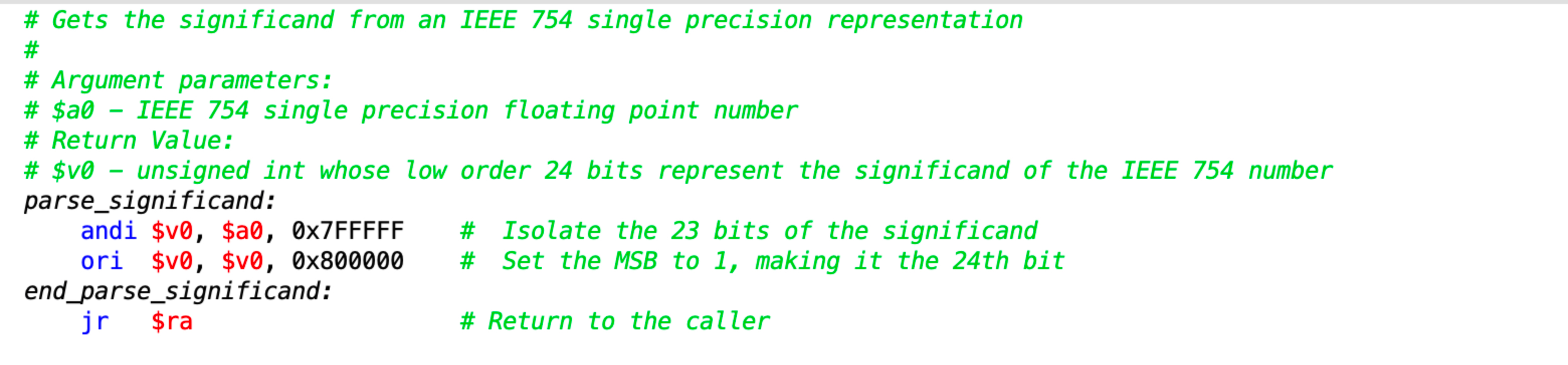
# Step : setup and call parsesignificand
move $a $t # Move the floating point number to $a for parsesignificand
jal parsesignificand # Call parsesignificand
move $a $v # move the result of parsesignificand to $a for print
# new line
la $a newline
li $v
syscall
la $a siglabel
li $v
syscall
move $a $a # Use $a for the significand result
li $v # System call for print unsigned int
syscall
# Step : setup and call calctruncateduint
# new line
la $a newline
li $v
syscall
# Step : setup and call calctruncateduint
# Print the label for the truncated unsigned integer value
la $a truncuintlabel # Load address of the label into $a
li $v # System call for print string
syscall # Print the label
move $a $t # Move the unbiased exponent to $a
move $a $v # Move the significand to $a
jal calctruncateduint # Call calctruncateduint
# Printing the truncated unsigned integer value
# Assume calctruncateduint has been called and result is in $v
# Print the truncated unsigned integer value
move $a $v # Move the result of calctruncateduint to $a for printing
li $v # System call for unsigne integer
syscall # Print the integer in $a
# Step : If you haven't been printing values along the way
# Print out the appropriate output here.
exitmain:
li $v # is the exit program syscall
syscall # execute call
## end of caasm
#
IEEE single precision floating point number based on the$a signed i
# Gets the sign from an IEEE single precision representation
#
# Argument parameters:
# $a IEEE single precision floating point number required
# Return Value:
# $v ascii char for sign or required
parsesign:
srl $v $a # Shift right to isolate the sign bit
andi $v $vx # Isolate the sign bit
beqz $v signispositive
li $v # Negative sign
endparsesign:
jr $ra
signispositive:
li $v # Positive sign
jr $ra
# Gets the exponent from an IEEE single precision representation
#
# Argument parameters:
# $a IEEE single precision floating point number
# Return Value:
# $v signed integer of exponent value with bias removed
parseexponent:
srl $t $a # Shift right to position the exponent bits
andi $t $txFF # Isolate the exponent bits
li $t #
sub $v $t $t # Adjust
endparseexponent:
Step by Step Solution
There are 3 Steps involved in it
1 Expert Approved Answer
Step: 1 Unlock

Question Has Been Solved by an Expert!
Get step-by-step solutions from verified subject matter experts
Step: 2 Unlock
Step: 3 Unlock
 Study Help